Have you ever pulled into your driveway, only to realize you left your garage remote inside? Or perhaps you’ve just bought a new vehicle and are frustrated by the extra clutter of carrying yet another remote. You’re not alone. Millions of drivers face this daily inconvenience, but the solution is simpler than you might think. Learning how to program a garage door opener to your car can streamline your routine, enhance security, and declutter your console. This guide will walk you through the process with clear, actionable steps.
Why Integrate Your Garage Door With Your Vehicle?
Before diving into the technical steps, it’s helpful to understand why this integration is worth your time. Modern vehicles often come equipped with built-in systems like HomeLink, Car2U, or AutoHomelink. These systems replace bulky handheld remotes with sleek, integrated buttons on your visor or overhead console.
According to industry data, over 60% of new cars sold in the US now feature some form of universal transmitter. This isn’t just about convenience; it’s about security. Handheld remotes can be lost, stolen, or have their batteries die at the worst possible moment. A programmed car system is always with you, always charged, and often uses rolling code technology that makes it harder for thieves to intercept your signal.
Identifying Your Car’s Built-In System
The first step in learning how to program a garage door opener to your car
is identifying what system your vehicle uses. The most common brands are:
- HomeLink: Found in Ford, Honda, Toyota, BMW, and many others. It usually features three buttons on the sun visor or rearview mirror.
- Car2U: Common in older Chrysler, Dodge, and Jeep models.
- AutoHomelink: Often found in Hyundai and Kia vehicles.
Check your owner’s manual if you’re unsure. Look for labels near the buttons or search your manual for “universal transmitter” or “garage door programming.” Knowing your system type is crucial because the programming steps vary slightly between manufacturers.
Step-by-Step: How To Program A Garage Door Opener To Your Car
While every car model has slight variations, the general process follows a consistent pattern. Below is a universal guide that works for most HomeLink and similar systems.
Step 1: Clear Previous Codes (If Necessary)
If your car is used or you’re reprogramming an existing button, start fresh. Press and hold the two outer buttons on your HomeLink system for 10–20 seconds until the indicator light flashes rapidly. This clears any old codes.
Step 2: Position Your Vehicle
Park your car outside the garage, ensuring the garage door is closed. You need to be within 5–10 feet of the garage door opener motor unit. Keep the engine running or the ignition in the “On” position to prevent battery drain during programming.
Step 3: Initiate Learning Mode on Your Car
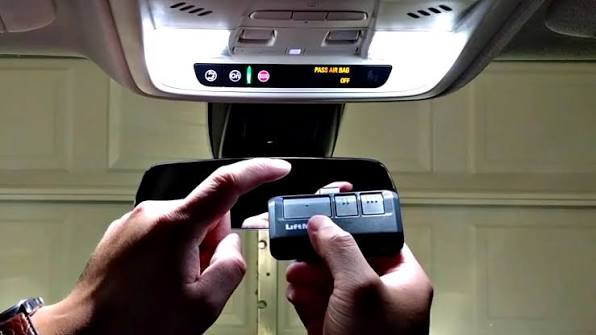
Press and hold the desired HomeLink button you wish to program. Do not release it yet. Simultaneously, bring your original handheld garage remote close to the HomeLink buttons (about 1–3 inches away).
Step 4: Sync the Signals
While still holding the HomeLink button, press and hold the button on your handheld remote that operates the garage door. Keep both buttons pressed. Watch the HomeLink indicator light. It will typically flash slowly at first, then rapidly. Once it flashes rapidly, release both buttons. This indicates the signal has been learned.
Step 5: Test the Connection
Press the programmed HomeLink button three times. If the garage door opens and closes, you’re done! If not, proceed to the next step, which is often required for newer security systems.
Step 6: Program the Garage Door Motor Unit (Rolling Code)
Most modern garage openers use “rolling code” technology for security. This means you must also tell your garage door motor to accept the new signal from your car.
- Locate the “Learn” or “Smart” button on your garage door opener motor unit (usually hanging from the ceiling). It’s often colored yellow, purple, or red.
- Press and release the “Learn” button. An LED light will usually turn on or blink.
- Return to your car within 30 seconds.
- Press and hold the programmed HomeLink button for 2–3 seconds, then release. Repeat this press-and-release cycle up to three times.
- The garage door should activate, confirming the sync is complete.
For a deeper understanding of rolling code technology and its security benefits, you can refer to this Wikipedia article on rolling codes.
Troubleshooting Common Programming Issues
Even with careful following of instructions, things don’t always go smoothly. Here are common hurdles and how to overcome them.
| Issue | Possible Cause | Solution |
|---|---|---|
| Light doesn’t flash | Dead battery in handheld remote | Replace the battery in your original remote. |
| Door moves but doesn’t stay synced | Rolling code not completed | Repeat Step 6 carefully, ensuring you press the “Learn” button on the motor unit. |
| Interference from LEDs | LED bulbs in garage opener | Old LED bulbs can emit signal interference. Try replacing them with incandescent bulbs temporarily during programming. |
| System times out | Too much time passed | Most systems have a 30-second window after pressing the “Learn” button. Work quickly. |
Alternative Methods: When Built-In Systems Fail
Not every car has a built-in universal transmitter. If your vehicle lacks HomeLink or similar tech, you have two primary options:
- Visor Clip Remotes: Purchase a universal remote designed to clip onto your sun visor. These are inexpensive and easy to program using similar steps to the handheld remote.
- Smart Garage Controllers: Devices like MyQ or Tailwind allow you to open your garage via a smartphone app. While this doesn’t integrate directly into your car’s buttons, it offers remote access from anywhere, which is a significant upgrade in convenience.
Frequently Asked Questions (FAQ)
1. Can I program multiple garage doors to one car?
Yes. Most HomeLink systems have three buttons, allowing you to program up to three different garage doors, gates, or even home lighting systems. Simply repeat the programming steps for each additional device using a different button.
2. Why does my garage door only work when I’m very close to the house?
This usually indicates a weak signal or interference. Check the antenna wire on your garage door motor unit; it should hang down freely. Also, ensure there are no large metal objects blocking the path between your car and the garage. Reprogramming the system can sometimes refresh the signal strength.
3. Is it safe to program my garage door opener to my car?
Yes, it is generally safe. Modern systems use rolling code technology, which changes the access code every time you use it. This prevents thieves from recording your signal and replaying it later. However, always keep your car locked and be mindful of who has access to your vehicle.
4. What if I don’t have the original handheld remote?
Programming without the original remote is difficult but not impossible. Some garage door openers allow you to program via a keypad on the outside of the garage. Alternatively, you can purchase a universal remote compatible with your garage door brand and use that to sync with your car. Consult your garage door opener’s manual for specific “remote-less” programming instructions.
5. Does programming my car void my warranty?
No. Programming a universal transmitter like HomeLink is a standard feature supported by vehicle manufacturers. It does not involve modifying the car’s electrical system or engine, so it will not affect your warranty.
6. How long does the programming process take?
For most users, the entire process takes between 5 to 15 minutes. If you encounter issues with rolling codes or interference, it may take slightly longer. Patience is key, especially when syncing the car with the garage motor unit.
Conclusion
Learning how to program a garage door opener to your car is a small investment of time that yields significant daily rewards. No more digging through bags for a lost remote or worrying about dead batteries. With your garage door integrated into your vehicle, you enjoy a smoother, safer, and more streamlined entry into your home.
Remember, the key to success is identifying your system type, following the rolling code steps carefully, and troubleshooting any interference issues. If you found this guide helpful, please share it with friends or family who might be struggling with their own garage door setups. A simple click can save someone else a lot of frustration!
Leave a Reply