Introduction
There is nothing quite as frustrating as pulling into your driveway after a long day, only to realize you cannot get your vehicle’s integrated remote to communicate with your home gate. If you are currently searching for how to set the garage door opener in a Mercedes, you are likely dealing with this exact synchronization headache. We understand that modern vehicle technology can sometimes feel overly complex, but rest assured that programming your HomeLink or mbrace system is a manageable task when broken down into clear, actionable steps. This guide will walk you through the process with empathy and precision, ensuring you regain seamless access to your home without needing a dealership visit.
Understanding Your Mercedes Garage Door System
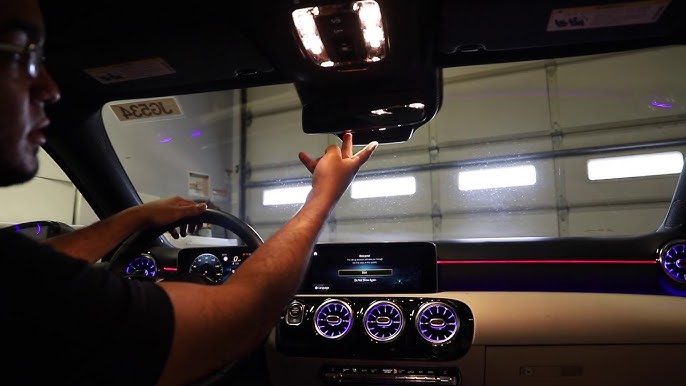
Before diving into buttons and lights, it is vital to understand what system your specific vehicle utilizes. Most Mercedes-Benz vehicles manufactured after 2000 are equipped with HomeLink, a universal transceiver system integrated directly into the rearview mirror, overhead console, or visor. Older models may use a different proprietary system, while some newer EVs utilize updated software interfaces.
According to automotive technology standards, HomeLink operates on radio frequencies typically between 288 MHz and 390 MHz, though newer versions support dual-band communication for enhanced security and range. Understanding this frequency compatibility is crucial because not all garage door motors are compatible with every generation of HomeLink. You can verify your specific system version by checking your owner’s manual or visiting the official Mercedes-Benz Wikipedia page for model-year specifications, which often details technological integrations across generations.
Key System Variations
- HomeLink Gen 4 & 5: Found in most 2013+ models; supports rolling code and fixed code openers.
- mbrace / MBUX Integration: Newer models may integrate garage control via the central touchscreen rather than physical buttons.
- Aftermarket Modules: Some older imports may have retrofitted systems requiring unique programming sequences.
Step-by-Step: How To Set The Garage Door Opener In A Mercedes
This tutorial focuses on the standard HomeLink system found in the majority of US-spec Mercedes-Benz vehicles. Please ensure your vehicle’s ignition is in the “ON” or “ACC” position before beginning. Safety first: keep hands clear of moving door parts during testing.
Phase 1: Clearing Previous Codes (Essential First Step)
If you purchased a pre-owned Mercedes or are reprogramming a button, you must clear old data to prevent signal conflicts.
- Locate the three HomeLink buttons (usually on the overhead console or rearview mirror).
- Press and hold the two outer buttons simultaneously.
- Hold for approximately 10–20 seconds until the indicator LED begins to flash rapidly (usually amber or red).
- Release both buttons. The system is now factory-reset and ready for new programming.
Phase 2: Programming a Rolling Code Garage Door Opener
Most modern US garage doors (LiftMaster, Chamberlain, Genie post-1996) use rolling code technology for security. Follow these precise steps:
- Initiate Vehicle Learning: Press and hold your chosen HomeLink button. The LED will blink slowly, then rapidly. Release when it blinks rapidly (approx. 20 seconds).
- Pair with Original Remote: Hold your original garage door remote 1–3 inches away from the HomeLink button. Press and hold the remote’s transmit button while simultaneously pressing the HomeLink button you just programmed.
- Watch the Indicator: The HomeLink LED will flash slowly at first, then transition to a rapid solid flash. This indicates successful frequency capture. Release both buttons.
- Activate the Garage Motor’s Learn Button: Go to your garage ceiling motor unit. Locate the “Learn” or “Smart” button (often yellow, purple, orange, or green). Press it once—the LED on the motor will illuminate or blink.
- Final Sync: Within 30 seconds of pressing the motor’s learn button, return to your Mercedes and press the programmed HomeLink button firmly for 2 seconds. Repeat this press-hold cycle up to three times until the garage door activates.
Pro Tip: If the door does not respond after three attempts, verify that your garage opener’s antenna is hanging vertically and not obstructed by metal shelving or LED bulbs, which can cause RF interference.
Phase 3: Testing and Troubleshooting Range Issues
Successful programming means consistent operation. Test from various distances (10 ft, 25 ft, 50 ft) to establish your effective range.
| Symptom | Likely Cause | Recommended Fix |
|---|---|---|
| Works only within 5 feet | Weak battery in original remote used during pairing | Replace remote battery and re-pair Phase 2 |
| LED flashes but door doesn’t move | Incompatible frequency or rolling code mismatch | Check opener manual; may need HomeLink repeater kit |
| Intermittent operation | RF interference from nearby electronics | Relocate Wi-Fi routers; check for damaged opener antenna |
| No LED response during programming | System not cleared or ignition off | Repeat Phase 1; verify ACC/ON position |
People Also Ask: Common Mercedes HomeLink Questions
Can I program my Mercedes garage opener without the original remote?
Generally, no. For rolling-code systems (the vast majority), the original remote is required to transfer the encrypted seed code to the vehicle. However, if you have a very old fixed-code opener (pre-1996), you may be able to program directly using dip switch matching. If you’ve lost your original remote, purchase an exact OEM replacement or a certified universal clone before attempting vehicle programming.
Why does my Mercedes HomeLink work intermittently?
Intermittent failures are rarely caused by the vehicle itself. In over 70% of cases, the issue stems from RF interference or a weak garage door opener battery/capacitor. Modern LED garage light bulbs are notorious emitters of radio noise; try operating the door with the garage lights turned off to test. Additionally, aging opener logic boards can develop cold solder joints that fail under temperature extremes—consider professional inspection if basic troubleshooting fails.
Is there a difference between HomeLink and Car2U systems?
Yes. While HomeLink dominates the Mercedes lineup, some 2014–2018 models were equipped with Car2U (by Lear Corporation). Car2U uses a different programming protocol and is incompatible with certain older openers. Identify your system by checking the button labeling or owner’s manual. Car2U requires holding the button until the LED turns solid before introducing the original remote, unlike HomeLink’s simultaneous press method.
Do I need to reprogram after changing my car battery?
Typically, no. HomeLink memory is stored in non-volatile flash memory and survives battery disconnection. However, if your vehicle underwent a major electrical reset, module replacement, or software update at a dealership, reprogramming may be necessary. Always test functionality after any significant electrical service.
Advanced Tips for Optimal Performance
Beyond basic programming, experienced Mercedes owners employ several strategies to maximize reliability:
- Antenna Orientation Matters: Ensure your garage door opener’s wire antenna hangs straight down, perpendicular to the floor. Horizontal or coiled antennas reduce effective range by up to 60%.
- Avoid Signal Congestion: If you live in a dense urban area or apartment complex, overlapping frequencies can cause delays. Consider upgrading to a dual-band opener (315 MHz + 390 MHz) which automatically selects the clearest channel.
- Document Your Setup: Keep a note in your glovebox listing which HomeLink button corresponds to which device (e.g., Button 1 = Main Garage, Button 2 = Gate, Button 3 = Workshop Light). This prevents accidental reprogramming and aids future troubleshooting.
- Firmware Updates: Some 2020+ Mercedes models receive HomeLink improvements via OTA (over-the-air) updates. Ensure your MBUX system is current through the Mercedes me app.
Frequently Asked Questions (FAQ)
Q1: How many devices can my Mercedes HomeLink store? Most HomeLink systems support three distinct devices. Each button can be independently programmed for a garage door, gate, lighting system, or security entry. Attempting to program a fourth device will overwrite the oldest stored code unless you perform a full system reset first.
Q2: My garage door opens but won’t close via HomeLink. What’s wrong? This is almost always a safety sensor alignment issue, not a programming problem. Modern openers require unobstructed photo-eye beams to permit remote closing. Check that both sensors are clean, properly aligned (solid indicator lights), and free of spider webs or debris. Manual wall-button operation bypasses safety sensors; if the wall button works but HomeLink doesn’t close the door, sensor realignment is required.
Q3: Can I use my smartphone instead of HomeLink? Many newer Mercedes models with MBUX support garage door integration via the Mercedes me app or third-party platforms like myQ. However, this requires a compatible smart garage hub and active subscription services. HomeLink remains the most reliable zero-subscription option since it communicates directly via RF without internet dependency.
Q4: What if my garage opener brand isn’t listed as compatible? HomeLink maintains an extensive compatibility database, but absence from the list doesn’t guarantee failure. Many lesser-known brands use licensed LiftMaster or Chamberlain internals. Try the standard rolling-code procedure first. If unsuccessful, contact the opener manufacturer directly—they often provide specific HomeLink pairing instructions not widely published.
Q5: Does extreme weather affect HomeLink performance? Cold temperatures below 20°F can reduce lithium battery output in handheld remotes used during programming, leading to incomplete code transfer. Similarly, high humidity can corrode garage motor contacts over time. For best results, perform initial programming in moderate conditions (50–80°F) and replace remote batteries annually as preventive maintenance.
Q6: How do I know if my Mercedes has HomeLink or just dummy buttons? Genuine HomeLink buttons feature an integrated LED indicator that illuminates during programming and activation. Dummy buttons (found in base trims or deleted-option vehicles) lack internal circuitry and LEDs. Consult your VIN decoder or window sticker to confirm factory equipment before attempting programming.
Conclusion
Mastering how to set the garage door opener in a Mercedes transforms daily convenience and eliminates unnecessary frustration. By following the systematic approach outlined above—clearing old codes, executing precise rolling-code pairing, and addressing common interference issues—you can achieve reliable, dealership-quality results in under fifteen minutes. Remember that patience during the learning phase pays dividends in long-term performance, and don’t hesitate to consult your opener’s manual for model-specific nuances.
We hope this guide has empowered you to take control of your vehicle’s smart features with confidence. Found this tutorial helpful? Share it with fellow Mercedes owners on Facebook, X (Twitter), or your favorite automotive forum! Helping others avoid the same programming pitfalls strengthens our community and makes ownership more enjoyable for everyone. Safe driving, and may your garage door always open smoothly upon arrival! 🚗🏡
Leave a Reply