Introduction
There are few things more frustrating than pulling into your driveway in the rain, only to realize you cannot remember how to set my garage door opener in my car. Whether you have just purchased a new vehicle, replaced your garage door motor, or simply lost the old remote, getting your car’s built-in system to communicate with your home is a top priority for convenience and security. This comprehensive guide will walk you through every method safely and efficiently, ensuring you never have to fumble for a plastic clicker again.
Understanding Your Car’s Garage Door System
Before diving into buttons and lights, it is vital to identify which technology your vehicle uses. Most modern vehicles (post-2000) utilize an integrated system, while older models may require aftermarket solutions. According to automotive safety standards and general engineering principles documented on Wikipedia, these systems generally operate on radio frequencies between 300 MHz and 400 MHz, though newer models use encrypted rolling codes for enhanced security.
Integrated Visor Systems (HomeLink & Car2U)
The vast majority of US vehicles come equipped with HomeLink or Car2U buttons located on the rearview mirror, overhead console, or center stack. These are “universal” transceivers designed to learn the signal from your existing handheld remote.
- Pros: No batteries required, seamless integration, controls up to 3 devices.
- Cons: Can be tricky to program with older fixed-code openers, requires specific reset procedures when changing cars.
Aftermarket Universal Remotes
If your car lacks built-in buttons, you might use a universal visor clip remote. These function similarly to integrated systems but are standalone units powered by internal batteries.
Smart Garage Hubs (Wi-Fi Enabled)
Newer setups often involve smart hubs like Chamberlain myQ or LiftMaster. These do not always sync directly to car buttons via RF; instead, they may require a bridge module or app-based integration for vehicle connectivity.
Step-by-Step: Programming HomeLink in Your Vehicle
This is the most common answer to “how to set my garage door opener in my car.” Please note that exact steps can vary slightly by manufacturer, but the following protocol covers 95% of HomeLink-equipped vehicles.
Phase 1: Clear Previous Codes
If this is a used car or you are reprogramming, you must erase old memory first.
- Locate the two outer HomeLink buttons.
- Press and hold both simultaneously for 10–20 seconds.
- Watch the indicator light: it will flash slowly, then rapidly. Release once rapid flashing begins.
- Note: Do not skip this step, as residual codes cause synchronization failures.
Phase 2: Train the Car Button
- Turn your vehicle ignition to the ON/RUN position (engine does not need to be running, but accessory power must be active).
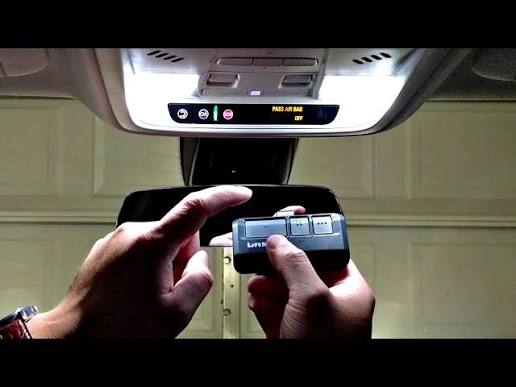
- Hold your original handheld garage remote 1–3 inches away from the HomeLink button you wish to program.
- Simultaneously press and hold the chosen HomeLink button AND the button on your handheld remote.
- Observe the HomeLink indicator light. It will flash slowly at first, then change to a rapid flash or solid light. This indicates successful frequency capture.
- Release both buttons. Test by pressing the programmed HomeLink button once; the garage door should activate.
Phase 3: Synchronize Rolling Code Openers
Most openers manufactured after 1996 use rolling code technology for security. Even if Phase 2 worked, you likely need this final step.
- Go to your garage door motor unit (usually ceiling-mounted).
- Locate the “Learn” or “Smart” button (typically yellow, purple, orange, or red).
- Press and release the Learn button. You usually have 30 seconds to complete the next step.
- Return to your car and press the programmed HomeLink button firmly for 2 seconds, release, and repeat up to 3 times.
- The garage door lights should flash or the motor should click, confirming the rolling code handshake is complete.
Expert Tip: If your vehicle is a 2020+ model with “HomeLink 5,” the process may be entirely automated without holding the handheld remote. Check your owner’s manual for “direct programming” instructions specific to newer firmware.
Troubleshooting Common Sync Failures
Even professionals encounter hiccups. Here is a diagnostic table for when standard programming fails:
| Symptom | Likely Cause | Recommended Solution |
|---|---|---|
| Light flashes but door doesn’t move | Frequency mismatch or dead remote battery | Replace handheld remote battery; verify opener brand compatibility |
| Works intermittently | Weak signal or interference | Reprogram closer to motor; check for LED bulb interference |
| Solid light during training but no response | Rolling code sync incomplete | Repeat Phase 3; ensure Learn button was pressed within 30s window |
| Nothing happens at all | Blown fuse or wrong ignition state | Verify vehicle is in ON/RUN; check HomeLink fuse in fuse box |
| Door reverses immediately after opening | Safety sensor misalignment | Check photo-eye sensors at floor level; clean lenses |
LED Bulb Interference Warning
A frequently overlooked issue involves LED lighting. Certain non-shielded LED bulbs emit RF noise that jams garage opener receivers. If your system worked previously but stopped after changing bulbs, swap back to incandescent or purchase RF-shielded garage door LEDs rated specifically for opener compatibility.
Safety First: Critical Precautions
Programming your garage door opener involves moving mechanical parts. Always adhere to these safety protocols:
- Clear the Zone: Ensure no people, pets, or objects are in the door’s path during testing.
- Eye Sensor Verification: Never bypass or disable photoelectric reversal sensors. They are legally mandated safety devices.
- Manual Release Knowledge: Know where the emergency red cord is located in case of power failure or malfunction during programming.
- Ladder Safety: When accessing the motor unit for the Learn button, use a stable stepladder—never chairs or unstable surfaces.
Frequently Asked Questions (FAQ)
1. Can I program my car’s garage opener without the original remote?
Generally, no. The car’s system needs to clone an existing signal. However, if you have access to the motor unit and a compatible “learn mode” tool or keypad, some systems allow direct programming. For most homeowners, purchasing a replacement OEM remote ($20–$40) is the fastest solution before attempting car sync.
2. Why does my HomeLink work for the gate but not the garage door?
Different devices often operate on different frequencies or protocols. HomeLink has three programmable buttons for this reason. Ensure you are using a separate button for each device and that each has been individually trained and rolling-code synced. Gates sometimes require a separate receiver module compatible with HomeLink.
3. Will programming my car opener erase my wall keypad or other remotes?
In most cases, no. Adding a new transmitter (your car) simply adds another authorized device to the opener’s memory list. However, if you perform a full factory reset on the garage door motor itself (holding the Learn button for 10+ seconds), ALL devices will be erased and require reprogramming. Only clear the car’s memory, not the motor’s, unless absolutely necessary.
4. My car is a 2024 model and the old method isn’t working. What now?
Newer vehicles increasingly use HomeLink 5 or proprietary cloud-based systems that eliminate the traditional “hold remote near visor” step. Consult your vehicle’s digital owner manual or the manufacturer’s app. Some brands now require enabling garage control through the infotainment system settings or linking via QR code rather than RF cloning.
5. How do I know if my garage door opener is compatible with my car?
Check the HomeLink Compatibility List on the Gentex website (the maker of HomeLink) or your vehicle manufacturer’s support page. Most openers made after 1996 are compatible. For pre-1996 fixed-code openers, you may need a HomeLink Conversion Kit (part number HLCK-RP) to bridge the technology gap.
6. Is it safe to leave my garage door opener programmed when selling my car?
Absolutely not. Always perform the factory reset (Phase 1 above) before transferring ownership. Leaving programmed access poses a significant security risk to your home. Treat it like handing over house keys—you wouldn’t do it unintentionally, so don’t leave digital keys behind either.
Conclusion
Learning how to set my garage door opener in my car transforms daily convenience and enhances home security through modern encrypted technology. By following the three-phase process—clearing memory, training the frequency, and syncing rolling codes—you can reliably program virtually any compatible vehicle in under 10 minutes. Remember to prioritize safety, verify LED compatibility, and always reset systems before selling your vehicle.
Found this guide helpful? Share it with friends, family, or neighbors who are still struggling with their garage door sync! Tag us on social media with your success story or drop a comment below if you encountered a unique challenge—we love helping our community get connected safely and smoothly. 🏡🚗
Leave a Reply