Introduction
Is your Genie garage door refusing to close all the way, leaving a gap that lets in cold air and pests? Or perhaps it reverses before hitting the floor, forcing you to manually push it down? You are not alone; this is one of the most common issues homeowners face with automatic openers. Learning how to set limits on Genie garage door opener systems can save you hundreds of dollars in service calls and restore peace of mind to your daily routine.
In this guide, we will walk you through the exact steps to adjust both the open and close limits for various Genie models. Whether you have a modern smart opener or an older screw-drive unit, these instructions are designed to be safe, clear, and effective for beginners.
Why Do Garage Door Limits Drift Over Time?
Before diving into the tools and buttons, it helps to understand why this happens. Garage door springs bear the immense weight of the door. Over time, these springs stretch, cables settle, and weather changes cause the metal tracks to expand or contract.
According to general mechanical principles, even a slight shift in tension can confuse the opener’s internal sensors. The motor counts rotations to determine position. If the physical door moves differently than expected, the “limit” settings become inaccurate. Adjusting them recalibrates the motor’s memory to match the door’s current physical reality.
Tools You Will Need
You do not need a professional toolkit to fix this. In most cases, you only need:
- A sturdy ladder (to reach the motor head safely).
- A small flathead screwdriver (for older models with dial adjustments).
- Your smartphone (to take photos of the original settings as a backup).
Safety First: Always keep your hands and fingers clear of moving parts. Never attempt to adjust limits while the door is in motion.
Identifying Your Genie Model Type
Genie produces several types of openers, and the adjustment method varies slightly by model. The two most common categories are:
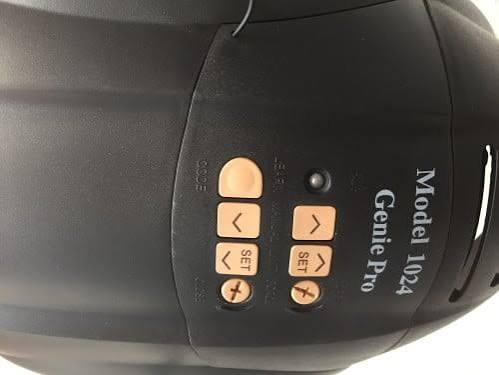
- Screw-Drive and Chain-Drive Models (e.g., Genie Pro, Excelerator): These usually have physical dials or buttons located on the back or side of the motor unit.
- Direct-Drive and Smart Models (e.g., Genie SilentMax, Wall-Mount): These often use digital programming via wall consoles or specific button sequences on the power head.
If you are unsure, look for a label on the motor casing. It will list the model number (e.g., ISD990, H3000). You can cross-reference this on Wikipedia’s page about garage door openers to understand the general mechanism type, though specific manual instructions are always best found in your user guide.
Step-by-Step: How To Set Limits On Genie Garage Door Opener (Button/Dial Method)
Most standard Genie openers use a simple two-dial or two-button system labeled “Open Limit” and “Close Limit.” Here is how to adjust them precisely.
Step 1: Locate the Limit Switches
Climb your ladder and locate the motor head. Look for two knobs or buttons. They are often color-coded:
- Red or Orange: Usually controls the Close limit.
- Green or Blue: Usually controls the Open limit.
Note: On newer models, these may be arrow buttons labeled “Up” and “Down” next to a “Program” button.
Step 2: Adjust the Close Limit
The close limit determines how far the door travels down before stopping.
- Press the wall button to close the door. Watch it carefully.
- If the door reverses before touching the ground, turn the Close Limit dial/button in the direction indicated by the arrow (usually clockwise or towards the “down” icon) in small increments.
- Test again. The door should touch the floor firmly but not strain against it.
- Critical Check: Place a 2×4 piece of wood on the floor under the center of the door. Close the door. It must reverse immediately upon hitting the wood. This tests the safety reversal system. If it does not reverse, stop and call a professional, as this is a critical safety hazard.
Step 3: Adjust the Open Limit
The open limit determines how high the door goes.
- Press the wall button to open the door.
- If the door stops too low, blocking your car roof, adjust the Open Limit dial/button in the “up” direction.
- Ensure the door opens fully without straining the motor at the top. If you hear a grinding noise at the top, you have set the limit too high. Back it off slightly.
Step 4: Fine-Tuning and Testing
Run the door through three complete cycles (open-close-open). Listen for unusual noises. The movement should be smooth and consistent. If the door jerks or hesitates, re-check the balance of the door itself (disconnect the opener and lift the door manually; it should stay in place when halfway open).
Troubleshooting Common Issues
Even after setting limits, problems may persist. Here is a quick comparison of symptoms and solutions.
| Symptom | Possible Cause | Solution |
|---|---|---|
| Door reverses immediately | Safety eyes misaligned | Clean lenses and ensure they face each other directly. |
| Motor runs but door doesn’t move | Broken spring or cable | Do not attempt repair. Call a pro immediately. |
| Door opens partially then stops | Obstruction in track | Check for debris, leaves, or bent tracks. |
| Remote works, wall button doesn’t | Lock feature enabled | Check if the “Lock” button on the wall console is lit. |
When to Call a Professional
While learning how to set limits on Genie garage door opener units is a valuable DIY skill, some issues are beyond home repair. You should contact a certified technician if:
- The garage door springs are broken or look stretched out.
- The cables are frayed or loose.
- The door feels extremely heavy when lifted manually.
- The motor makes loud grinding or screeching noises.
Garage doors are under high tension. Incorrect handling of springs can cause severe injury. Always prioritize safety over cost savings.
FAQ Section
1. Why does my Genie garage door go down then come back up?
This is usually a safety feature trigger. The most common causes are misaligned safety eyes (sensors) near the floor, an obstruction in the track, or the close limit being set too tight, causing the motor to think it hit an obstacle. Check the sensors first to ensure the LED lights are solid and not blinking.
2. Can I reset the limits if I mess them up?
Yes. Most Genie openers have a “Reset” or “Clear” function. Typically, holding down the program button for 10–15 seconds will clear the existing limits and remote codes, allowing you to start fresh. Consult your specific model’s manual for the exact reset sequence.
3. How often should I adjust the limits?
You should only adjust limits when necessary, such as after seasonal temperature changes or if the door behavior changes. However, it is good practice to inspect the door’s operation monthly. If you notice the door not sealing tightly against the weather stripping, it may be time for a minor adjustment.
4. What is the difference between force and limit settings?
Limit settings tell the motor where to stop (position). Force settings tell the motor how much power to use to move the door. If your limit settings are correct but the door still reverses, you may need to slightly increase the close force. However, be cautious: too much force can damage the door or injure someone.
5. My Genie opener has no dials, only buttons. How do I adjust it?
Newer Genie models (like the SilentMax series) use electronic programming. You typically press and hold the “Up” or “Down” arrow buttons on the power head or wall console to jog the door to the desired position, then press the “Set” or “Program” button to save that spot. Refer to the specific manual for your model number, as button combinations vary.
Conclusion
Mastering how to set limits on Genie garage door opener systems empowers you to maintain your home’s security and convenience without relying on expensive service calls. By understanding the difference between open and close limits, and following the safety checks outlined above, you can ensure your door operates smoothly for years to come.
Remember, small adjustments make a big difference. Take your time, test frequently, and always prioritize the safety reversal features. If you found this guide helpful, please share it with your neighbors or on social media to help others troubleshoot their garage door woes!
Leave a Reply