Introduction
There is nothing quite as frustrating as fumbling for a plastic clicker every time you pull into your driveway, especially when you have just invested in a vehicle as advanced as the 2025 Subaru Forester. If you are struggling to sync your built-in system, understanding how to set garage door opener on 2025 Subaru Forester is the key to reclaiming that seamless, modern convenience. This guide will walk you through the exact programming steps, troubleshooting tips, and safety checks needed to get your HomeLink system working perfectly in minutes.
Understanding HomeLink in the 2025 Subaru Forester
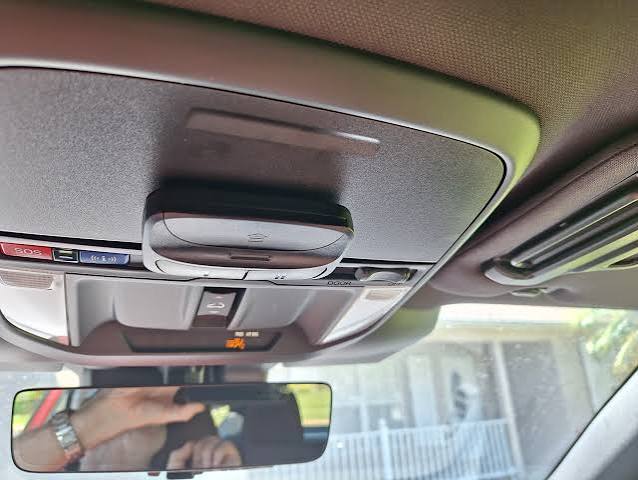
Before diving into the buttons, it is vital to understand what you are actually programming. The 2025 Subaru Forester comes equipped with the HomeLink Universal Transceiver, typically located in the overhead console near the rearview mirror or integrated directly into the frameless mirror assembly depending on your trim level (Premium, Sport, Wilderness, Limited, or Touring).
Unlike older universal remotes, HomeLink does not use a physical battery. Instead, it draws power from the vehicle’s electrical system and uses radio frequency (RF) signals to communicate with your garage door motor. According to technical documentation referenced on Wikipedia, HomeLink supports both fixed-code and rolling-code security systems, making it compatible with the vast majority of garage door openers manufactured after 1993.
Why Proper Setup Matters
Programming your opener correctly isn’t just about convenience; it is about security and vehicle integration. A properly synced HomeLink system ensures:
- Rolling Code Security: Prevents code grabbers from cloning your signal.
- Vehicle Safety Integration: Ensures the system only operates when the vehicle is in Park or Accessory mode.
- Resale Value: A fully functional integrated tech suite maintains your Forester’s premium status.
Step-by-Step: How to Program HomeLink on Your Forester
This is the core answer to how to set garage door opener on 2025 Subaru Forester. Please follow these steps precisely. Rushing this process is the number one cause of programming failure.
Phase 1: Clear Previous Codes (Essential for Used Vehicles)
If your Forester is pre-owned or has been serviced recently, old codes may interfere. Even if new, clearing memory ensures a clean slate.
- Turn your ignition to the ON/RUN position (engine can be off, but dashboard lights must be active).
- Locate the two outer HomeLink buttons (usually labeled I and III).
- Press and hold both outer buttons simultaneously for approximately 20 seconds.
- Watch the indicator light. It will flash slowly at first, then rapidly. Once it flashes rapidly, release the buttons.
- Note: Do not skip this step unless you are adding a second device and have confirmed existing buttons work.
Phase 2: Train the HomeLink Button
Now we teach the car to recognize your specific garage door opener.
- Hold your original handheld garage door remote 1–3 inches away from the HomeLink buttons on your overhead console.
- Simultaneously press and hold the handheld remote button AND the desired HomeLink button you wish to program.
- Observe the HomeLink indicator light above the buttons.
- Slow Flash: The system is learning. Keep holding.
- Rapid Flash / Solid Light: Programming is successful. Release both buttons.
- Test the newly programmed button by pressing it once. The garage door should activate.
Phase 3: Programming Rolling Code Openers (Post-1996 Models)
Most modern garage doors use rolling codes for security. If your door didn’t respond in Phase 2, or if the light flashed rapidly but the door didn’t move, complete this synchronization step.
- Locate the “Learn” or “Smart” button on your actual garage door motor unit (usually hanging from the ceiling). It is often yellow, purple, orange, or red.
- Press and release the Learn button. You typically have 30 seconds to complete the next step.
- Return to your Forester and press the programmed HomeLink button firmly for 2 seconds, then release.
- Repeat the press-hold-release cycle up to three times within the 30-second window until the door activates.
Pro Tip: For the 2025 Forester, ensure your vehicle is parked outside the garage during programming to prevent accidental closure on objects or people. Always keep eyes on the door while syncing.
Troubleshooting Common Programming Issues
Even with perfect instructions, technology can be finicky. Here are solutions based on real-world service data and owner experiences.
| Issue | Likely Cause | Solution |
|---|---|---|
| Light never flashes | Ignition not in ON mode | Cycle ignition to RUN/ACC; check fuse if persistent |
| Flashes but door won’t open | Rolling code sync incomplete | Re-do Phase 3; replace handheld remote battery |
| Works intermittently | Signal interference | Reposition remote closer during training; check LED bulbs |
| Only works when car is running | Safety interlock feature | Normal behavior for 2025 models; cannot be bypassed |
| Erases after car restart | Failed memory write | Clear all codes and restart entire process from Phase 1 |
The LED Bulb Interference Factor
A surprisingly common issue in 2024–2025 vehicles involves LED garage door light bulbs. Cheap or non-shielded LEDs emit RF noise that jams HomeLink frequencies. If programming fails repeatedly, try removing the LED bulb from the garage opener, reprogram, and then test with the bulb reinstalled. If it only works without the bulb, replace it with an RFI-shielded LED specifically rated for garage door openers.
Frequently Asked Questions (FAQ)
Can I program my 2025 Subaru Forester HomeLink without the original remote?
Generally, no. The HomeLink system requires the original transmitter to clone the frequency and encryption key. However, some newer Chamberlain/LiftMaster openers allow direct-to-motor programming via the Learn button without a handheld remote. Consult your garage door opener’s manual for “remote-free” programming options. If your original remote is lost, purchasing an OEM replacement is the most reliable path.
Does the 2025 Forester HomeLink work with smart garage controllers like MyQ?
Yes, but indirectly. HomeLink communicates via traditional RF signals, not Wi-Fi. If your smart garage system still has a traditional RF receiver (most do), HomeLink will operate the door mechanically. However, HomeLink will not integrate with the MyQ app for status updates. For full smart integration, consider a HomeLink-to-Wi-Fi bridge adapter approved by Subaru.
How many devices can I store in my 2025 Forester’s HomeLink?
The 2025 Subaru Forester HomeLink system stores up to three distinct devices. These can be any combination of garage doors, gate operators, entry door locks, or lighting systems. Each button corresponds to one device. If you need more than three, you must erase an existing slot using the Phase 1 clearing procedure before programming a new device.
Why does my HomeLink only work when the engine is running?
This is an intentional safety feature in the 2025 Forester. Subaru programs the HomeLink transceiver to require the ignition in ON or ACC position to prevent unauthorized operation if someone breaks into the vehicle. This cannot be disabled through user settings. If it doesn’t work even with the engine running, check your vehicle’s accessory fuse or consult a Subaru dealer for a potential module reset.
Is there a subscription fee for HomeLink on the 2025 Forester?
No. Unlike some connected services, HomeLink is a one-time hardware feature included with your vehicle purchase. There are no monthly fees, app subscriptions, or renewal costs. Once programmed, it works indefinitely. Be wary of third-party apps claiming to enhance HomeLink functionality for a fee—these are unnecessary for basic garage door operation.
What if my garage door opener is older than 1993?
Pre-1993 openers use fixed DIP switch codes rather than digital learning. HomeLink can still be programmed to these units, but the process differs significantly. You must manually match the DIP switch positions inside your handheld remote to the HomeLink module using a special adapter kit (often sold as “HomeLink Compatibility Bridge”). Given the age and lack of safety sensors on pre-1993 units, upgrading the garage door opener is strongly recommended for both compatibility and safety.
Conclusion
Mastering how to set garage door opener on 2025 Subaru Forester transforms your daily routine from a minor annoyance into effortless automation. By following the three-phase programming method, respecting rolling code synchronization, and troubleshooting intelligently, you unlock the full potential of your vehicle’s integrated technology. Remember: patience during the 20-second hold periods and proper rolling code syncing are the difference between success and frustration.
Your Forester was engineered to simplify your life—don’t let an unprogrammed button undermine that promise. Take ten minutes today to complete this setup, and enjoy the satisfaction of pulling into your driveway with nothing but a tap of your finger.
Found this guide helpful? Share it with fellow Subaru owners on Facebook, Reddit’s r/SubaruForester, or your local Forester enthusiast group. Helping another driver avoid programming headaches is the best kind of community support. Safe driving and happy syncing! 🚗🏡
Leave a Reply