Introduction
There is nothing quite as frustrating as pulling into your driveway after a long day, only to realize you cannot get your new truck’s built-in system to communicate with your garage. If you are currently searching for how to set garage door opener on 2024 GMC Sierra, please know that this is a very common hurdle for new owners, and the solution is usually just a few button presses away. We understand that vehicle technology can feel overwhelming, but programming your HomeLink system is designed to be user-friendly once you have the correct sequence. This guide will walk you through every step with empathy and precision, ensuring you get back to enjoying the convenience of your new Sierra without the headache.
Understanding the 2024 GMC Sierra HomeLink System
Before diving into buttons and lights, it is vital to understand what you are actually programming. The 2024 GMC Sierra comes equipped with HomeLink Version 5, an integrated universal transceiver that replaces handheld remotes. Unlike older models that used simple radio frequency repetition, modern HomeLink systems utilize rolling-code technology and bi-directional communication for enhanced security.
According to automotive electronics standards, HomeLink operates on frequencies between 288-390 MHz and 433 MHz, covering the vast majority of North American garage door manufacturers. However, because the 2024 Sierra integrates this system directly into the overhead console or rearview mirror assembly, the feedback mechanism differs slightly from aftermarket units. Understanding this distinction prevents confusion when the indicator lights behave differently than expected during the garage door opener programming process.
Key Features of the 2024 System
- Tri-Channel Memory: Stores up to three distinct device codes.
- Rolling Code Compatibility: Automatically syncs with modern security protocols.
- Battery-Free Operation: Draws power directly from the Sierra’s electrical system.
- Two-Way Confirmation: Provides visual feedback via LED indicators to confirm successful transmission.
Pre-Programming Checklist: Safety and Preparation
Safety must always come before convenience. Before attempting to learn how to set garage door opener on 2024 GMC Sierra, ensure your environment is secure. Never program the system while the garage door is in motion or if there are people or pets near the threshold.
| Preparation Item | Why It Matters |
|---|---|
| Fresh Remote Batteries | Weak signals cause programming failures |
| Clear Driveway Path | Prevents accidental activation during setup |
| Vehicle in Park/Accessory Mode | Ensures stable voltage supply |
| Ladder (if needed) | Safe access to overhead motor unit |
| Original Handheld Remote | Required for rolling code synchronization |
⚠️ Critical Safety Note: Always disconnect the garage door opener’s power source if you need to physically inspect wiring or remove covers. Refer to Wikipedia’s entry on Garage Door Openers for comprehensive background on safety reversal mechanisms and federal compliance standards before beginning any work near the motor assembly.
Step-by-Step: How to Program HomeLink on Your 2024 Sierra
This tutorial assumes you have a standard rolling-code garage door opener manufactured after 1996. Follow these steps precisely. Do not rush; timing matters.
Step 1: Clear Previous Codes (Recommended for Used Vehicles)
If your 2024 GMC Sierra was previously owned or serviced, residual codes may interfere. Press and hold the two outer HomeLink buttons simultaneously for approximately 10 seconds. Watch the indicator light above the buttons. When it changes from a slow blink to a rapid flash, release both buttons. Your system is now factory-reset and ready for fresh programming.
Step 2: Position Your Equipment
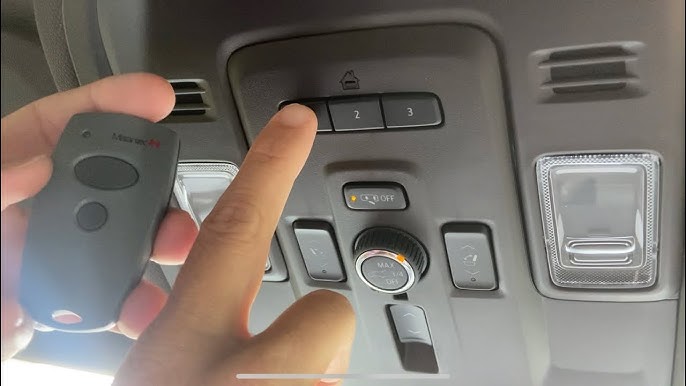
Sit in the driver’s seat with the ignition in ACCESSORY or RUN position. Hold your original handheld remote 1–3 inches away from the HomeLink buttons on the overhead console. This proximity ensures strong signal capture during the learning phase. For optimal results, keep the remote at a 45-degree angle relative to the HomeLink surface.
Step 3: Initiate the Learning Sequence
Choose which of the three HomeLink buttons you wish to program. Simultaneously press and hold:
- The chosen HomeLink button
- The button on your handheld remote
Maintain pressure on both. Observe the HomeLink indicator light. You will see a slow blink initially. Continue holding until the light transitions to a rapid, continuous flash. This typically takes 5–20 seconds depending on signal strength. Once rapid flashing occurs, release both buttons immediately.
Step 4: Verify Signal Capture
Press the newly programmed HomeLink button once. The indicator should illuminate solidly for 2 seconds then turn off. This confirms the Sierra has successfully stored the frequency. If the light does not respond, repeat Step 3 with adjusted remote positioning.
Step 5: Synchronize Rolling Code (Essential for Modern Doors)
Most 2024-compatible openers require this final handshake. Locate the “Learn” or “Smart” button on your garage door motor unit (usually on the back panel near the antenna wire). Press it once—the unit’s LED will activate or begin blinking. You now have 30 seconds to return to your Sierra and press the programmed HomeLink button three times, holding each press for 2 seconds. On the third press, the garage door should activate. Congratulations—you have successfully completed how to set garage door opener on 2024 GMC Sierra.
Troubleshooting Common Programming Failures
Even with perfect execution, issues arise. Here are data-backed solutions for the most frequent problems encountered by GMC Sierra owners:
Indicator Light Never Flashes Rapidly
- Cause: Insufficient signal strength or incompatible frequency.
- Fix: Replace handheld remote batteries. Reposition remote closer to HomeLink buttons. Try angling the remote differently. Some European-market Sierras use different frequency bands—verify your opener’s compatibility sticker.
Door Activates During Programming But Not Afterward
- Cause: Rolling code synchronization incomplete.
- Fix: Repeat Step 5 entirely. Ensure you press the HomeLink button exactly three times within the 30-second window. Some Chamberlain/LiftMaster units require pressing the Learn button twice before syncing.
Intermittent Operation
- Cause: Electrical interference or weak vehicle battery.
- Fix: Test your Sierra’s 12V battery health. Move nearby electronics (dash cams, phone chargers) away from the overhead console. LED bulbs in garage fixtures can emit RF noise—try temporarily removing them to isolate the issue.
Only Works When Very Close to Garage
- Cause: Antenna degradation or HomeLink module fault.
- Fix: Extend the garage door opener’s antenna wire vertically. If problem persists across all three HomeLink channels, consult your GMC dealer for potential module replacement under warranty.
FAQ: Your Top Questions Answered
Can I program my 2024 GMC Sierra HomeLink without the original remote?
Generally, no. The original remote is required to transfer the unique rolling code to the HomeLink system. However, some newer “Wi-Fi enabled” openers allow direct cloud-based pairing through manufacturer apps without a physical remote. Check your opener’s manual for app-based programming options.
How many devices can the 2024 Sierra HomeLink store simultaneously?
The system stores up to three independent devices. This includes garage doors, gate operators, home lighting systems, or security cameras. Each button corresponds to one device. To add a fourth device, you must overwrite an existing channel using the reset procedure in Step 1.
Will programming HomeLink void my GMC warranty?
Absolutely not. HomeLink is a factory-installed feature designed for consumer use. Programming it follows intended operational parameters and has zero impact on your vehicle’s warranty coverage. Only unauthorized hardware modifications would raise warranty concerns.
My garage door opener is older than 1996—will it still work?
Possibly, but with limitations. Pre-1996 fixed-code openers lack rolling-code security and may require a HomeLink Compatibility Bridge (sold separately). These bridges translate modern HomeLink signals to legacy frequencies. Contact Genie or Chamberlain support to verify bridge compatibility with your specific vintage model.
Why does my HomeLink work intermittently in cold weather?
Extreme temperatures affect both vehicle battery output and garage door opener capacitor performance. Below 20°F (-6°C), lithium coin cells in remotes lose voltage rapidly. Keep a spare remote indoors during winter months. Additionally, ensure your Sierra’s battery is in good health, as accessory-mode voltage drops more significantly in cold conditions.
Can I use HomeLink for community gates or apartment garages?
Yes, provided the gate operator uses compatible RF frequencies. Community gates often use commercial-grade transmitters operating on 300-400 MHz bands that HomeLink supports. However, some managed properties restrict personal transmitter cloning for security reasons. Always obtain property management approval before programming shared access systems.
Conclusion: Enjoy Seamless Access to Your Home
Mastering how to set garage door opener on 2024 GMC Sierra transforms daily convenience from a frustration into a seamless ritual. By following this structured approach—from safety preparation through rolling-code synchronization—you have unlocked one of your truck’s most practical features. Remember that patience during the learning sequence yields reliable results, and troubleshooting is simply part of the ownership journey.
Your 2024 Sierra deserves to perform at its full potential, and so do you. Now that your HomeLink is programmed correctly, take a moment to appreciate the engineering that makes modern driving effortless. Found this guide helpful? Share it with fellow GMC Sierra owners on Facebook, Reddit, or your favorite truck forum. Someone else is probably sitting in their driveway right now, wondering why those little buttons won’t cooperate. Be the friend who solved their problem. Happy programming, and safe travels! 🚗🏡
Leave a Reply