Introduction
There is nothing quite as frustrating as pulling into your driveway after a long day, only to realize you cannot get your new truck’s built-in remote to communicate with your garage. If you are struggling to figure out how to set garage door opener on 2024 Chevy Silverado, please know that you are not alone; this is one of the most common questions new Silverado owners ask during their first month of ownership. The good news is that the 2024 model features an updated HomeLink interface that, once understood, makes programming seamless and secure for your daily routine.
Understanding the 2024 Silverado HomeLink System
Before diving into the buttons, it is vital to understand what you are actually programming. The 2024 Chevy Silverado does not use a proprietary “Chevy” garage signal. Instead, it utilizes the HomeLink Wireless Control System, which is the industry standard integrated into nearly all modern North American vehicles.
According to technical documentation referenced on Wikipedia, HomeLink operates on radio frequencies typically between 288–390 MHz, though newer systems also support dual-band and rolling-code security protocols. This distinction matters because the programming method changes depending on whether your home garage door opener uses a fixed code (older) or a rolling code (newer/security-enhanced).
Why Your 2024 Model Might Feel Different
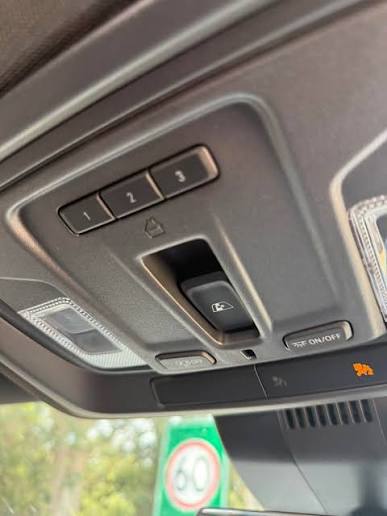
If you have owned previous generations of the Silverado, note that the 2024 redesign moved the HomeLink buttons. In older models, they were often located in the overhead console near the map lights. In many 2024 Silverado trims, especially those with the premium interior or sunroof packages, the buttons may be integrated into the rearview mirror assembly or the lower dashboard panel. Always verify your specific trim level’s layout before starting.
Step-by-Step: How To Set Garage Door Opener On 2024 Chevy Silverado
Programming your vehicle requires patience and precision. Follow these exact steps to ensure a successful sync.
Phase 1: Clearing Previous Codes (Recommended)
Even if your truck is brand new, it is best practice to clear the memory banks to prevent interference from factory test signals or previous owner data.
- Locate the three HomeLink buttons in your 2024 Silverado.
- Press and hold Button 1 and Button 3 simultaneously.
- Hold for approximately 20 seconds until the indicator light begins to flash rapidly.
- Release both buttons. The memory is now cleared.
Phase 2: Programming the Vehicle to the Remote
This phase teaches your Silverado the frequency of your handheld garage remote.
- Turn your Silverado’s ignition to ACC/ACCESSORY mode (engine off, electronics on).
- Hold your handheld garage door remote 1–3 inches away from the HomeLink buttons. Note: Distance is critical. Too far, and it won’t learn; too close, and signal saturation occurs.
- Simultaneously press and hold the desired HomeLink button in the truck AND the button on your handheld remote.
- Watch the HomeLink indicator light. It will flash slowly at first, then rapidly when the frequency is learned.
- Release both buttons once the rapid flashing begins.
Phase 3: Synchronizing Rolling Code Openers
Most garage openers manufactured after 1996 use rolling codes for security. If your HomeLink light flashes rapidly but the door does not open, you must complete this step.
- Go to your garage door opener motor unit (usually mounted on the ceiling).
- Locate the “Learn” or “Smart” button. It is typically yellow, orange, purple, or red.
- Press and release the Learn button. You usually have 30 seconds to complete the next step.
- Return to your Silverado immediately.
- Press and hold the programmed HomeLink button for 2 seconds, then release. Repeat this press-hold-release cycle up to 3 times.
- Test the system. The door should now activate.
Troubleshooting Common Programming Failures
Even with perfect execution, technology can be finicky. Here is a diagnostic table for when things go wrong.
| Symptom | Probable Cause | Solution |
|---|---|---|
| Light never flashes | Dead remote battery or wrong distance | Replace remote battery; adjust distance to 1-3 inches |
| Flashes slowly, never rapidly | Frequency incompatibility | Check opener compatibility on HomeLink website |
| Rapid flash, but door won’t open | Rolling code sync incomplete | Re-do Phase 3 within the 30-second window |
| Works intermittently | Signal interference | Remove LED bulbs from garage fixture; check wiring |
| Buttons unresponsive | Fuse blown or module error | Check Silverado owner’s manual for fuse location |
Expert Tip: LED Bulb Interference
A frequently overlooked issue in 2024 vehicles involves aftermarket LED garage lighting. Cheap LED bulbs emit radio frequency noise that jams the HomeLink receiver. If your system worked previously but suddenly stopped, try turning off your garage lights or replacing them with RF-shielded LED bulbs rated for garage door openers.
Safety and Security Best Practices
When learning how to set garage door opener on 2024 Chevy Silverado, safety must remain paramount. Never program your system while the garage door is in motion. Always ensure the door path is clear of people, pets, and objects before testing.
Additionally, treat your HomeLink system like a house key. If you sell or trade in your Silverado, always perform the factory reset (Phase 1) to erase your home’s access code from the vehicle’s memory. This prevents unauthorized access by future owners or thieves.
Frequently Asked Questions (FAQ)
Can I program my 2024 Silverado without a handheld remote?
Generally, no. The HomeLink system requires an existing transmitter to learn the frequency. However, if your garage opener supports direct Wi-Fi integration or has a keypad with a “learn” function that broadcasts a signal, some advanced setups allow direct pairing. For most users, a working handheld remote is mandatory for initial programming.
Does the 2024 Silverado support Chamberlain MyQ or smart openers?
Yes, but indirectly. HomeLink communicates via RF signals, not Wi-Fi. Even if you have a smart MyQ opener, the Silverado still uses the traditional RF learning process described above. The “smart” features (phone control) operate independently of the truck’s HomeLink system.
Why does my HomeLink work for the garage but not my gate?
Gates often use different frequencies or require longer hold times during programming. Some community gates also use encrypted commercial transmitters that are incompatible with consumer HomeLink systems. Verify your gate operator’s compatibility list before attempting repeated programming, as excessive attempts can sometimes lock out the receiver temporarily.
How many devices can I store in my 2024 Silverado?
The standard HomeLink system in the 2024 Chevy Silverado supports up to three distinct devices. This allows you to program your primary garage, a secondary garage or shed, and a community gate or entry bollard simultaneously. Each device occupies one button position.
Will disconnecting my truck battery erase HomeLink settings?
No. HomeLink memory is stored in non-volatile memory, meaning it persists even when the vehicle loses power. You do not need to reprogram your garage door opener after a battery replacement or jump start. However, a complete module reset or dealership reflashing may clear the memory.
Is there a subscription fee for using HomeLink in the 2024 Silverado?
No. Unlike some connected services (e.g., OnStar navigation or Wi-Fi hotspot), HomeLink is a hardware-based feature with no monthly fees or subscriptions. Once programmed, it functions indefinitely without any ongoing costs or app requirements.
Conclusion
Mastering how to set garage door opener on 2024 Chevy Silverado transforms your daily arrival experience from fumbling with remotes to effortless, integrated convenience. By understanding the three-phase process—clearing memory, learning the frequency, and syncing rolling codes—you can confidently program your vehicle in under ten minutes. Remember to prioritize safety, troubleshoot methodically using the diagnostic table, and always reset your system before transferring ownership.
Your 2024 Silverado is engineered for modern living, and a properly configured HomeLink system is a small but significant part of that promise. Did this guide help you get synced? Share this article with fellow Silverado owners on Facebook, X (Twitter), or your favorite truck forum so they can skip the frustration and enjoy seamless garage access too!
Leave a Reply