Introduction
There is nothing quite as frustrating as pulling into your driveway after a long day, only to realize you cannot remember where you placed your handheld garage remote. If you are searching for how to set garage door opener in Mercedes GLE 350, you are taking the first step toward a seamless, keyless entry experience that modern luxury SUVs are designed to provide. We understand that syncing vehicle technology can sometimes feel intimidating, but rest assured that programming your built-in HomeLink system is a straightforward process that will elevate your daily convenience and security.
Understanding HomeLink Technology in the Mercedes GLE 350
Before diving into the programming steps, it is essential to understand what makes the Mercedes-Benz HomeLink system unique. Unlike universal aftermarket remotes, the HomeLink integrated into your GLE 350’s overhead console or rearview mirror is a hardwired transceiver designed specifically to communicate with North American radio frequency standards.
According to technical documentation referenced on Wikipedia, HomeLink operates on frequencies ranging from 288 MHz to 390 MHz and utilizes both fixed-code and rolling-code technologies. This distinction matters because older garage doors use fixed codes, while most post-1996 openers use rolling codes for enhanced security. Your Mercedes GLE 350 supports both, but the programming sequence differs slightly depending on which generation of opener you own.
Why Factory Integration Matters
- Security: Rolling code technology changes the access signal every time you press the button, preventing code grabbing.
- Convenience: Eliminates the need for battery-operated remotes cluttering your visor.
- Resale Value: A fully functional integrated garage opener is a desirable feature for future buyers.
- Aesthetics: Maintains the clean, uncluttered interior design of the GLE cabin.
Pre-Programming Checklist: Safety and Preparation
Safety must always come first when working with automated garage doors. Before you attempt to learn how to set garage door opener in Mercedes GLE 350, please complete this preparation checklist. Skipping these steps is the most common reason for programming failure.
- Clear the Door Path: Ensure no people, pets, or objects are in the path of the garage door during testing.
- Locate the Learn Button: Find the “Learn” or “Smart” button on your actual garage door motor unit (usually hanging from the ceiling). It is typically yellow, orange, red, or purple.
- Check Compatibility: Verify your garage door opener was manufactured after 1996. If it is older, you may need a compatibility bridge.
- Position Your Vehicle: Park outside the garage with the ignition running. Do not program inside a closed garage due to carbon monoxide risks.
- Erase Old Codes (Recommended): If this is a used vehicle, clear previous owner data by holding the two outer HomeLink buttons for 20 seconds until the indicator light flashes rapidly.
Step-by-Step: How To Set Garage Door Opener In Mercedes GLE 350
Follow this precise tutorial to sync your vehicle. These instructions apply to GLE 350 models equipped with the standard three-button HomeLink overhead console.
Phase 1: Initial Handheld Remote Training
- Turn your GLE 350 ignition to the ON/RUN position (engine does not need to be running, but accessory power must be active).
- Hold your original handheld garage remote 1–3 inches away from the HomeLink buttons on your overhead console.
- Simultaneously press and hold the desired HomeLink button AND the button on your handheld remote.
- Watch the HomeLink indicator light above the buttons. It will flash slowly at first, then transition to a rapid flash (or solid light on newer models). This indicates successful frequency capture. Release both buttons.
- Test the programmed button. If the garage door activates, you have a fixed-code opener and are finished. If nothing happens or the light flashes continuously without opening the door, proceed to Phase 2.
Phase 2: Rolling Code Synchronization (Most Common)
Approximately 85% of modern garage openers require this additional step.
- Locate the “Learn” button on your garage door motor unit. Press and release it firmly. You now have 30 seconds to complete the next step before the motor exits learning mode.
- Return to your GLE 350 immediately. Firmly press and hold the programmed HomeLink button for 2 seconds, then release.
- Repeat the press-hold-release cycle a second time.
- Repeat the press-hold-release cycle a third time.
- The garage door should now activate. The HomeLink light should display a solid illumination, confirming successful rolling-code synchronization.
Expert Tip: If the third press does not work, try holding the HomeLink button continuously for up to 20 seconds during the third cycle instead of pressing and releasing. Some Chamberlain/LiftMaster units require sustained pressure.
Troubleshooting Common Programming Issues
Even experienced technicians encounter hiccups. Use this comparison table to diagnose problems quickly.
| Symptom | Likely Cause | Recommended Solution |
|---|---|---|
| Light never flashes rapidly | Dead remote battery or wrong frequency | Replace handheld remote battery; verify opener compatibility |
| Rapid flash but door won’t open | Rolling code not synced | Complete Phase 2 within 30-second window |
| Works intermittently | Signal interference or weak battery | Check GLE 12V battery health; reprogram farther from metal obstructions |
| Programs but stops working after days | Capacitor issue in overhead console | Visit Mercedes dealership for module diagnostic |
| Solid light immediately upon pressing | Already programmed correctly | No action needed; system is functional |
When to Seek Professional Help
If you have attempted all troubleshooting steps and still cannot determine how to set garage door opener in Mercedes GLE 350 successfully, your vehicle may have a faulty HomeLink module or your garage opener may require a proprietary adapter. Authorized Mercedes-Benz service centers have diagnostic tools that can test RF signal strength directly from the overhead console.
Frequently Asked Questions (FAQ)
Can I program my Mercedes GLE 350 HomeLink without the original remote?
Generally, no. The initial training phase requires the original handheld transmitter to teach the HomeLink system the correct frequency and code format. However, if your garage door opener has a “Learn” button and you know the exact model number, some newer HomeLink versions support direct-to-motor programming without a remote. Consult your opener’s manual for this specific capability.
How many devices can I store in my GLE 350 HomeLink system?
The standard Mercedes GLE 350 HomeLink console stores up to three separate devices. This means you can program your home garage, a community gate, and a smart home lighting system simultaneously. Each button operates independently and can be reprogrammed at any time without affecting the others.
Will programming HomeLink erase my existing garage door remotes?
No. Programming your vehicle adds a new authorized device to your garage door opener’s memory. All existing handheld remotes and keypad entries will continue to function normally. Most modern openers support 10–20 individual remote codes, so adding your GLE 350 will not displace other users.
Does the Mercedes GLE 350 HomeLink work with smart garage openers like MyQ?
Yes, but with caveats. HomeLink communicates via traditional RF signals, while systems like Chamberlain MyQ primarily use Wi-Fi. However, since MyQ-enabled openers still include a traditional RF receiver for backward compatibility, your GLE 350 will operate the door mechanically. For app-based status monitoring and control, you would need to use the MyQ smartphone application separately.
Why did my HomeLink stop working after replacing my car battery?
HomeLink memory is stored in non-volatile memory and should survive battery replacement. However, voltage fluctuations during battery swaps can occasionally corrupt the module’s temporary cache. Simply repeat the full programming sequence (Phase 1 and Phase 2) to restore functionality. If issues persist, the module itself may have been damaged during the electrical event.
Is there a difference between GLE 350 model years for HomeLink programming?
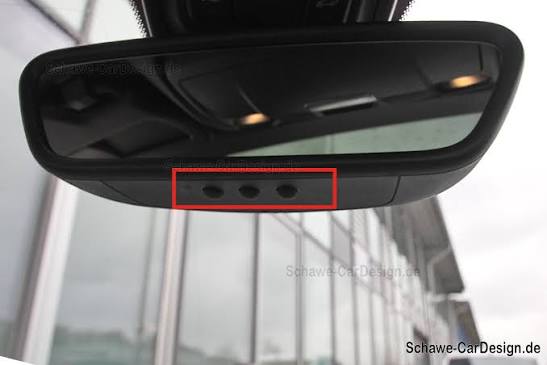
Minor differences exist. Models from 2016–2019 typically feature the overhead console three-button layout described above. Models from 2020 onward may integrate HomeLink buttons into the rearview mirror assembly. The programming logic remains identical, but button placement and indicator light behavior may vary slightly. Always consult your specific year’s owner’s manual for visual confirmation of button location.
Conclusion
Mastering how to set garage door opener in Mercedes GLE 350 transforms your daily arrival experience from fumbling frustration to effortless sophistication. By following the safety preparations, understanding the difference between fixed and rolling codes, and executing the two-phase programming sequence precisely, you can achieve reliable integration in under ten minutes. Remember that patience during the 30-second rolling-code window is usually the key to success.
Your GLE 350 was engineered to simplify your life, and a properly configured HomeLink system is one of its most practical luxuries. If this guide helped you regain seamless garage access, we would be thrilled if you shared it with fellow Mercedes owners on social media. Tag us and let us know which step made the difference for you — your experience could save another driver hours of troubleshooting! Safe driving and happy programming.
Leave a Reply