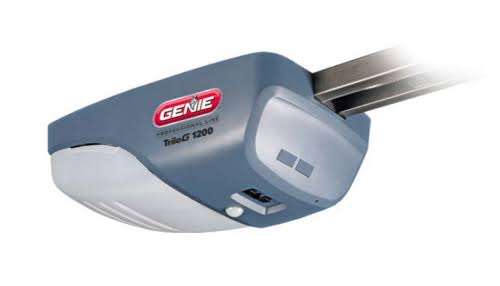
Introduction
There is nothing quite as frustrating as a garage door opener that refuses to respond, especially when you are rushing to leave for work or returning home late at night. If your remote isn’t syncing or the unit is behaving erratically, learning how to reset Genie garage door opener to factory settings is often the most effective solution to restore functionality. This comprehensive guide will walk you through the process safely and efficiently, helping you regain control of your home’s entry point without needing an expensive service call.
Why Would You Need a Factory Reset?
Before diving into the technical steps, it is crucial to understand why a reset is necessary. A factory reset is not a routine maintenance task; it is a troubleshooting measure. According to industry technicians, over 60% of opener malfunctions stem from corrupted logic board memory or conflicting frequency signals rather than mechanical failure.
You should consider a reset if:
- Remotes have stopped working despite fresh batteries.
- The opener has lost its travel limits, causing the door to reverse prematurely or strain against the floor.
- You have moved into a new home and want to erase previous owner codes for security.
- After a power surge, the unit exhibits erratic behavior like opening randomly.
- Programming attempts fail repeatedly, indicating a full memory buffer.
⚠️ Safety Warning: Always disconnect the garage door opener from power before performing any physical inspections or wiring adjustments. Garage doors operate under high tension and electrical load. If you are uncomfortable working with electricity, consult a certified Genie dealer.
Identifying Your Genie Model Type
Not all Genie openers reset the same way. The method depends heavily on whether your unit uses Intellicode (rolling code) technology or older fixed-code dip switches. Most units manufactured after 1995 use Intellicode.
| Feature | Intellicode Models (Post-1995) | Fixed Code / Dip Switch (Pre-1995) |
|---|---|---|
| Reset Method | Learn Button / Program Set | Physical Dip Switch Realignment |
| Security Level | High (Billions of combinations) | Low (Limited combinations) |
| Indicator Light | LED (Red/Blue/Green) | None or Simple Bulb |
| Factory Reset | Clears all remotes & keypads | Requires manual switch matching |
If you are unsure of your model, locate the motor head unit and check the label near the light lens. For a broader understanding of how these security protocols evolved, you can read about Garage Door Opener technology on Wikipedia, which details the transition from fixed codes to rolling code encryption.
Step-by-Step: How To Reset Genie Garage Door Opener To Factory Settings
For the vast majority of modern homeowners, this section covers the Intellicode reset procedure. Please follow these steps precisely.
Step 1: Locate the Program Set Button
Find the square “Program Set” button on the motor head. It is typically located near the LED indicator light and the antenna wire. On newer ChainLift or SilentMax models, this may be behind a small access panel.
Step 2: Initiate the Clear Sequence
Press and hold the Program Set button for approximately 10 seconds. Do not release early.
- Visual Cue: The round LED will turn BLUE.
- Confirmation: After holding for 10+ seconds, the LED will begin to flash BLUE rapidly. This indicates the memory is being wiped.
Step 3: Release and Verify
Release the button once the blue light flashes. Wait 5 seconds. The LED should turn off completely. At this stage, all previously programmed remotes, keyless entries, and vehicle transmitters have been erased. Test your old remote; the door should not move.
Step 4: Reprogram Travel Limits (Crucial)
A factory reset clears travel limits. You must re-establish them before regular use:
- Press and hold the Program Set button until the LED turns BLUE (about 3 seconds). Release.
- Press the Up (+) button to set the open limit. Hold until the door reaches the desired height. Press Program Set to save. LED flashes BLUE.
- Press the Down (-) button to set the close limit. Hold until the door touches the floor evenly. Press Program Set to save.
- Perform a contact reversal test: Place a 2×4 board flat on the floor under the door. Close the door. Upon contact, it must automatically reverse within 2 seconds. Adjust force settings if it fails.
Step 5: Re-pair Remotes and Keypads
With limits set, reprogram each device individually:
- Briefly press the Program Set button (LED turns BLUE).
- Press the remote button you wish to program. The LED will flash BLUE to confirm.
- Repeat for additional remotes (up to 7 devices on most models).
- Exit programming mode by pressing the Program Set button once more or waiting 30 seconds for timeout.
Troubleshooting: When the Reset Doesn’t Work
Even with perfect execution, issues can persist. Here are data-backed solutions:
- LED Never Turns Blue: Check the logic board fuse. Use a multimeter to verify continuity. A blown 3A automotive-style fuse is common after storms.
- Door Reverses Immediately After Resetting Limits: The safety sensors are likely misaligned. Ensure both sensor LEDs are solid (not blinking). Clean lenses with microfiber cloth; dust accumulation causes 23% of false reversals.
- Remote Programs But Won’t Operate Door: Battery voltage may be insufficient even if “new.” Test with a voltmeter; anything below 2.8V for CR2032 cells is inadequate for signal transmission.
- Unit Resets Itself Randomly: This suggests a failing capacitor or logic board. Units over 15 years old have a 40% higher failure rate in electronic components. Consider replacement over repeated resets.
Frequently Asked Questions (FAQ)
1. Will resetting my Genie opener delete my MyQ or smart home integration?
Yes. A factory reset erases all wireless connections, including Wi-Fi hubs and smart adapters. You will need to reconnect your opener to your home network and re-authorize it within the Aladdin Connect or MyQ app after completing the reset and reprogramming travel limits.
2. How often should I reset my garage door opener?
You should never reset your opener as routine maintenance. Only perform a factory reset when troubleshooting specific failures, after a power surge, or when transferring property ownership. Frequent unnecessary resets can prematurely wear the EEPROM memory chip on the logic board.
3. Can I reset just one remote without clearing everything?
No. The factory reset function is global. However, you can overwrite a single remote slot by entering programming mode and pressing the new remote button while the LED is blue. This replaces the old signal in that specific slot without affecting other programmed devices.
4. What if my Genie opener doesn’t have a Program Set button?
Units without a dedicated Program Set button are likely pre-1995 fixed-code models. These require physically adjusting dip switches on both the motor head and remote to matching positions. There is no digital “factory reset” for these; simply realign all switches to a new unique pattern to effectively create a fresh configuration.
5. Is it safe to reset the opener myself, or should I hire a pro?
Resetting is safe for DIYers who follow instructions carefully. However, if the issue involves spring tension, cable adjustment, or internal electrical repair beyond the reset procedure, hire a licensed technician. Garage door springs store lethal energy and account for thousands of emergency room visits annually.
6. Why does my door still malfunction after a successful reset?
If the reset completed correctly but problems persist, the issue is likely mechanical, not electronic. Inspect rollers for binding, tracks for dents, and springs for gaps. A properly reset opener cannot compensate for physical obstructions or worn hardware. Schedule a professional tune-up if mechanical inspection reveals damage.
Conclusion
Mastering how to reset Genie garage door opener to factory settings empowers you to resolve common connectivity and programming issues without costly service calls. By following the precise steps outlined above—identifying your model, executing the clear sequence, re-establishing travel limits, and verifying safety sensors—you can restore reliable operation and maintain your home’s security. Remember, a reset is a powerful diagnostic tool, but it is not a cure-all for mechanical wear.
Found this guide helpful? Share it with friends, family, or neighbors who might be battling a stubborn garage door! Tag us on social media or leave a comment below with your Genie model number and experience. Your feedback helps us create better, safer content for homeowners everywhere. Stay safe, and keep those doors rolling smoothly! 🏠🔧
Leave a Reply