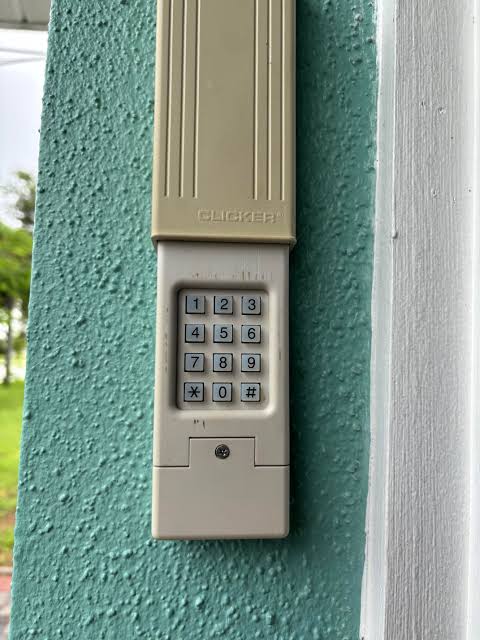
Introduction
There are few things more frustrating than standing in your driveway, locked out because you forgot your PIN or moved into a home with an unknown entry code. If you are searching for how to reset Clicker garage door keypad without code LiftMaster, you are not alone; this is one of the most common homeowner maintenance issues. The good news is that LiftMaster and Clicker systems are designed with a factory reset feature specifically for this scenario, allowing you to regain access safely and quickly without calling a technician.
In this comprehensive guide, we will walk you through the exact process of clearing old codes and programming new ones, ensuring your home remains secure while restoring your convenience. Whether you have a KLIK3U-BK universal remote or a dedicated 877MAX keypad, these steps apply to the vast majority of Clicker/LiftMaster ecosystems.
Understanding Your Clicker and LiftMaster Compatibility
Before attempting a reset, it is vital to understand the relationship between these brands. Clicker is essentially the consumer retail brand manufactured by The Chamberlain Group, the same parent company behind LiftMaster. This means their internal logic boards and radio frequencies (typically 315 MHz or 390 MHz) are interoperable.
According to technical documentation referenced in general automation standards on Wikipedia, modern rolling-code technology ensures that each transmission is unique, preventing code grabbing. When you reset a keypad without the original code, you are essentially telling the receiver to discard its current “trusted device” list for that specific accessory and accept a new handshake.
Key Compatibility Facts
- Brand Interchangeability: Clicker keypads work with LiftMaster, Chamberlain, and Craftsman openers manufactured after 1993.
- Security Protocol: Most units use Security+ 2.0 or Security+ 1.0 rolling codes.
- Reset Trigger: The “Learn” button on the motor head is the master key for all resets when the keypad PIN is lost.
Safety First: Pre-Reset Checklist
Garage door openers involve high-tension springs and moving mechanical parts. Before you climb a ladder to reach the motor unit, please observe these safety protocols:
- Clear the Area: Ensure no children, pets, or vehicles are directly under the door path.
- Disconnect Power (Optional but Recommended): If you need to inspect wiring, unplug the opener. For simple reprogramming via the Learn button, power can remain on.
- Check Battery Health: A weak battery in the keypad is the #1 cause of failed programming. Replace with a fresh 9V alkaline battery before starting.
- Identify Your Learn Button Color: LiftMaster/Clicker units use color-coded Learn buttons (Yellow, Purple, Orange/Red, Green). This determines which programming sequence to follow.
⚠️ Critical Warning: Never attempt to adjust the garage door springs yourself. Spring tension can cause severe injury. Only interact with the electronic keypad and motor unit controls as described below.
Step-by-Step: How to Reset Clicker Garage Door Keypad Without Code LiftMaster
This is the core solution. Since you do not have the old code, you cannot use the keypad’s internal “Change PIN” menu. Instead, you must perform a hard reset from the motor unit. This clears the keypad’s association and allows you to pair it as if it were brand new.
Step 1: Locate the Learn Button on the Motor Unit
Grab a sturdy stepladder and locate the back or side panel of your LiftMaster/Clicker garage door opener motor. Find the square or round “Learn” button. It will typically be colored Yellow, Purple, Orange, Red, or Green. Next to it is usually a small LED indicator light.
Step 2: Clear the Old Keypad Association
Because you don’t know the code, you must force the opener to forget the device.
- Press and hold the Learn button on the motor unit for approximately 6 to 10 seconds.
- Watch the LED indicator next to the button. It will turn on, then eventually turn off completely.
- Once the light goes out, release the button.
- Note: This action may erase ALL remotes and keypads depending on your model. If you only want to reset one specific keypad without erasing others, skip to Step 3 immediately; however, without the old code, a full clear-and-reprogram is often the most reliable method for Clicker keypads.
Step 3: Program the New PIN
Now that the system is ready to accept a new credential:
- Briefly press and release the Learn button again. The LED should illuminate steadily or begin blinking (depending on model). You now have 30 seconds to complete the next step.
- Go to your exterior Clicker keypad.
- Enter your desired new 4-digit PIN. Choose a code that is easy to remember but hard to guess (avoid 1234 or birth years).
- Press and hold the ENTER button on the keypad.
- Keep holding ENTER until you see the motor unit lights flash or hear a distinct click. This confirms the rolling code has been synced.
- Release the ENTER button.
Step 4: Test the System
Wait 5 seconds, then enter your new PIN and press ENTER. The door should activate immediately. If it does not, repeat Step 3, ensuring you are within the 30-second window after pressing the Learn button.
Troubleshooting: When the Reset Fails
Even professionals encounter hiccups. Use this diagnostic table to identify your issue:
| Symptom | Probable Cause | Solution |
|---|---|---|
| LED flashes but door doesn’t move | Weak keypad battery | Replace 9V battery; ensure proper polarity |
| Learn button won’t stay lit | Capacitor/board issue | Check power supply; consult manual for error codes |
| Keypad accepts PIN but no response | Frequency mismatch | Verify keypad is compatible with your opener’s Learn button color |
| Works once then stops | Signal interference | Check for nearby LED bulbs; replace with RF-shielded garage LEDs |
| Light blinks 5 times | Safety sensor misalignment | Realign photo-eye sensors at floor level; clean lenses |
Expert Insight on Signal Interference
A frequently overlooked issue is LED bulb interference. Many modern LED bulbs emit radio frequency noise that blocks the 315/390 MHz signal between your Clicker keypad and the LiftMaster motor. If your reset works intermittently, try unscrewing the garage light bulbs temporarily and testing again. If functionality returns, switch to “garage door compatible” LED bulbs.
Advanced Tips for Long-Term Reliability
To avoid needing to search for how to reset Clicker garage door keypad without code LiftMaster again in the future, consider these best practices:
- Document Your PIN Securely: Store your new code in a password manager or a secure home safe—not on a sticky note inside the garage.
- Annual Battery Swap: Replace the keypad battery every 12 months proactively, even if it still seems functional. Cold winters drain batteries faster.
- Weatherproofing: Apply a thin layer of dielectric grease to the battery contacts during replacement to prevent corrosion from humidity.
- Firmware Updates: Some newer LiftMaster MyQ-enabled units receive over-the-air updates that can affect accessory compatibility. Check the MyQ app periodically for notifications.
Frequently Asked Questions (FAQ)
1. Can I reset a Clicker keypad without accessing the motor unit?
Generally, no. Without the existing PIN, there is no way to enter the keypad’s internal programming mode. The motor unit’s Learn button serves as the physical security override to prevent unauthorized users from simply guessing reset combinations outside your home.
2. Will resetting the keypad erase my car remotes too?
It depends on how you reset. Holding the Learn button for 6–10 seconds performs a factory reset that clears ALL paired devices. If you briefly press the Learn button and immediately program the keypad (as shown in Step 3 above), your existing car remotes should remain unaffected. However, if you had to do a full clear due to persistent issues, you will need to re-pair each remote individually.
3. How do I know which Clicker keypad model I have?
Check the back of the keypad housing or inside the battery compartment for a model number (e.g., KLIK3U-BK, 877MAX, 940EV-P2). You can also identify compatibility by matching your motor unit’s Learn button color to the packaging specifications. Universal Clicker keypads typically support all four Learn button colors.
4. Why does my keypad work during the day but not at night?
This is almost always a battery voltage drop issue exacerbated by temperature. Batteries lose efficiency in cold weather. Even if the battery tests fine at room temperature, it may fail under load in cooler evening conditions. Replace with a premium alkaline or lithium 9V battery rated for extreme temperatures.
5. Is it safe to use a generic keypad instead of Clicker/LiftMaster?
While third-party keypads exist, we strongly recommend using OEM Clicker or LiftMaster accessories. Generic units may not fully support Security+ 2.0 rolling code encryption, potentially creating a vulnerability. OEM keypads are tested for weather resistance and signal reliability specific to your opener’s frequency band.
6. What if my Learn button is broken or missing?
If the physical Learn button is damaged, you may need to replace the logic board or the entire motor unit. Some older models allow programming via DIP switches inside the remote/keypad housing, but this technology was phased out after 1993. Contact a certified LiftMaster dealer for diagnosis if hardware failure is suspected.
Conclusion
Regaining access to your garage shouldn’t require expensive service calls or hours of frustration. By following this guide on how to reset Clicker garage door keypad without code LiftMaster, you’ve taken control of your home security and convenience. Remember: the key is using the motor unit’s Learn button as your master override, always starting with a fresh battery, and verifying compatibility through the color-coded system.
Your garage is the primary entry point to your home—keeping its access system maintained is just as important as changing your front door locks. Now that you’ve successfully reset your keypad, take a moment to test all your remotes and safety sensors to ensure everything operates harmoniously.
Found this guide helpful? Share it on Facebook, Pinterest, or your neighborhood Nextdoor group to help another homeowner avoid getting locked out! Have additional tips or a unique model variation? Drop a comment below—we’d love to hear from our community of DIY enthusiasts. Safe opening! 🏠🔧
Leave a Reply