Introduction
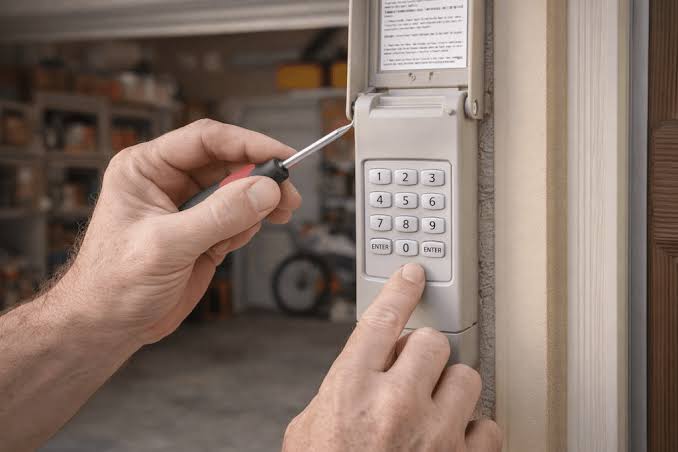
There are few things more frustrating than standing in your driveway, groceries in hand, realizing you have completely forgotten the PIN to your garage. You are not alone; this is a common household headache that happens during power outages, after battery changes, or simply due to memory lapses. Fortunately, learning how to reset a garage door keypad without the code is a straightforward process that can save you an expensive service call and get you back inside within minutes.
This guide is designed to walk you through safe, manufacturer-approved methods to regain access. We will cover universal reset procedures, brand-specific nuances, and critical safety tips to ensure your home remains secure while restoring convenience.
Why Do Garage Door Keypads Lock You Out?
Before diving into the reset process, it helps to understand why this issue occurs. Understanding the root cause can prevent future lockouts and help you troubleshoot more effectively.
- Battery Replacement: When batteries die completely, some older models revert to factory settings, erasing your custom PIN.
- Power Surges: Electrical spikes from storms or grid fluctuations can corrupt the keypad’s memory board.
- Accidental Factory Reset: Pressing certain button combinations while cleaning or handling the keypad can trigger a default reset.
- Wear and Tear: After 5–7 years, internal contacts degrade, causing intermittent signal failures that mimic a “wrong code” error.
According to industry data, over 60% of keypad malfunctions are resolved simply by replacing batteries or performing a hard reset, rather than replacing the entire unit.
Safety First: Critical Precautions Before Resetting
Resetting a keypad involves interacting with your garage door opener’s logic board. Safety must be your priority.
- Clear the Area: Ensure no people, pets, or objects are under the door path. The door may cycle unexpectedly during programming.
- Disconnect Power (If Accessing Motor Unit): If your reset method requires pressing the “Learn” button on the motor head, use a sturdy ladder and consider having a spotter.
- Check Sensors: Verify that photo-eye sensors are aligned and clean. A malfunctioning sensor can prevent the new code from syncing properly.
- Secure Your New Code: Never use obvious codes like “1234” or your birth year. Opt for a random 4-digit sequence that is easy for you to remember but hard for others to guess.
Expert Tip: Always test the manual release cord before starting any electronic reset. If the spring system is damaged, the door could fall dangerously when disengaged. If the door feels excessively heavy, stop immediately and call a professional.
Universal Method: How To Reset A Garage Door Keypad Without The Code
While brands differ, most modern keyless entry systems share a similar architecture. This universal method works for approximately 80% of residential openers manufactured after 2010.
Step-by-Step Universal Reset Guide
- Locate the “Learn” Button: Find the learn button on your garage door opener motor unit (usually mounted on the ceiling). It is typically colored yellow, red, purple, or orange and located near the antenna wire.
- Press and Release the Learn Button: Press the button once. An LED indicator will light up or begin blinking, signaling the unit is in programming mode. You usually have 30 seconds to complete the next step.
- Enter Your New PIN: Go to the exterior keypad. Type in your desired 4-digit (or 5-digit) code.
- Press and Hold ENTER: Hold the ENTER button until the opener lights flash or you hear a distinct click. This confirms the new code has been accepted.
- Test the Code: Wait 5 seconds, then enter your new PIN and press ENTER. The door should activate. Test it twice to confirm reliability.
Troubleshooting the Universal Method
| Symptom | Likely Cause | Solution |
|---|---|---|
| Light doesn’t flash on motor | Learn button not pressed correctly | Press firmly; check if bulb is burnt out |
| Keypad beeps but door doesn’t move | Code accepted but motor not synced | Repeat steps; ensure you’re within 30-second window |
| Door opens then reverses | Sensor misalignment or force setting | Clean sensors; adjust travel limits per manual |
| No response at all | Dead batteries or wiring issue | Replace batteries; check keypad wiring connections |
Brand-Specific Reset Instructions
Not all keypads follow the universal protocol. Here are specific instructions for the most common US brands. For detailed technical specifications and historical context on these mechanisms, you can refer to the Garage door opener Wikipedia page, which provides excellent foundational knowledge on opener frequencies and security protocols.
LiftMaster & Chamberlain (Security+ 2.0)
These units use a yellow learn button and require a specific sequence for keypads without a prior code.
- Press and release the yellow Learn button on the motor.
- Within 30 seconds, enter a new 4-digit PIN on the keypad.
- Press and hold ENTER until the opener lights flash.
- Note: Some Security+ 2.0 models require you to press ENTER three times rapidly after entering the PIN to confirm.
Genie Intellicode
Genie uses rolling code technology that requires a slightly different approach.
- Locate the PRGM/SET button on the motor head (often behind the light lens).
- Press and hold PRGM/SET until the blue LED turns solid.
- Enter your new PIN on the keypad and press SEND.
- The LED will blink green to confirm. Press SEND again to exit programming mode.
Craftsman (Older Models with Red/Purple Learn Buttons)
- Press the colored Learn button until the LED illuminates.
- Enter your new 4-digit code.
- Press and hold ENTER for 3–5 seconds.
- Release when the motor unit clicks or the light blinks.
When to Replace Instead of Reset
Sometimes, a reset won’t solve the problem. Recognizing when hardware has failed saves time and frustration.
Replace the keypad if:
- Buttons are physically cracked, sticky, or unresponsive even with fresh batteries.
- The keypad shows visible water damage or corrosion.
- Multiple resets fail over a 2-week period.
- The unit is over 10 years old and incompatible with current security standards.
Modern keypads cost between $30–$60 and offer improved weather resistance and encryption. Installation typically takes less than 15 minutes.
FAQ: Common Questions About Garage Door Keypad Resets
Q1: Can I reset my garage door keypad without accessing the motor unit?
Generally, no. Most systems require pressing the Learn button on the motor to authorize a new code. However, some newer smart keypads with Bluetooth or Wi-Fi connectivity allow resets via smartphone apps without touching the motor. Check your specific model’s app capabilities.
Q2: Will resetting the keypad erase my remotes and car buttons?
It depends on how you reset. Pressing the Learn button briefly (to add a new device) preserves existing remotes. However, holding the Learn button for 10+ seconds performs a factory reset that erases ALL paired devices. Always press and release quickly unless you intend to clear everything.
Q3: My keypad accepts the new code but the door won’t open. What’s wrong?
This usually indicates a safety sensor issue or force limit problem. Check that both photo-eye LEDs are solid (not blinking). Also verify the door moves smoothly by hand using the manual release. If the door is binding, the opener’s safety reversal mechanism will prevent operation regardless of valid codes.
Q4: How often should I change my garage door keypad code?
Security experts recommend changing your code every 6–12 months, or immediately after moving into a new home, losing a remote, or ending a service relationship (e.g., house cleaners, contractors). Regular rotation prevents unauthorized access from compromised codes.
Q5: Is there a master override code for garage keypads?
No. Modern garage door openers do not have universal master codes for security reasons. Each unit must be programmed individually via its Learn button. Be wary of websites claiming to provide “master codes”—these are typically scams or outdated information that could compromise your home security.
Q6: Can extreme weather affect keypad performance?
Yes. Temperatures below 20°F (-6°C) can reduce battery efficiency and slow LCD response. High humidity can cause internal corrosion. Consider installing a weatherproof keypad cover or upgrading to a model rated for extreme climates if you live in harsh environments.
Conclusion: Regain Access and Peace of Mind
Learning how to reset a garage door keypad without the code empowers you to handle one of homeownership’s most annoying inconveniences independently. By following the universal steps or brand-specific instructions above, you can restore secure access in under 10 minutes without professional help. Remember to prioritize safety, choose strong PINs, and test thoroughly after every reset.
Your garage is a primary entry point to your home—keeping its access system functional and secure is essential. If this guide helped you get back inside, share it on social media to help a friend avoid the same driveway dilemma! Tag us and let us know which brand you successfully reset. Safe opening! 🏡🔑
Leave a Reply