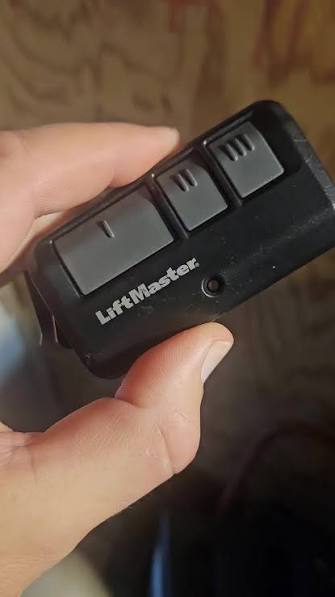
Have you ever stood in your driveway, pressing your garage remote button repeatedly, only to watch your garage door remain stubbornly closed? It’s a frustrating scenario that many homeowners face, but the good news is that how to reprogram a Craftsman garage door opener remote is usually a straightforward process. Whether you’ve lost your old remote, bought a replacement, or simply need to reset your system for security reasons, this guide will walk you through every step with clarity and confidence.
Why Do You Need to Reprogram Your Craftsman Remote?
Before diving into the technical steps, it helps to understand why reprogramming might be necessary. Common reasons include:
- Lost or stolen remote: For security purposes, you’ll want to erase old codes and program new ones.
- New remote purchase: Replacement remotes don’t work out of the box—they need to sync with your opener.
- Interference issues: Nearby electronics or neighbors using similar frequencies can cause signal conflicts.
- Battery replacement: Sometimes, changing batteries disrupts the connection.
According to the Consumer Product Safety Commission (CPSC), approximately 15% of garage door service calls are related to remote control issues. Understanding how to handle these problems yourself can save time and money.
Identifying Your Craftsman Garage Door Opener Model
Not all Craftsman openers use the same programming method. The first critical step is identifying which model you have. Look for a label on the motor unit (usually mounted on your garage ceiling) that displays:
- Model number
- Serial number
- Frequency (typically 315 MHz or 390 MHz)
Craftsman has produced several generations of garage door openers, including:
| Generation | Features | Programming Method |
|---|---|---|
| Older Models (Pre-2005) | Dip switches | Manual switch matching |
| Mid-Range (2005–2015) | Learn button (yellow, red, or purple) | Button-press synchronization |
| Newer Models (2016+) | Security+ 2.0, MyQ compatibility | Smart button pairing |
If you’re unsure about your model, check the Wikipedia page on garage door openers for general technical background and industry standards.
Step-by-Step Guide: How To Reprogram A Craftsman Garage Door Opener Remote
Step 1: Locate the “Learn” Button on Your Opener
The Learn button is the key to reprogramming most modern Craftsman openers. It’s typically located on the back or side of the motor unit and may be colored yellow, red, purple, or green depending on the model year.
- Yellow button: Common in models from 2005–2010
- Red/Purple button: Found in Security+ models (2011+)
- Green button: Used in newer MyQ-enabled units
Pro tip: Use a sturdy ladder and ensure the area is well-lit before attempting to access the motor unit.
Step 2: Clear Existing Codes (Optional but Recommended)
If you’re reprogramming due to a lost remote or security concerns, clear all previously programmed remotes first:
- Press and hold the Learn button for approximately 6–10 seconds.
- Wait until the indicator light next to the button turns off.
- Release the button.
This action erases all paired remotes and keypads, so you’ll need to reprogram every device you use.
Step 3: Program Your New Remote
Now comes the actual pairing process:
- Press the Learn button once briefly. The indicator light should illuminate or blink.
- Within 30 seconds, press and hold the button on your remote that you want to program.
- Keep holding until the opener’s lights flash or you hear a click sound.
- Test the remote by pressing the button again—the garage door should respond.
Important: If the light doesn’t blink after pressing the Learn button, try replacing the remote’s battery first. Weak batteries are a common culprit behind failed programming attempts.
Step 4: Test and Confirm Functionality
After programming, test your remote from various distances:
- Close range (within 10 feet)
- Medium range (15–20 feet)
- Maximum range (as specified in your manual, typically 50–100 feet)
If the remote works inconsistently, consider these troubleshooting tips:
- Replace the battery with a fresh CR2032 or AA battery (check your remote’s specifications).
- Ensure no large metal objects or electronic devices are blocking the signal.
- Verify that the antenna wire on the motor unit is hanging down freely.
Troubleshooting Common Programming Issues
Even with careful following of instructions, things don’t always go smoothly. Here are solutions to frequent problems:
Remote Won’t Program
- Check battery orientation: Ensure the battery is inserted correctly.
- Verify compatibility: Not all universal remotes work with Craftsman openers. Use only compatible models.
- Reset and retry: Clear codes completely and start the process from scratch.
Garage Door Responds Intermittently
- Inspect the antenna: The wire antenna on the motor unit should hang vertically without obstructions.
- Reduce interference: Move cordless phones, Wi-Fi routers, or baby monitors away from the opener.
- Check range limitations: Older models have shorter effective ranges.
Learn Button Doesn’t Light Up
- Power cycle the opener: Unplug it for 30 seconds, then plug it back in.
- Check for locked mode: Some models have a lock feature that disables programming. Consult your manual.
Frequently Asked Questions (FAQ)
Q1: Can I reprogram a Craftsman remote without the original manual?
A: Yes! Most Craftsman openers follow standardized programming procedures based on the Learn button color and location. You can find model-specific guides online by searching your model number. However, having the manual is always helpful for unique features.
Q2: How many remotes can I program to one Craftsman opener?
A: Most Craftsman garage door openers support up to 8 remotes and/or wireless keypads. Check your specific model’s specifications, as older units may have lower limits.
Q3: What if my Craftsman opener uses dip switches instead of a Learn button?
A: Older models (pre-2005) use dip switches—small toggle switches inside both the remote and the motor unit. To program:
- Open both the remote and motor unit covers.
- Match the dip switch positions exactly between the two devices.
- Close the covers and test.
This method is less secure than modern rolling-code systems, so consider upgrading if you still use dip-switch models.
Q4: Is it safe to reprogram my garage door opener myself?
A: Absolutely. Reprogramming involves simple button presses and poses no electrical hazard as long as you don’t open the motor housing or touch internal wiring. Always use a stable ladder and avoid working alone if you’re uncomfortable with heights.
Q5: Why does my remote work close up but not from farther away?
A: This typically indicates:
- Weak battery: Replace it immediately.
- Antenna issues: Ensure the antenna wire is intact and hanging freely.
- Signal interference: Nearby electronics can block or weaken the signal.
Q6: Can I use a universal remote with my Craftsman opener?
A: Many universal remotes are compatible with Craftsman openers, especially those labeled for “Security+” or “315/390 MHz” systems. However, compatibility isn’t guaranteed. Check the universal remote’s packaging or website for a list of supported brands and models.
Final Thoughts: Take Control of Your Garage Security
Learning how to reprogram a Craftsman garage door opener remote empowers you to maintain control over your home’s security and convenience. Whether you’re dealing with a lost remote, upgrading to a newer model, or simply refreshing your system, the process is manageable with the right guidance.
Remember these key takeaways:
- Identify your opener model and Learn button color first.
- Clear old codes if security is a concern.
- Follow the step-by-step pairing process carefully.
- Troubleshoot systematically if issues arise.
By mastering this skill, you’ll save money on service calls and gain peace of mind knowing your garage operates securely.
Did you find this guide helpful? Share it with friends and family who might struggle with their garage door remotes! Bookmark this page for future reference, and feel free to leave comments with your own tips or questions.
Leave a Reply