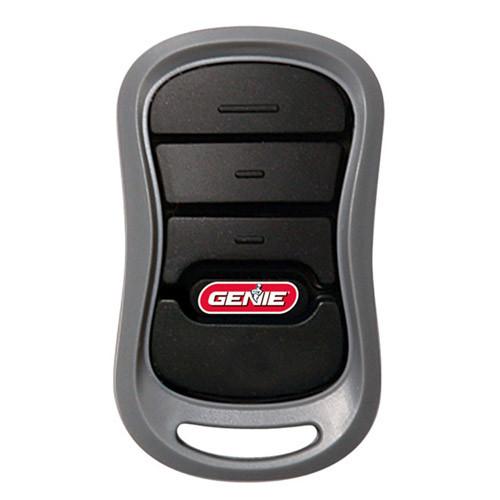
Losing or breaking your garage door remote can feel like a major inconvenience. Whether you’ve misplaced it, dropped it in a puddle, or it simply stopped working, knowing how to replace a Genie garage door opener remote can save you time, money, and frustration. In this guide, we’ll walk you through everything you need to know—from identifying the right replacement to programming it successfully.
Why You Might Need to Replace Your Genie Remote
Before diving into the replacement process, it’s helpful to understand why remotes fail. Common reasons include:
- Battery depletion: Even if the remote looks fine, weak batteries are the #1 cause of malfunction.
- Physical damage: Drops, water exposure, or wear and tear can break internal components.
- Signal interference: Nearby electronics or changed frequencies may disrupt communication.
- Lost or stolen remotes: Security concerns often prompt homeowners to replace and reprogram all remotes.
According to a 2023 consumer survey by HomeAdvisor, nearly 40% of garage door service calls were related to remote control issues—not the opener itself. This highlights how critical proper remote maintenance and replacement knowledge is for everyday convenience.
Step-by-Step Guide: How To Replace A Genie Garage Door Opener Remote
Replacing your Genie remote doesn’t require professional help in most cases. Follow these clear steps:
Step 1: Identify Your Genie Model
Genie produces several opener series, including:
- Genie Intellicode (older models with dip switches)
- Genie CodeDodger (rolling code technology)
- Genie Aladdin Connect (smart/Wi-Fi enabled)
Check the label on your motor unit (usually mounted on the ceiling) for the model number. You can also find this information in your owner’s manual. If you don’t have the manual, visit Genie’s official support page or search your model number online.
Pro Tip: Taking a photo of the model label can help when purchasing a replacement remote.
Step 2: Purchase the Correct Replacement Remote
Not all Genie remotes are compatible with every opener. Here’s a quick compatibility guide:
| Remote Type | Compatible With | Notes |
|---|---|---|
| Genie GM3T | Most Intellicode & CodeDodger models | 3-button universal remote |
| Genie GIRT | Intellicode openers only | Compact design |
| Genie Aladdin Remote | Aladdin Connect systems only | Wi-Fi enabled |
| Universal Aftermarket Remotes | Varies | Check compatibility list carefully |
You can buy replacements from:
- Home Depot, Lowe’s, or Amazon
- Genie’s official website
- Local garage door supply stores
Average cost: $15–$40 depending on features.
Step 3: Remove Old Remote from System (If Necessary)
If your old remote was lost or stolen, it’s wise to clear it from the opener’s memory for security:
- Locate the “Learn” button on your Genie motor unit. It’s usually purple, red, or orange.
- Press and hold the Learn button for 6–10 seconds until the indicator light blinks or turns off.
- This erases all previously programmed remotes and keypads.
⚠️ Warning: This step removes all devices. You’ll need to reprogram every remote and keypad afterward.
Step 4: Program the New Remote
Programming methods vary by model. Here are the two most common approaches:
Method A: For Intellicode & CodeDodger Models
- Press the Learn button on the motor unit once. The LED will light up.
- Within 30 seconds, press and hold the button on your new remote that you want to use.
- Release when the motor unit’s light blinks or you hear a click.
- Test the remote by pressing the button again. The door should respond.
Method B: For Older Dip-Switch Models
- Open both the remote and the motor unit cover.
- Match the dip switch positions exactly (up/down settings).
- Close the covers and test.
📌 Note: If programming fails, try replacing the battery first. Use a fresh CR2032 lithium battery for most Genie remotes.
Step 5: Test and Troubleshoot
After programming:
- Stand at various distances (5 ft, 15 ft, 30 ft) to test range.
- Ensure no large metal objects or Wi-Fi routers are blocking the signal.
- If the remote works intermittently, check for radio frequency interference from neighbors’ devices.
For more technical details on radio frequencies used in garage openers, refer to the Wikipedia article on garage door openers, which explains how rolling code technology enhances security.
Common Problems & Solutions
Even after replacement, issues can arise. Here’s a quick troubleshooting table:
| Problem | Possible Cause | Solution |
|---|---|---|
| Remote doesn’t work at all | Dead battery | Replace with CR2032 battery |
| Works only up close | Weak signal or interference | Reprogram; check for obstructions |
| Door moves but stops halfway | Safety sensor misalignment | Clean and realign sensors |
| Multiple remotes needed | Erased memory during reset | Reprogram all devices |
FAQ Section
Q1: Can I use a universal remote with my Genie opener?
Yes, but ensure it’s listed as compatible with your specific Genie model. Universal remotes from brands like Chamberlain or Craftsman often work with Genie Intellicode systems.
Q2: How do I know if my remote uses rolling code technology?
Check your owner’s manual or look for “CodeDodger” or “Intellicode” branding. Rolling code remotes change their signal with each use for enhanced security.
Q3: What battery does a Genie remote use?
Most Genie remotes use a CR2032 3V lithium coin cell battery. Some older models may use AA or 9V batteries. Check the battery compartment for labeling.
Q4: Can I program multiple remotes to one Genie opener?
Absolutely. Most Genie openers support up to 7–10 remotes and keypads combined. Simply repeat the programming steps for each device.
Q5: My new remote won’t program. What should I do?
First, replace the battery. Then, ensure you’re pressing the Learn button correctly and programming within the 30-second window. If issues persist, consult Genie’s support line or consider a factory reset of the opener.
Q6: Is it safe to buy third-party Genie remotes online?
Yes, as long as they’re from reputable sellers and explicitly state compatibility with your model. Avoid unusually cheap generics, as they may lack proper encryption or durability.
Conclusion
Knowing how to replace a Genie garage door opener remote empowers you to handle a common household issue without calling a technician. By identifying your model, choosing the right replacement, and following proper programming steps, you can restore convenience and security in minutes.
Remember:
- Always verify compatibility before purchasing.
- Keep spare batteries on hand.
- Reprogram all devices if you reset the opener for security.
If this guide helped you, consider sharing it on social media to help friends and family tackle their own garage door woes. Have questions? Drop them in the comments below—we’re happy to help!
Leave a Reply