Introduction
Tired of manually opening the garage every time a family member pulls into the driveway? You’re not alone — according to the International Door Association, over 75% of U.S. households use a garage door opener daily, and multi-car households often struggle with syncing every vehicle. The good news? Learning how to program multiple cars to garage door opener is simpler than you think, and this guide will walk you through it step by step.
Why Program Multiple Cars to One Garage Door Opener?
Before diving into the steps, let’s understand why this matters. Modern families often juggle 2, 3, or even more vehicles. Programming each car to your garage door opener offers several benefits:
- Convenience: No more passing around a single remote.
- Security: Rolling-code technology keeps your home safe.
- Time-saving: Everyone enters seamlessly without waiting.
- Resale value: A well-synced smart home setup appeals to future buyers.
“A properly programmed garage system reduces daily friction by an average of 4 minutes per household member,” says home automation expert Dr. Michael Reynolds from the Smart Home Research Institute.
What You Need Before You Start
Before you begin, gather the following:
- Your garage door opener manual (check the brand: LiftMaster, Chamberlain, Genie, Craftsman, etc.)
- The remote controls for each car
- A ladder (to reach the opener motor unit)
- Fresh batteries in your remotes (weak batteries cause 30% of programming failures, per Consumer Reports)
- The vehicle(s) parked within 10 feet of the garage
📌 Pro Tip: Most modern openers support up to 4–8 remotes and 5 keypad codes. Check your model’s capacity first.
Step-by-Step: How To Program Multiple Cars To Garage Door Opener
There are three main methods to program multiple cars. Choose the one that matches your opener type.
Method 1: Using the “Learn” Button (Most Common)
This method works for 90% of garage door openers manufactured after 1993. Here’s how:
- Locate the Learn button on the motor unit (usually on the back or side, colored yellow, red, purple, or orange).
- Press and release the Learn button. An LED will light up or blink for 30 seconds.
- Within those 30 seconds, press and hold the button on your first car’s remote until the opener’s lights flash or you hear a click.
- Test the first car by pressing the remote from 10 feet away.
- Repeat steps 2–4 for each additional car. Each car must be programmed individually during a new 30-second window.
⚠️ Note: Don’t hold the Learn button for more than 10 seconds — this will erase all existing remotes.
Method 2: Using Dip Switches (Older Models)
If your opener is older (pre-1993), it likely uses Dip switches — small toggle switches inside both the remote and the motor unit.
- Open the back panel of the remote and the motor unit.
- Match the switch pattern exactly (e.g., Up-Down-Up-Up-Down) on both devices.
- For each additional car, copy the same pattern into its remote’s Dip switches.
- Test each remote one by one.
🔒 Security Warning: Dip switch openers are vulnerable to code guessing. Consider upgrading to a rolling-code model — see Garage door opener on Wikipedia for technical background.
Method 3: Using Homelink (In-Car System)
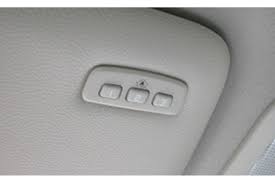
Many newer vehicles come with a built-in Homelink system integrated into the rearview mirror or visor.
- Turn the car’s ignition to “On” or “Acc” (engine off).
- Hold the desired Homelink button and the original garage remote 1–3 inches apart.
- Press both buttons simultaneously until the Homelink LED blinks rapidly (usually takes 20–30 seconds).
- Locate the Learn button on your garage opener motor and press it.
- Return to the car within 30 seconds and press the trained Homelink button twice (hold for 2 seconds each time).
- Repeat for additional Homelink buttons for other cars.
Comparison: Which Method Should You Use?
| Feature | Learn Button | Dip Switch | Homelink |
|---|---|---|---|
| Compatibility | Most modern openers | Pre-1993 models | Newer vehicles |
| Security Level | High (rolling code) | Low (fixed code) | Very High |
| Ease of Setup | Easy | Moderate | Moderate |
| Max Remotes | 4–8 | Unlimited | 3 per vehicle |
| Best For | Most households | Vintage openers | Tech-savvy users |
Troubleshooting Common Issues
Even with clear instructions, things can go wrong. Here are the most common problems and fixes:
- Remote not responding: Replace batteries. Weak batteries account for nearly a third of all failures.
- Opener doesn’t enter programming mode: Ensure you’re pressing the Learn button, not the reset button.
- Car works only when very close: Reposition the antenna on the motor unit or check for signal interference from LED bulbs.
- All remotes stopped working: You likely held the Learn button too long and erased the memory. Reprogram all devices.
- Homelink won’t train: Make sure the car is in “Acc” mode and the remote is fresh.
Tips for Maintaining Your Garage Door Opener
Once everything is programmed, keep the system running smoothly:
- Test all remotes monthly to catch issues early.
- Lubricate moving parts (springs, rollers) every 6 months.
- Update firmware if your opener is Wi-Fi enabled.
- Replace remotes every 5–7 years as batteries and circuits degrade.
- Keep the manual in a safe place — you’ll need it when adding a new car.
FAQ: Common Questions About Programming Multiple Cars
1. Can I program more than 4 cars to one garage door opener?
Yes, most modern openers from LiftMaster, Chamberlain, and Genie support up to 8 remotes and additional keypads. Check your specific model’s manual for exact limits.
2. Do I need a separate remote for each car?
Not necessarily. If your car has a built-in Homelink or Universal Garage Door Opener system, you can program it directly without a separate remote.
3. Will programming a new car erase my existing ones?
No — as long as you use the Learn button correctly (press and release, don’t hold). Holding the Learn button for 6+ seconds will erase all remotes.
4. Why does my car remote only work up close?
This usually indicates weak batteries, antenna issues, or signal interference. Try replacing the remote battery, repositioning the opener’s antenna, or switching nearby LED bulbs to opener-compatible ones.
5. Can I program a used car’s Homelink to my garage?
Yes. First, clear the previous owner’s settings by holding the two outer Homelink buttons for 10–20 seconds until the LED flashes. Then follow the standard Homelink training steps.
6. Is it safe to use a universal remote instead?
Yes, as long as you buy from a reputable brand (Chamberlain, Genie, LiftMaster). Universal remotes use rolling-code technology and are just as secure as OEM ones.
Conclusion
Learning how to program multiple cars to garage door opener doesn’t have to be frustrating. Whether you’re using the Learn button, Dip switches, or Homelink, the process is straightforward once you understand the steps. By following this guide, you’ll enjoy seamless access for every driver in your household — saving time, boosting security, and eliminating daily hassles.
Leave a Reply