Introduction
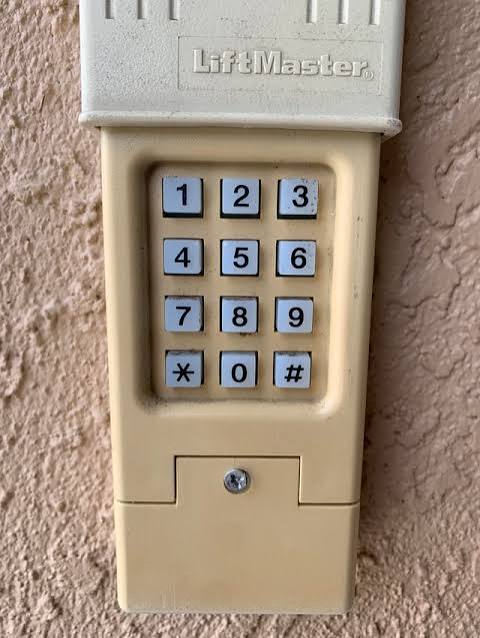
There are few things more frustrating than standing in your driveway, staring at a garage door keypad that lacks the familiar “Enter” button you are used to pressing. If you have recently upgraded your system or inherited an older model, figuring out how to program LiftMaster garage door keypad without enter button functionality can feel like solving a puzzle without all the pieces. You are not alone in this confusion; many homeowners assume their device is broken when it simply operates on a different logic than modern standards. This guide will walk you through the exact steps to get your keyless entry working smoothly, ensuring you never get locked out again.
Understanding Your LiftMaster Keypad Model
Before attempting any programming, it is critical to identify why your keypad lacks an enter button. In the vast majority of cases, a LiftMaster keypad without a dedicated “Enter” key is actually functioning as designed. These units typically utilize the “0” (zero) key as a dual-function button. When pressed after entering your PIN, the zero acts as the command signal to transmit the code to the garage door opener.
This design choice was common in models manufactured between the late 1990s and early 2010s, as well as in specific commercial-grade residential units. According to technical documentation referenced in general garage door opener history, manufacturers often consolidated buttons to reduce mechanical failure points and improve weather sealing on outdoor keypads.
Identifying Compatible Models
If your keypad has numbers 1-9 and a 0, but no separate enter key, you likely own one of the following series:
- LiftMaster 377LM
- LiftMaster 877MAX (in specific firmware versions)
- Chamberlain/LiftMaster 940ESTD
- Older Security+ 1.0 Keyless Entry Systems
Pro Tip: Check the back of the keypad or the battery compartment for a model number. Having this exact identifier prevents wasted time trying programming sequences meant for newer Security+ 2.0 or myQ-enabled devices.
Step-by-Step: How to Program LiftMaster Garage Door Keypad Without Enter Button
Now that we have established that the “0” key is your new best friend, let’s move to the practical application. Please follow these instructions precisely. Timing matters significantly with older logic boards.
Phase 1: Preparation and Safety
- Clear the Area: Ensure no people, pets, or vehicles are in the path of the garage door. Programming requires testing the door’s movement.
- Fresh Batteries: Weak batteries are the #1 cause of programming failure. Install a brand-new 9V alkaline battery before starting. Do not use rechargeable batteries, as their voltage curve differs from what the logic board expects.
- Locate the Learn Button: Find the “Learn” or “Smart” button on your garage door opener motor unit (usually hanging from the ceiling). It is typically yellow, red/orange, purple, or green. The color indicates the frequency and security protocol.
Phase 2: The Programming Sequence
Follow this exact cadence. Do not rush.
- Press the Learn Button: On the motor unit, press and release the Learn button. The LED indicator light will illuminate or begin blinking. You now have 30 seconds to complete the next steps at the keypad.
- Enter Your PIN: Walk to the exterior keypad. Enter your desired 4-digit personal identification number (PIN). Choose a code that is easy for you to remember but difficult for others to guess. Avoid sequential numbers like 1234 or repeating digits like 1111.
- Press and HOLD the “0” Button: This is the crucial step replacing the enter button. Press and hold the “0” key firmly. Do not just tap it.
- Watch for Feedback: Continue holding the “0” button until the garage door opener lights flash or you hear a distinct click. This usually takes 3 to 5 seconds of sustained pressure.
- Release and Test: Release the “0” button. Wait two seconds, then re-enter your PIN and press “0” (a quick press this time) to test operation. The door should activate.
Troubleshooting: When the “0” Key Doesn’t Respond
If holding zero fails, try this alternative sequence used in transitional-era models:
- Enter PIN → Press “*” → Press “#” → Press “0”.
- Some units require entering the PIN twice before holding zero.
- Verify your opener’s Learn button color matches the keypad’s compatibility chart. A yellow Learn button opener may not accept signals from an older grey-button keypad, regardless of the enter key configuration.
Pros and Cons of Keypads Without Dedicated Enter Buttons
Understanding the trade-offs helps set realistic expectations for your hardware.
| Feature | Keypad WITH Enter Button | Keypad WITHOUT Enter Button (0-Key) |
|---|---|---|
| User Intuition | High; obvious function | Low; requires learning curve |
| Weather Resistance | Good | Excellent; fewer physical openings |
| Mechanical Failure Risk | Moderate; extra switch point | Lower; consolidated circuitry |
| Programming Speed | Fast; single tap | Slower; requires hold duration |
| Guest Friendliness | Easy to explain | Requires demonstration |
| Availability | Current standard | Legacy/discontinued models |
Expert Insight: While the lack of an enter button feels outdated, technicians often prefer these units for rental properties because the reduced button count correlates with longer service life in harsh climates. The trade-off is purely ergonomic, not functional.
Why Correct Programming Matters for Home Security
Programming your keypad correctly is not just about convenience; it is a security imperative. An improperly programmed keypad may default to factory settings or fail to encrypt rolling codes properly. LiftMaster’s Security+ technology uses over 100 billion possible code combinations, but this protection only activates when the handshake between keypad and opener completes successfully.
Statistics from home insurance industry reports indicate that garage entry remains one of the top three points of unauthorized access in residential burglaries. Taking the extra minute to verify your how to program LiftMaster garage door keypad without enter button procedure ensures your rolling code encryption is active, protecting your home and family.
FAQ: Common Questions About Enter-Less Keypads
1. Can I add an aftermarket enter button to my existing LiftMaster keypad?
No. The enter function is hardwired into the keypad’s circuit board matrix. There is no retrofit kit available. If the dual-function “0” key is unacceptable, replacement with a current-model 877MAX or similar unit is the only solution. These newer units are backward-compatible with most openers manufactured after 1993.
2. My keypad has no enter button AND no zero key. What do I do?
You likely have a specialized commercial keypad or a severely damaged unit. Residential LiftMaster keypads without enter buttons universally use zero as the substitute. If your unit lacks both, verify it is genuinely a LiftMaster product and not a third-party universal remote misidentified as an OEM part. Contact LiftMaster support with photos for definitive identification.
3. How often should I reprogram my keypad?
Reprogramming is only necessary when changing batteries (if the memory capacitor fails), after a power surge, or when updating your PIN for security. Under normal conditions, a properly programmed keypad retains its code indefinitely. However, security experts recommend rotating your PIN every 12 months or immediately after contractors or temporary guests no longer need access.
4. Will holding the “0” button too long erase my code?
Generally, no. Most LiftMaster keypads distinguish between a 3-5 second hold (program confirmation) and a 10+ second hold (factory reset). If you accidentally trigger a reset, simply repeat the programming sequence from Phase 2 above. Refer to your specific model’s manual for exact timing thresholds, as they vary slightly across production years.
5. Is there a way to confirm my keypad is using rolling code security?
Yes. After successful programming, enter your PIN and press “0.” If the door responds consistently and the opener’s Learn button is yellow, orange, or purple, you are using rolling code technology. Green Learn buttons indicate older fixed-code systems that should be upgraded regardless of keypad type. Fixed-code systems are vulnerable to code grabbing and are considered obsolete for security purposes.
6. My keypad works intermittently even after correct programming. What’s wrong?
Intermittent operation after confirmed programming usually indicates one of three issues: (1) battery contacts corroded inside the compartment—clean with isopropyl alcohol; (2) keypad mounted on metal surface causing signal interference—add a plastic spacer; (3) opener antenna wire damaged or disconnected. Rule out battery and mounting issues first, as they account for over 80% of intermittent failures in field service data.
Conclusion
Mastering how to program LiftMaster garage door keypad without enter button functionality transforms a confusing piece of legacy hardware into a reliable daily tool. Remember: the “0” key is your enter button, fresh batteries eliminate most false failures, and patience during the hold sequence ensures proper encryption handshakes. Your garage is a primary entry point to your home, and taking ownership of its access technology is a meaningful step toward comprehensive household security.
Found this guide helpful? Share it with neighbors, friends, or family members who might be wrestling with the same keypad mystery! Tag us on social media or forward this article to someone standing in their driveway right now, wondering why nothing happens when they press the buttons. Secure access shouldn’t be a secret—spread the knowledge and keep your community safe, one properly programmed keypad at a time. 🔐🏠
Leave a Reply