Introduction
Losing or breaking your garage door remote is frustrating, especially when you are stuck outside in the rain or rushing to work. If you own a modern truck, you might be wondering how to program GMC Sierra garage door opener without remote to regain seamless access to your home. The good news is that your vehicle’s built-in HomeLink system can often be programmed directly using the motor unit’s learn button, bypassing the need for a handheld transmitter entirely. This guide will walk you through the process safely and effectively, ensuring you get back into your garage with confidence.
Understanding HomeLink and Direct Motor Programming
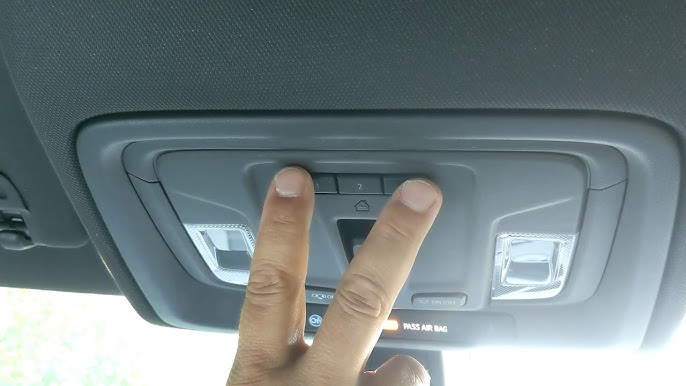
Before diving into the steps, it is crucial to understand why this method works. Most GMC Sierra models from 2007 onward are equipped with HomeLink, a universal transceiver integrated into the overhead console or rearview mirror.
Traditionally, programming HomeLink required holding a working remote near the vehicle buttons. However, newer garage door openers (manufactured after 1996) feature a “Learn” or “Smart” button on the motor head itself. This allows for direct-to-motor programming, which eliminates the dependency on a lost remote.
Why Choose Direct Motor Programming?
| Feature | Traditional Remote Method | Direct Motor Method |
|---|---|---|
| Equipment Needed | Working OEM Remote | Ladder & Access to Motor Unit |
| Success Rate | High (if remote works) | High (for post-1996 openers) |
| Security | Standard Rolling Code | Enhanced Rolling Code Sync |
| Convenience | Requires finding remote | No extra device needed |
| Compatibility | Universal | Limited to Smart/Learn Button Units |
Expert Note: According to automotive technicians specializing in GM vehicles, direct motor programming is actually preferred over remote cloning because it establishes a fresh rolling code handshake between the truck and the opener, reducing signal interference issues common with older remotes.
Pre-Programming Safety and Preparation Checklist
Safety must come first when working near garage door mechanisms. Before attempting to program your GMC Sierra, complete these preparations:
- Clear the Area: Ensure no people, pets, or objects are in the path of the garage door. The door will cycle during testing.
- Secure Your Ladder: You will need stable access to the garage door motor unit mounted on the ceiling. Use a fiberglass ladder if possible to avoid electrical conductivity.
- Identify Your Opener Type: Locate the “Learn,” “Smart,” or “Program” button on the motor unit. It is typically yellow, orange, red, purple, or green. If your unit only has DIP switches and no learn button, this method will not work.
- Check Vehicle Ignition: For most GMC Sierras, the ignition must be in the “ON/RUN” position (engine running or accessory mode) for HomeLink to accept programming commands.
- Clear Previous Codes (Optional but Recommended): If the HomeLink button was previously used, hold the two outer HomeLink buttons for 10–20 seconds until the indicator light flashes rapidly. This resets the system.
Step-by-Step: How To Program GMC Sierra Garage Door Opener Without Remote
Follow these precise instructions to sync your truck directly to the garage door motor. Accuracy in timing is essential.
Step 1: Position the Vehicle Correctly
Park your GMC Sierra outside the garage, facing the door. Keep the engine running to prevent battery drain and ensure the HomeLink module receives adequate power. Maintain a distance of at least 10 feet from the door to avoid accidental activation during setup.
Step 2: Activate the Motor Unit’s Learn Mode
Using your ladder, locate the “Learn” button on the back or side of the garage door opener motor housing. Press and release the button firmly.
- Visual Cue: An LED light next to the button will illuminate or begin blinking.
- Time Window: You typically have 30 seconds to complete the next step before the motor exits learning mode. Move quickly but safely.
Step 3: Program the HomeLink Button
Return to your vehicle immediately. Choose one of the three HomeLink buttons you wish to assign.
- Press and hold the chosen HomeLink button.
- Watch the indicator light above the button. It will flash slowly at first, then transition to a rapid flash or solid light (depending on model year).
- Once the light changes state, release the button. This indicates the truck has successfully captured the signal from the motor unit.
Step 4: Verify and Test the Connection
Press the newly programmed HomeLink button once. The garage door should activate.
- If it works: Congratulations! You have successfully learned how to program GMC Sierra garage door opener without remote.
- If it doesn’t work: Repeat Steps 2 and 3. Some systems require a second press-and-hold cycle to confirm the rolling code synchronization. Hold the HomeLink button again for 2 seconds, release, and repeat up to three times.
Step 5: Final Security Check
After successful programming, test the safety reversal sensors. Place a 2×4 board on the floor under the door’s path. Close the door using HomeLink; it should reverse immediately upon contacting the wood. Never skip this verification step.
Troubleshooting Common Programming Failures
Even with perfect technique, issues can arise. Here are solutions to the most frequent problems:
- Light Flashes But Door Doesn’t Move: The frequency may not have synced. Try holding the HomeLink button while simultaneously pressing the Learn button on the motor (requires two people). Alternatively, check if your opener uses Security+ 2.0 (yellow learn button), which sometimes requires a specific HomeLink compatibility bridge.
- HomeLink Light Never Changes Pattern: Your Sierra’s HomeLink module may need a hard reset. Disconnect the vehicle battery for 5 minutes, reconnect, and retry. Also verify the fuse for the overhead console is intact.
- Door Activates Intermittently: Signal interference from LED bulbs in the garage can disrupt HomeLink frequencies. Replace any non-shielded LED bulbs with garage-door-opener-rated LEDs or incandescent bulbs temporarily to test.
- Older Opener Without Learn Button: If your unit predates 1996 and lacks a learn button, direct programming is impossible. You will need to purchase a compatible replacement remote or upgrade the opener system entirely.
Frequently Asked Questions (FAQ)
Can I program HomeLink if my GMC Sierra battery is disconnected?
No. HomeLink requires vehicle power to store codes. Always keep the ignition ON or the engine running during programming. A weak battery can also cause incomplete code storage, leading to intermittent failures later.
Does direct motor programming work with all garage door brands?
It works with most major brands (Chamberlain, LiftMaster, Genie, Craftsman) manufactured after 1996 that feature a learn button. However, some proprietary commercial systems or very old residential units may not be compatible. Check your opener’s manual or manufacturer website for HomeLink compatibility lists.
Will programming HomeLink erase my existing remotes?
Generally, no. Using the learn button to add HomeLink adds a new code without deleting others. However, if you hold the learn button for an extended period (usually 10+ seconds), it may clear all stored devices. Always press and release briefly unless intentionally resetting the system.
How many vehicles can I program to one garage door opener?
Most residential openers support 15–30 unique codes, including HomeLink entries, remotes, and keypads. Refer to your specific opener’s specifications. If you reach capacity, you’ll need to clear unused codes before adding new ones.
Is it safe to program while the garage door is partially open?
Absolutely not. Always ensure the door is fully closed or fully open and stationary before beginning programming. Partial positions can trigger safety sensor errors or cause the door to move unexpectedly during the learning sequence, creating serious injury risk.
What if my Sierra has CarPlay/Android Auto but no physical HomeLink buttons?
Some 2023+ GMC models integrate HomeLink functionality into the touchscreen infotainment system rather than physical overhead buttons. Navigate to Settings > Vehicle > HomeLink in your display and follow the on-screen prompts, which mirror the physical button process described above.
Conclusion
Learning how to program GMC Sierra garage door opener without remote empowers you to maintain independence from easily lost transmitters while leveraging your vehicle’s advanced technology. By following the direct motor programming method outlined above, you can establish a secure, reliable connection in under five minutes—no dealership visit or expensive replacement remote required. Remember to prioritize safety, verify sensor function, and consult your owner’s manual for model-specific nuances.
Found this guide helpful? Share it with fellow GMC owners on Facebook, Twitter, or your favorite truck forum! Helping others avoid the frustration of a missing remote strengthens our community. Have questions or unique experiences? Drop a comment below—we’d love to hear from you!
Leave a Reply