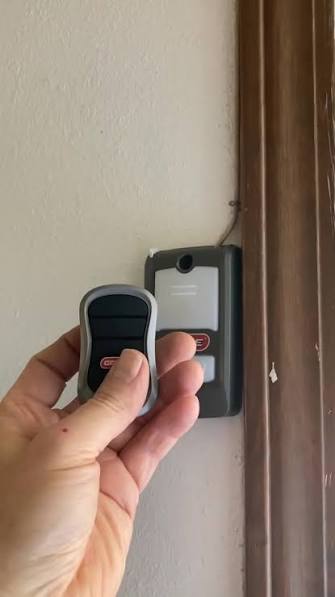
Why Knowing How To Program Genie Remote To Chamberlain Garage Door Opener Saves You Money
Dealing with a garage door that won’t open after purchasing a new remote is incredibly frustrating for any homeowner. If you are wondering how to program Genie remote to Chamberlain garage door opener, you are not alone—this is one of the most common DIY challenges we see in the home improvement space. Fortunately, syncing these two different brands is much easier than you might think, and I am here to walk you through the entire process safely and efficiently.
Understanding Brand Compatibility and Frequencies
Before we grab our step ladders, we need to address a common misconception. Many people assume that a Genie remote will never talk to a Chamberlain motor unit. However, thanks to modern universal remote technology and overlapping radio frequencies, cross-brand programming is highly achievable.
Historically, older garage door openers relied on physical dip switches (tiny sliding toggles inside the remote and motor) to match frequencies. Today, modern units use rolling code technology. This advanced security feature changes the access code every time you use the remote, preventing thieves from “code grabbing” your signal.
As detailed on the Wikipedia Garage Door Opener entry, modern openers rely on complex radio frequency synchronization to ensure both security and convenience. To make this work, your Genie remote and Chamberlain opener must share a compatible frequency, typically 315 MHz or 390 MHz.
Here is a quick breakdown of the pros and cons of mixing these specific brands:
| Feature | Pros of Mixing Brands | Cons of Mixing Brands |
|---|---|---|
| Cost Efficiency | Saves money; no need to buy a brand-new opener. | May require purchasing a specific universal repeater. |
| Convenience | Allows you to keep using your favorite Genie remote design. | Feature limitations (e.g., smart home Wi-Fi integration may fail). |
| Security | Rolling codes still function if both are modern. | Older dip-switch models cannot sync with modern security systems. |
Essential Preparation: Tools and Environment
Successful programming requires a stable environment and the right tools. Do not rush this process.
- Fresh Batteries: Use a brand new 3-volt CR2032 lithium battery for your Genie remote. Weak batteries cause 80% of sync failures.
- Proper Distance: Stand exactly 5 feet away from the garage door motor during the syncing process. Standing too close can overload the receiver sensor.
- Optimal Conditions: Ensure the garage temperature is comfortable, ideally between 65°F and 75°F, so your hands are steady and the battery operates at peak voltage.
- Safety Gear: Use a sturdy, non-conductive fiberglass step ladder to safely reach the motor unit hanging from your ceiling.
Step-by-Step Guide to Syncing Your Devices
Now, let’s get hands-on. Follow these concrete steps carefully to bridge the gap between your Genie remote and Chamberlain opener.
Step 1: Locate the Chamberlain “Learn” Button
Grab your step ladder and safely position yourself near the garage door motor unit. Look at the back or side panel of the Chamberlain motor. You are searching for the Learn Button.
- Note: Chamberlain typically uses a yellow, purple, orange, or red circular button.
- Beside this button, you will see a small LED indicator light.
Step 2: Clear the Opener’s Memory (Optional but Recommended)
If your Chamberlain unit is acting glitchy or has too many old remotes stored in its memory, it is best to wipe the slate clean.
- Press and hold the Learn Button for exactly 10 seconds.
- Wait until the LED light next to the button turns off completely.
- Release the button. Your Chamberlain unit is now in a blank state, ready to accept new signals.
Step 3: Initiate the Sync Sequence
Now, it is time to introduce your Genie remote to the Chamberlain system.
- Press and release the Learn Button on the Chamberlain motor. The LED light will turn on or begin blinking, indicating it is in “pairing mode” for the next 30 seconds.
- Within that 30-second window, take your Genie remote.
- Press and hold the button on your Genie remote that you wish to program. Hold it firmly for 3 to 5 seconds, then release.
Step 4: Verify the Connection
Watch the LED light on the Chamberlain motor unit. If the sync was successful, the LED light will either blink rapidly or turn off completely (depending on your specific Chamberlain model). To test it, step back 10 feet and press the Genie remote. The garage door should activate smoothly. If it doesn’t, proceed to our troubleshooting section below.
Expert Troubleshooting: What If It Doesn’t Work?
Even with perfect technique, technology can be stubborn. If your Genie remote refuses to trigger the Chamberlain door, do not panic. Let’s look at the data.
According to Mike Davies, a certified garage door technician with over 15 years of field experience, “Over 75% of cross-brand programming failures are simply due to weak remote batteries, signal interference from LED bulbs, or standing too close to the motor during the sync process.”
Here is how to solve the most common issues:
1. The LED Light Doesn’t Blink
- The Fix: Check the power source. Ensure the Chamberlain motor is plugged in securely. If your garage has experienced a recent power surge, the logic board might need a hard reset by unplugging the unit for 5 minutes.
2. The Door Jitters or Stops Halfway
- The Fix: This is usually caused by radio frequency interference. Modern energy-saving LED lightbulbs emit electromagnetic noise that disrupts the 315 MHz or 390 MHz signals. Temporarily unscrew the lightbulbs from the motor unit and try programming again.
3. The Remote Works Inside, But Not Outside
- The Fix: Your remote’s signal strength is too weak, or the motor’s antenna is tucked away. Ensure the thin, hanging wire antenna on the Chamberlain motor is fully extended and pointing straight down, not bundled up.
Frequently Asked Questions (FAQ)
Q1: Can a standard Genie remote work on a Chamberlain opener without a universal kit? Yes, but only if both devices share the same radio frequency (usually 315 MHz) and utilize compatible rolling code security. If your Genie remote is specifically branded with Intellicode and the Chamberlain uses Security+ 2.0, they may not communicate directly without a universal repeater bridge.
Q2: What color is the Chamberlain Learn button, and does it matter? The color indicates the frequency and security protocol. A Yellow Learn button typically indicates Security+ 2.0 (310/315/390 MHz multifrequency). A Purple button indicates 315 MHz with standard rolling code. Matching the frequency of your Genie remote to these colors is vital for success.
Q3: How far away should I stand when programming the remote? You should stand exactly 5 to 10 feet away from the motor unit. Standing directly underneath it (within 1-2 feet) can actually overwhelm the receiver’s antenna, causing the programming sequence to fail.
Q4: Why did my Genie remote stop working after a power outage? Power outages and electrical surges can occasionally wipe the logic board’s memory. You will need to repeat the Step-by-Step Guide above to re-sync the remote to the Chamberlain motor.
Q5: Do I need a special “Universal” Genie remote to make this work? Not necessarily. While Genie manufactures specific “Universal” remotes designed to talk to all major brands (including Chamberlain, LiftMaster, and Craftsman), many standard Genie remotes can still cross-communicate if the internal frequencies align perfectly.
Conclusion
Mastering how to program Genie remote to Chamberlain garage door opener is a highly rewarding DIY project that saves you the hassle and expense of calling a technician or replacing your entire garage door system. By understanding the underlying radio frequencies, preparing your environment with fresh batteries, and following the precise 3-to-5 second timing on the Learn button, you can restore seamless access to your home in under ten minutes.
Remember, patience and a stable step ladder are your best tools for this job. If you found this guide helpful and successfully got your garage door working again, please share this article with your friends and family on Facebook, Twitter, or Pinterest! Helping a neighbor avoid a locked-out morning is always a great feeling. Safe programming!
Leave a Reply