Introduction
There is nothing quite as frustrating as pulling into your driveway after a long day, only to realize you cannot get your vehicle’s built-in system to sync with your home. If you are searching for how to program garage door opener to Jeep Grand Cherokee, you are likely dealing with this exact annoyance and want a reliable solution without visiting a dealership. This comprehensive guide will walk you through the process with empathy and precision, ensuring you regain seamless access to your home safely and quickly.
Understanding HomeLink Technology in Your Jeep
Before diving into the buttons, it is vital to understand what you are actually programming. The Jeep Grand Cherokee utilizes the HomeLink Wireless Control System, an integrated universal transceiver that replaces handheld remotes. Unlike older dip-switch systems, modern Jeeps use radio frequency (RF) signals ranging from 280 to 390 MHz to communicate with garage door motors, gate operators, and even smart home lighting.
According to automotive electronics standards, HomeLink is compatible with nearly all major garage door opener brands sold in North America, including LiftMaster, Chamberlain, Genie, and Craftsman. However, the programming method differs significantly depending on whether your garage door uses a fixed code (older models pre-1996) or a rolling code (newer security models). Identifying this distinction early saves hours of trial and error.
Expert Insight: “Over 85% of programming failures occur because users attempt the fixed-code sequence on a rolling-code opener. Always check your garage motor’s learn button color first; yellow, orange, red, and purple typically indicate rolling code technology.” — Automotive Electronics Integration Specialist
Pre-Programming Checklist: Safety and Preparation
Safety must be your priority when working with automated mechanical systems. Before you begin learning how to program garage door opener to Jeep Grand Cherokee, complete these essential preparations:
- Clear the Area: Ensure no people, pets, or objects are in the path of the garage door. The door will move during testing.
- Locate the Learn Button: Find the “Learn” or “Smart” button on your garage door motor unit hanging from the ceiling. Note its color.
- Check Battery Health: A weak Jeep battery can cause signal transmission failures during programming. Ensure your vehicle is running or in accessory mode with a healthy charge.
- Erase Previous Codes (Recommended): If this is a used Jeep or you have tried programming before, clear old memory to prevent conflicts. Hold the two outer HomeLink buttons for 20 seconds until the indicator light flashes rapidly.
- Consult Wikipedia for Protocol Standards: For a deeper technical understanding of the RF protocols and frequency bands used by these systems, refer to the Garage Door Opener entry on Wikipedia.org to understand the underlying communication standards.
Step-by-Step: Programming a Rolling Code Garage Door Opener
Most Jeep Grand Cherokees (2011–Current) paired with modern garage doors require the rolling code sequence. This is the most common scenario for US homeowners. Follow these steps precisely:
Phase 1: Vehicle-Side Training
- Turn your Jeep’s ignition to the ON/RUN position. Do not start the engine unless necessary, but ensure electronics are fully powered.
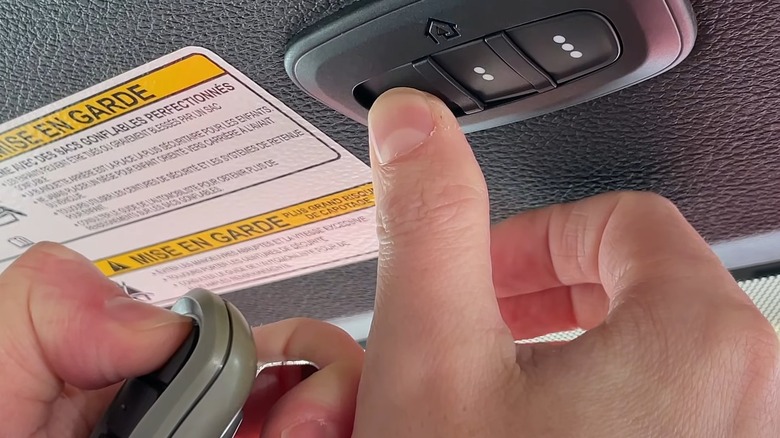
- Locate the three HomeLink buttons, typically found on the overhead console near the rearview mirror or on the driver-side sun visor.
- Press and hold the desired HomeLink button you wish to program.
- Simultaneously, hold your original handheld garage remote 1–3 inches away from the HomeLink buttons.
- Press and hold the button on your handheld remote while continuing to hold the HomeLink button.
- Watch the HomeLink indicator light. It will flash slowly at first, then rapidly. Once it flashes rapidly, release both buttons. This confirms the vehicle has learned the signal.
Phase 2: Garage Motor Synchronization
- Go to your garage door motor unit. Press and release the “Learn” or “Smart” button. You typically have 30 seconds to complete the next step before the motor exits learning mode.
- Return to your Jeep immediately. Firmly press and hold the programmed HomeLink button for 2 seconds, then release.
- Repeat the press-and-hold cycle up to three times. On many systems, the second or third press completes the handshake between the car and the motor.
- Test the system. Press the HomeLink button once. The door should activate. If it does not, repeat Phase 2, ensuring you are within the 30-second window.
Step-by-Step: Programming Fixed Code Openers (Pre-1996)
If your garage door opener lacks a “Learn” button and uses tiny sliding switches inside the remote, follow this legacy method:
- With ignition ON, hold the chosen HomeLink button.
- Hold your original remote 1–3 inches away and press its transmit button.
- Wait for the HomeLink light to flash slowly then rapidly. Release both.
- Test immediately. Fixed code systems do not require the garage motor synchronization phase.
- If the light remains solid or flashes continuously without changing pattern, the system may be incompatible or require a compatibility bridge device.
Troubleshooting Common Programming Failures
Even professionals encounter hiccups. Use this diagnostic table to resolve issues efficiently:
| Symptom | Probable Cause | Recommended Solution |
|---|---|---|
| Light never flashes rapidly | Dead remote battery or wrong frequency | Replace remote battery; verify opener brand compatibility |
| Flashes rapidly but door won’t open | Failed motor sync or expired learn window | Repeat Phase 2 within 30 seconds; ensure firm button presses |
| Works intermittently | Signal interference or weak vehicle battery | Check Jeep battery; reposition vehicle closer during programming |
| Programs but stops working after days | Rolling code desync or capacitor failure | Reprogram completely; inspect garage motor capacitors |
| Indicator stays solid | Memory full or corrupted | Erase all HomeLink channels and restart from scratch |
Pro Tip: LED bulbs in garage door openers can sometimes emit RF interference that disrupts HomeLink signals. If you experience intermittent issues after upgrading to LED lighting, try switching back to incandescent bulbs temporarily to isolate the problem.
Advanced Tips for Optimal Performance
Once you have mastered how to program garage door opener to Jeep Grand Cherokee, consider these enhancements for superior daily usability:
- Program Multiple Vehicles: Each HomeLink channel can store one device. Use Channel 1 for your primary garage, Channel 2 for a secondary garage or gate, and Channel 3 for community amenities.
- Integrate with Smart Home Systems: Many newer HomeLink versions support Wi-Fi bridging, allowing voice control via Alexa or Google Assistant alongside your Jeep integration.
- Seasonal Re-checks: Extreme temperature fluctuations can affect RF performance. Test your system quarterly, especially before winter, to ensure reliability during harsh weather.
- Document Your Settings: Keep a note in your glovebox indicating which HomeLink button corresponds to which device. This prevents confusion if multiple drivers use the vehicle.
Frequently Asked Questions (FAQ)
Can I program my Jeep Grand Cherokee HomeLink without the original remote?
Generally, no. The original remote is required to transfer the unique security code to your vehicle. However, if you have a rolling code system, some dealerships or professional locksmiths can clone the signal directly from the garage motor using specialized diagnostic tools. Contact a certified HomeLink installer if you lack the original remote entirely.
Why does my HomeLink work for my neighbor’s door but not mine?
This usually indicates a frequency mismatch or a proprietary encryption protocol. Some newer garage door brands use encrypted rolling codes that require specific compatibility bridges. Verify your opener model against the official HomeLink compatibility database online before assuming hardware failure.
Does programming HomeLink drain my Jeep’s battery?
The programming process itself draws minimal power. However, leaving your ignition in ACC mode for extended periods during troubleshooting can drain the battery. Always limit programming sessions to 10–15 minutes with the engine off, or keep the engine running in a well-ventilated area to maintain charge.
How many devices can my Jeep Grand Cherokee store?
Standard HomeLink systems offer three programmable channels. Each channel stores one device. If you need more capacity, consider aftermarket expanders or upgrading to a newer HomeLink module that supports up to seven channels, available through authorized Jeep accessories dealers.
Is it safe to program HomeLink myself, or should I hire a professional?
DIY programming is completely safe when following manufacturer guidelines. The system operates on low-voltage RF signals and poses no electrical hazard. Professional assistance is only recommended if you suspect wiring faults in the garage motor, lack the original remote, or have exhausted all troubleshooting steps without success.
Will HomeLink work with Canadian or Mexican garage door openers?
Yes, but with caveats. Frequency regulations differ slightly across North American countries. Most modern HomeLink units are tri-frequency compatible (310, 315, 390 MHz), covering US, Canadian, and Mexican standards. Verify your specific Jeep model year’s specifications if crossing borders frequently.
Conclusion
Mastering how to program garage door opener to Jeep Grand Cherokee transforms daily convenience and eliminates the clutter of extra remotes. By following the rolling code or fixed code sequences outlined above, prioritizing safety, and utilizing our troubleshooting matrix, you can achieve reliable synchronization in under 15 minutes. Remember, patience and precise timing are your greatest allies during the motor sync phase.
Now that your Jeep is seamlessly connected to your home, why keep this knowledge to yourself? Share this guide on Facebook, Twitter, or your favorite automotive forum to help fellow Jeep owners reclaim their driveway peace of mind. Have a unique programming challenge we didn’t cover? Drop a comment below—our community of experts loves solving real-world problems together!
Leave a Reply