Are you tired of fumbling for a separate remote every time you pull into your driveway? You are definitely not alone, but the good news is that your truck has a built-in solution. In this guide, we will show you exactly how to program 2006 Nissan Titan garage door opener systems quickly and safely.
How To Program 2006 Nissan Titan Garage Door Opener: Step-by-Step
Before we dive into the actual syncing process, it helps to understand what we are working with. Your 2006 Nissan Titan is equipped with the HomeLink universal transceiver.
This system is integrated directly into your overhead console. According to industry estimates, built-in vehicle systems like HomeLink are utilized by tens of millions of drivers daily. They are highly preferred because they eliminate the need for extra visor clutter and significantly reduce the chances of losing your remote.
What You Need Before You Start
To ensure a smooth and frustration-free process, gather the following items before you begin:
- Your 2006 Nissan Titan (parked safely outside the garage).
- The original hand-held garage door remote (ensure it has fresh batteries).
- A sturdy stepladder (if you need to access the motor unit on the ceiling).
- About 10 to 15 minutes of uninterrupted time.
Pro Tip: Always keep your original hand-held remote handy. Even after successfully programming your truck, you will need it for future troubleshooting or if you ever buy a new vehicle.
Step 1: Clear the Old Memory (Erase Mode)
If your truck is used, or if you previously programmed a different door, you must clear the old memory first. This ensures there are no frequency conflicts.
- Turn the ignition to the ON/RUN position. You do not need to start the engine, but the electrical system must be active.
- Locate the two outer HomeLink buttons in your overhead console.
- Press and hold both outer buttons simultaneously.
- Keep holding them for about 20 seconds until the small indicator light begins to flash rapidly.
- Release the buttons. The system is now completely erased and ready for new programming.
Step 2: Program the Universal Transmitter
Now, we will teach your truck’s system to recognize the radio frequency of your garage door remote.
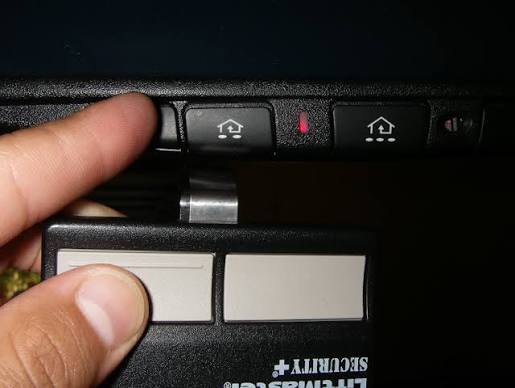
- Hold your original garage door remote exactly 1 to 3 inches away from the HomeLink buttons.
- Press and hold the desired HomeLink button you want to program.
- Simultaneously, press and hold the button on your hand-held garage remote.
- Watch the HomeLink indicator light closely. It will start by blinking slowly.
- After about 30 to 90 seconds, the light will flash rapidly and then turn solid.
- Release both buttons. The solid light indicates a successful frequency capture.
Step 3: Activate the “Rolling Code” Feature on Your Motor
This is the most critical step for modern garage doors. If your garage door opener was manufactured after 1996, it uses rolling code technology for enhanced security.
Instead of using the same code every time, the system changes the access code after every single use. For a deeper technical understanding of this security feature, you can read about rolling code technology on Wikipedia.
Because of this advanced security, you must synchronize the truck directly with the garage motor unit.
- Locate the “Learn” or “Smart” button on your actual garage door motor (usually hanging from the ceiling). It is often yellow, red, or purple.
- Press and release the “Learn” button. The indicator light on the motor will illuminate or blink.
- You have exactly 30 seconds to complete the next step before the motor times out.
- Go back to your Nissan Titan and press the newly programmed HomeLink button.
- Hold it for a few seconds, or press it twice, until you see the garage door lights flash or hear the motor click.
- Safety First: Ensure no people or pets are in the path of the garage door while testing the synchronization. Your system is now fully paired!
Built-In HomeLink vs. Traditional Remotes: Pros and Cons
Why should you bother learning how to program your truck’s built-in system instead of just using the original clicker? Let us break it down.
| Feature | Built-In HomeLink System | Traditional Hand-Held Remote |
|---|---|---|
| Convenience | High: Always in the vehicle, no need to grab it. | Medium: Must be carried in pockets or bags. |
| Aesthetics | Clean: Hidden neatly in the overhead console. | Cluttered: Hangs visibly from the sun visor. |
| Loss Risk | Low: Impossible to lose since it is in the truck. | High: Easily misplaced, dropped, or left inside. |
| Setup Time | Longer: Requires a 10-minute programming process. | Instant: Ready to use right out of the box. |
Troubleshooting Common Syncing Issues
Even with a perfect guide, technology can sometimes be stubborn. Here are a few common issues and how to fix them.
The Indicator Light Never Turns Solid If the light keeps flashing and never turns solid, your remote batteries might be weak. Replace the battery in your hand-held remote (usually a CR2032 coin cell) and try again. Ensure you are maintaining that strict 1-to-3-inch distance during the process.
The Truck Works, But the Garage Door Doesn’t Move If the HomeLink light flashes but the door does not respond, you likely skipped the “Rolling Code” synchronization. Go back to Step 3 and ensure you pressed the “Learn” button on the ceiling motor within the 30-second window.
Frequency Compatibility Issues HomeLink operates between 288-390 MHz. If you have a very old European or specialized door opener operating outside this range, it may require a specific compatibility repeater to bridge the signal.
Frequently Asked Questions (FAQ)
Q1: Where exactly are the HomeLink buttons located in a 2006 Nissan Titan? In the 2006 Nissan Titan, the HomeLink buttons are integrated into the overhead console, situated directly between the driver and passenger sun visors. They are usually three rectangular buttons with a small LED indicator light positioned just below them.
Q2: How many garage doors can a 2006 Nissan Titan store? The HomeLink system in your 2006 Titan can store up to three different frequencies. This means you can program it to open your main garage door, a side gate, and even a neighbor’s door or a home lighting system.
Q3: What if my garage door opener motor does not have a “Learn” button? If your motor lacks a “Learn” button, it is likely an older model that uses a fixed-code system (pre-1996). In this case, you do not need Step 3. Simply follow Step 2, and once the HomeLink light turns solid, press the programmed HomeLink button repeatedly (up to 4 times) to test if the door activates.
Q4: Will programming a new remote erase my previously programmed devices? No, programming a new button will not erase the other buttons. The only time the system erases all memory is when you intentionally perform the “Erase Mode” sequence by holding the two outer buttons for 20 seconds.
Final Thoughts and Next Steps
Mastering this process will completely change your daily routine. No more rolling down your window in the rain or digging through your center console to find a tiny remote. By taking just a few minutes to sync your truck, you gain seamless, secure, and convenient access to your home.
Leave a Reply