Introduction
There is nothing quite as frustrating as pulling into your driveway after a long day of work, only to realize you still have to dig through your center console for a separate garage remote. If you are struggling to sync your new truck’s built-in system, understanding how to program garage door opener to 2024 Chevy Silverado is the key to reclaiming that seamless convenience. This guide will walk you through the exact steps to get your Homelink system communicating perfectly with your garage, eliminating clutter and streamlining your daily routine.
Understanding the 2024 Silverado Homelink System
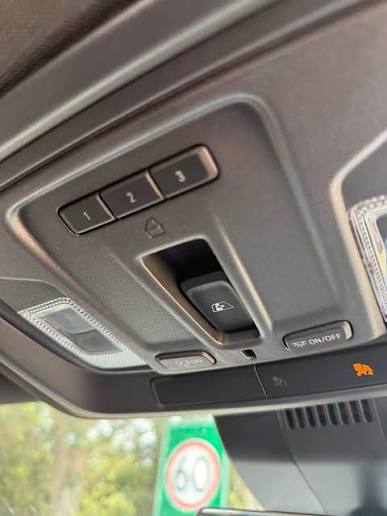
Before diving into buttons and lights, it is vital to understand what you are actually programming. The 2024 Chevy Silverado comes equipped with the Homelink Wireless Control System, typically integrated into the overhead console or the rearview mirror assembly. Unlike older universal remotes that simply clone a signal, modern Homelink systems use rolling-code technology for enhanced security.
According to automotive safety standards outlined by Wikipedia, Homelink is designed to replace up to three handheld transmitters, operating on frequencies between 288-399 MHz. For the 2024 Silverado, this system is often tied to the vehicle’s ignition status for safety, meaning some functions may only operate when the truck is in “Accessory” or “Run” mode. Knowing this prevents confusion if your garage door doesn’t respond while the engine is completely off.
Rolling Code vs. Fixed Code: Why It Matters
Most garage doors manufactured after 1996 use rolling codes. This means the access code changes every time you use the remote. If your 2024 Silverado programs successfully but fails to open the door afterward, you likely missed the crucial “learn button” synchronization step at the garage motor unit itself.
Step-by-Step: How to Program Garage Door Opener to 2024 Chevy Silverado
Follow this precise tutorial to sync your vehicle. Ensure your garage door area is clear of people and obstacles before beginning.
Phase 1: Clearing Previous Codes (Recommended)
If this is a used Silverado or you are reprogramming a button, start fresh.
- Turn the ignition to ACC/ACCESSORY mode.
- Press and hold the two outer Homelink buttons simultaneously for approximately 10 seconds.
- Watch the indicator light; it will flash rapidly to confirm memory has been erased.
- Release both buttons. Note: Do not skip this step if you are unsure of the button’s history.
Phase 2: Training the Silverado to Your Remote
This phase teaches the truck the frequency of your existing handheld remote.
- Hold your original garage remote 1–3 inches away from the Homelink buttons on the Silverado’s overhead console.
- Simultaneously press and hold the original remote button AND the desired Homelink button.
- Observe the Homelink indicator light. It will flash slowly at first, then change to a rapid flash (or solid light, depending on trim). This usually takes 5–20 seconds.
- Once the light flashes rapidly, release both buttons.
- Test the programmed Homelink button. If the garage door activates, you have a fixed-code opener and are finished. If the light flashes rapidly but the door does not move, proceed to Phase 3.
Phase 3: Synchronizing Rolling Code Openers
This is the most commonly missed step for 2024 vehicles paired with modern LiftMaster, Chamberlain, or Genie openers.
- Locate the “Learn” or “Smart” button on your garage door motor unit (usually on the back or side panel). Colors vary: yellow, purple, orange, red, or green.
- Press the Learn button once. An LED will illuminate or blink, indicating the unit is in pairing mode. You typically have 30 seconds to complete the next step.
- Return to your Silverado immediately.
- Press and hold the programmed Homelink button for 2 seconds, then release.
- Repeat the press-hold-release cycle up to 3 times until the garage door moves.
- The synchronization is now complete.
Pro Tip: For the 2024 Silverado, ensure your key fob is inside the vehicle during programming. Some trims require the passive entry system to detect the authorized key before allowing Homelink transmission.
Troubleshooting Common Programming Failures
Even with perfect execution, issues arise. Use this comparison table to diagnose problems quickly.
| Symptom | Likely Cause | Solution |
|---|---|---|
| Light never flashes rapidly | Dead remote battery or wrong distance | Replace remote battery; adjust distance to 1-3 inches |
| Rapid flash but no door movement | Rolling code sync incomplete | Perform Phase 3 within 30-second window |
| Works intermittently | Signal interference or low truck battery | Check vehicle battery health; remove nearby LED bulbs |
| Button won’t program at all | Max devices reached or system lockout | Clear all codes (Phase 1) and restart process |
| Door opens but won’t close via Homelink | Safety sensor misalignment | Inspect garage floor sensors for obstruction/misalignment |
When to Seek Professional Help
If you have attempted all phases multiple times without success, your garage opener may be incompatible with the 2024 Homelink generation. While rare, some European or proprietary commercial openers require a Homelink Compatibility Bridge. Consult your Silverado owner’s manual or a certified Chevy technician before purchasing additional hardware.
Expert Tips for Optimal Performance
- Battery Health Matters: A weak CR2032 battery in your handheld remote is the #1 cause of programming failure. Always use a fresh battery before starting.
- Avoid LED Interference: Cheap LED garage bulbs can emit RF noise that blocks Homelink signals. If programming fails repeatedly, temporarily unscrew garage LEDs and try again.
- Document Your Setup: Keep a note in your glovebox indicating which Homelink button corresponds to which device (e.g., “Left = Garage, Center = Gate, Right = Lights”). This helps future owners or valets.
- Test All Three Buttons: Even if you only need one, consider programming spare buttons for family members’ garages or community gates. The 2024 Silverado supports three independent channels.
Frequently Asked Questions (FAQ)
Q1: Can I program my 2024 Silverado Homelink without an original remote?
Generally, no. You need an existing transmitter to teach the Silverado the correct frequency and code. However, if your garage opener has a direct Homelink pairing feature (rare on residential units), consult the opener’s manual. Otherwise, purchase a compatible replacement remote first.
Q2: Why does my Homelink work sometimes but not others?
Intermittent operation usually indicates signal interference or a failing component. Check for new electronics near the garage motor, replace the remote battery, and verify your Silverado’s battery voltage. Extreme cold can also temporarily reduce signal range.
Q3: Is Homelink standard on all 2024 Chevy Silverado trims?
No. Homelink is typically included in LT, RST, LTZ, and High Country trims, often as part of optional packages like the Convenience Package or Premium Package. Base WT trims may lack the hardware entirely. Verify by checking your overhead console for the three-button array.
Q4: Can I program a gate operator or smart plug alongside my garage door?
Yes. The 2024 Silverado Homelink supports three separate devices. You can dedicate one button to your garage, another to a driveway gate, and a third to exterior lighting or a smart home plug, provided each device operates on a compatible frequency.
Q5: Does programming Homelink void my Silverado warranty?
Absolutely not. Homelink is an OEM-integrated feature designed for user programming. Following the manufacturer’s instructions poses zero risk to your vehicle warranty. Only unauthorized electrical modifications could affect coverage.
Q6: How do I know if my garage opener uses rolling code technology?
Check the manufacture date on the motor unit. Openers made after 1996 almost universally use rolling codes. Additionally, if your original remote requires pressing a “learn” button on the motor during initial setup, it is definitely rolling code. When in doubt, assume rolling code and complete Phase 3.
Conclusion
Mastering how to program garage door opener to 2024 Chevy Silverado transforms your driving experience from cluttered to effortless. By following the three-phase process—clearing old codes, training the receiver, and synchronizing rolling codes—you unlock the full potential of your truck’s integrated technology. Remember, patience during the 30-second learn window makes all the difference.
Now that your Silverado is perfectly synced, enjoy the seamless entry and share this guide with fellow Chevy owners who are still fumbling for remotes! Tag us on social media with your successful setup—we’d love to see your 2024 Silverado in action! 🚗🏡
Disclaimer: Always prioritize safety. Never program Homelink while the vehicle is in motion. Refer to your official 2024 Chevrolet Silverado Owner’s Manual for trim-specific variations.
Leave a Reply