Introduction
There is nothing quite as frustrating as pulling into your driveway after a long day, only to realize you cannot get your new truck’s built-in system to talk to your garage. If you are struggling to sync your vehicle, understanding how to program garage door opener on 2025 GMC Sierra is the first step toward seamless home entry. We know that navigating modern vehicle technology can feel overwhelming, but this guide is designed to walk you through the process with clarity and confidence.
Programming the HomeLink system in your 2025 Sierra is not just about convenience; it is about integrating your vehicle into your smart home ecosystem securely. Whether you have a traditional rolling-code opener or a newer Wi-Fi-enabled unit, the steps below will help you achieve a reliable connection without needing a dealership visit. Let’s get your Sierra synced up so you can enjoy the effortless entry you paid for.
Understanding HomeLink Technology in the 2025 GMC Sierra
Before diving into the buttons, it is vital to understand what makes the 2025 GMC Sierra’s system unique. General Motors has integrated the latest generation of HomeLink transceivers into the overhead console and, in some trims, directly into the rearview mirror assembly. This system operates on radio frequencies typically between 288 MHz and 399 MHz, allowing it to communicate with over 95% of residential garage door openers sold in North America.
According to technical specifications from Gentex (the manufacturer of HomeLink), the 2025 iteration supports both fixed-code and rolling-code security protocols. Rolling code technology changes the access code every time you press the button, preventing thieves from “grabbing” your signal. For a deeper technical understanding of how these radio frequency identification systems work within automotive applications, you can refer to the Wikipedia entry on Radio Frequency Identification, which explains the foundational science behind secure wireless communication.
Key Features of the 2025 System
- Three Programmable Buttons: Allows control of two garage doors and one gate or light.
- LED Feedback Indicators: Provides visual confirmation during programming.
- Rolling Code Compatibility: Essential for openers manufactured after 1996.
- Smart Home Integration: Capable of pairing with select cloud-based openers via bridge devices.
Prerequisites: What You Need Before Starting
Success relies on preparation. Attempting to program without the right tools leads to repeated failures and battery drain. Gather the following items before sitting in your driver’s seat:
- Original Garage Door Remote: Even if you plan to discard it later, you need it for the initial handshake.
- Fresh Batteries: Ensure both your handheld remote and the Sierra’s key fob have full power. Weak signals are the #1 cause of programming failure.
- Owner’s Manual (Digital or Physical): Specific trim levels (Denali vs. Pro Safety) may have slight interface variations.
- Ladder or Step Stool: You may need to reach the “Learn” button on the motor unit.
- Clear Line of Sight: Park outside the garage, at least 10 feet away, to avoid signal interference during training.
Pro Tip: If your garage door opener was manufactured before 1996, it likely uses a fixed code. The 2025 GMC Sierra is optimized for rolling codes. While backward compatible, older units may require a specific “legacy” programming sequence detailed in your owner’s manual.
Step-by-Step: How to Program Garage Door Opener On 2025 GMC Sierra
This tutorial covers the standard rolling-code procedure applicable to most 2025 Sierra trims. Follow these steps precisely. Do not rush the timing windows.
Step 1: Clear Previous Memory (Recommended)
If this is a used vehicle or you are reprogramming a button, start fresh.
- Locate the three HomeLink buttons on your overhead console or mirror.
- Press and hold the two outer buttons simultaneously.
- Hold for approximately 10–20 seconds until the indicator LED flashes rapidly.
- Release both buttons. The memory is now cleared.
Step 2: Train the Vehicle to the Handheld Remote
- Sit in the driver’s seat with the ignition in ACC/ACCESSORY mode (engine off, electronics on).
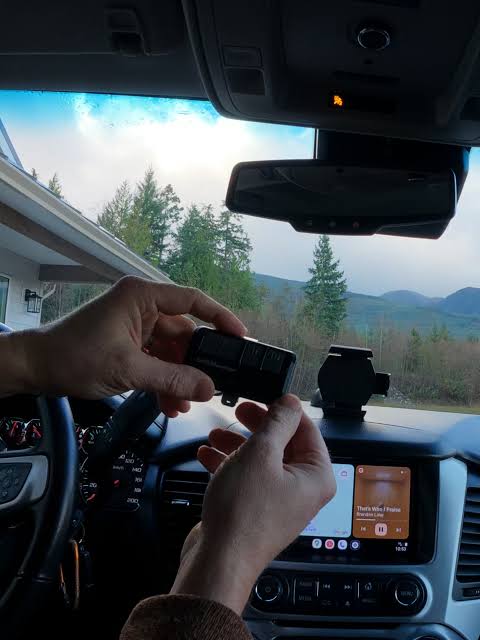
- Hold your original garage door remote 1–3 inches away from the HomeLink button you wish to program.
- Simultaneously press and hold the HomeLink button AND your handheld remote button.
- Watch the HomeLink LED. It will flash slowly, then rapidly.
- Once the LED flashes rapidly (usually after 5–10 seconds), release both buttons.
- Test by pressing the programmed HomeLink button once. If the door moves, you have a fixed-code opener and are done. If the LED stays solid or the door does not move, proceed to Step 3 (Rolling Code Training).
Step 3: Complete Rolling Code Synchronization
Most modern openers require this secondary handshake at the motor unit itself.
- Go to your garage door opener motor head. Locate the “Learn” or “Smart” button (often yellow, purple, red, or orange).
- Press the Learn button firmly. The indicator light near it will illuminate or blink. You typically have 30 seconds to complete the next step.
- Return to your Sierra immediately.
- Press and hold the programmed HomeLink button for 2 seconds, then release.
- Repeat the press-hold-release cycle up to three times within the 30-second window.
- The garage door should activate, confirming successful synchronization.
Troubleshooting Table: Common Issues & Fixes
| Symptom | Probable Cause | Solution |
|---|---|---|
| LED never flashes | Ignition not in ACC mode | Turn key to ACC or push start button without brake |
| LED flashes slowly but never fast | Signal too weak / Wrong frequency | Replace remote battery; move remote closer to button |
| Programs but door won’t open | Rolling code sync failed | Repeat Step 3; ensure Learn button was pressed first |
| Works intermittently | Interference or range issue | Reposition vehicle; check for LED bulb interference |
| Button programs but unprograms | Faulty module or fuse | Check interior fuse panel; consult dealer service |
Programming Wi-Fi Enabled Smart Openers (MyQ/Chamberlain)
The 2025 GMC Sierra increasingly interfaces with smart ecosystems. If you own a MyQ or similar Wi-Fi opener, the physical button method above may not work because these units often lack a traditional RF receiver for aftermarket remotes.
Instead, you may need a HomeLink Bridge or use the native integration available in higher-tier 2025 Sierra infotainment systems. Check your GMC Infotainment settings under “Vehicle” > “HomeLink” to see if a digital setup wizard exists. This software-based approach bypasses RF training entirely, linking your truck’s VIN to your smart home account securely. Always verify compatibility on the opener manufacturer’s website before purchasing additional bridges.
Safety Precautions and Best Practices
While programming is low-risk, safety must remain paramount. Never attempt to program while the vehicle is in motion. Always keep hands and tools clear of moving door sections during testing.
Additionally, be mindful of signal security. When clearing memory (Step 1), you erase all three buttons. If you share the vehicle with family members who use other buttons, coordinate with them first. Finally, dispose of old handheld remotes responsibly; simply removing the battery prevents accidental activation by unauthorized users.
Frequently Asked Questions (FAQ)
Can I program my 2025 GMC Sierra garage door opener without an original remote?
Generally, no. The HomeLink system requires cloning an existing signal for security reasons. However, if you have a smart Wi-Fi opener, you may be able to set up integration through the GMC infotainment screen or a dedicated app without a physical RF remote. If your original remote is lost, purchase an exact OEM replacement before attempting programming.
Why does my HomeLink button flash slowly and never turn solid?
A slow flash indicates the vehicle is receiving a signal but cannot complete the handshake. This usually means the batteries in your handheld remote are weak, the remote is incompatible with the 2025 Sierra’s frequency band, or you are holding the buttons incorrectly. Try fresh batteries and ensure you are holding both buttons continuously until the rapid flash occurs.
Does programming HomeLink affect my Sierra’s warranty?
No. Programming the factory-installed HomeLink system is a user-serviceable feature explicitly covered in your owner’s manual. It does not void any portion of your bumper-to-bumper or powertrain warranty. However, installing third-party wiring harnesses or modifying the overhead console could impact electrical coverage.
How many garage doors can I program into my 2025 GMC Sierra?
The standard HomeLink system in the 2025 Sierra supports three independent devices. This typically allows for two garage doors and one additional device like a front gate, exterior lighting, or smart plug. Each button functions independently and can be reprogrammed individually without affecting the others.
Will LED light bulbs in my garage interfere with HomeLink programming?
Yes, this is a documented issue. Certain cheap or non-compliant LED bulbs emit RF noise that jams the 288–399 MHz spectrum used by HomeLink. If programming fails repeatedly despite correct technique, temporarily unscrew LED bulbs in the garage fixture and test again. Use FCC-compliant LED bulbs labeled “garage door opener safe” for permanent installation.
What if my 2025 Sierra has the camera-based rearview mirror instead of buttons?
Some 2025 Sierra trims feature a digital display mirror with touch-sensitive zones rather than physical buttons. The programming logic remains identical, but the interface differs. Refer to the digital mirror’s user guide for the specific touch-hold duration required. The LED feedback is typically displayed on-screen rather than via a physical light.
Conclusion
Mastering how to program garage door opener on 2025 GMC Sierra transforms your daily routine from fumbling with remotes to effortless, integrated access. By following the structured steps above—clearing memory, training the RF signal, and completing the rolling-code handshake—you ensure a secure and reliable connection that respects both convenience and safety standards. Remember, patience during the 30-second sync window is usually the difference between success and frustration.
Now that your Sierra is perfectly synced, why not share this knowledge? Tag a fellow GMC owner on social media or send this guide to a friend who just took delivery of their 2025 Sierra. Helping others navigate their vehicle’s tech is what builds a stronger truck community. Safe driving and happy parking!
Leave a Reply