Introduction
There is nothing quite as frustrating as pulling into your driveway after a long day, only to realize you cannot get your new truck’s built-in transmitter to talk to your garage. If you are currently searching for how to program garage door opener on 2025 Chevy Silverado, you are likely dealing with this exact synchronization hurdle. We understand that navigating modern vehicle technology can feel overwhelming, but rest assured that syncing your HomeLink system is a straightforward process that will soon have you opening your garage with a simple button press.
Understanding the 2025 Silverado HomeLink System
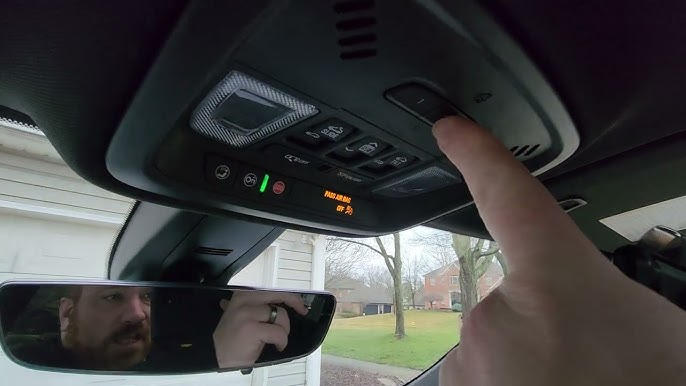
Before diving into the programming steps, it is vital to understand what makes the 2025 model unique. The 2025 Chevy Silverado comes equipped with the latest generation of the HomeLink Universal Transceiver. Unlike older aftermarket add-ons, this system is integrated directly into the overhead console or rearview mirror assembly, depending on your trim level (LT, RST, ZR2, or High Country).
This system supports three distinct channels, meaning you can program up to three different devices—such as your primary garage door, a gate operator, and smart home lighting. According to automotive safety standards outlined by Wikipedia, these systems utilize rolling-code technology for security, which prevents signal interception and requires a specific handshake protocol between the truck and the garage motor.
Why Rolling Code Matters for 2025 Models
Most modern garage openers manufactured after 1996 use rolling codes. This means the frequency changes every time you press the button. When learning how to program garage door opener on 2025 Chevy Silverado, you aren’t just copying a signal; you are establishing a secure, encrypted link. Skipping the “rolling code” step is the number one reason programming fails for new owners.
Step-by-Step: How To Program Garage Door Opener On 2025 Chevy Silverado
Follow these precise instructions to ensure a successful sync. Note: Ensure your vehicle is parked outside the garage during initial programming to prevent accidental door movement.
Phase 1: Clearing Previous Codes (Essential for New Owners)
Even if your 2025 Silverado is brand new, it may have factory test codes or previous owner data. Always start fresh.
- Locate the two outer HomeLink buttons on your overhead console.
- Press and hold both outer buttons simultaneously for approximately 20 seconds.
- Watch the indicator light. It will flash slowly at first, then rapidly.
- Release both buttons once the rapid flashing begins. Your system is now erased and ready.
Phase 2: Initial Handshake Training
This step teaches the Silverado the unique signature of your handheld remote.
- Hold your original garage door remote 1–3 inches away from the HomeLink buttons. Pro Tip: For 2025 models, holding the remote at a slight angle often improves signal capture.
- Simultaneously press and hold the desired HomeLink button AND your handheld remote button.
- Observe the HomeLink indicator light. It will flash slowly, then transition to a solid or rapid flash.
- Release both buttons immediately upon seeing the solid/rapid light.
- Test the programmed button. If the garage door activates, you have a fixed-code opener (rare). If the light flashes but the door does not move, proceed to Phase 3.
Phase 3: Completing the Rolling Code Sync
This is the critical step for 90% of 2025 Silverado owners.
- Go to your garage door opener motor unit mounted on the ceiling.
- Locate the “Learn” or “Smart” button. It is typically yellow, purple, orange, or red.
- Press and release the Learn button. You usually have 30 seconds to complete the next step before the motor exits learning mode.
- Return to your Silverado and firmly press and hold the programmed HomeLink button for 2 seconds. Release.
- Repeat the press-and-hold sequence a second time. In some cases, a third press is required.
- The garage door should now activate via the truck button.
Expert Insight: If your 2025 Silverado has the optional “Digital Rearview Mirror” with integrated HomeLink, the buttons are touch-sensitive rather than mechanical. Apply firm, deliberate pressure rather than quick taps to ensure the capacitive sensor registers the command during the rolling code handshake.
Troubleshooting Common Programming Failures
If you have followed the steps above and still struggle with how to program garage door opener on 2025 Chevy Silverado, consult this diagnostic table before visiting a dealer.
| Symptom | Likely Cause | Recommended Solution |
|---|---|---|
| Light never turns solid during Phase 2 | Dead remote battery or wrong distance | Replace CR2032 battery in handheld; vary distance 1–6 inches |
| Light turns solid but door won’t open | Rolling code sync incomplete | Re-do Phase 3; ensure Learn button press was clean (not held) |
| Door opens but closes immediately | Safety sensor misalignment | Check photo-eye sensors at floor level; clean lenses |
| Intermittent operation | Signal interference | Remove LED bulbs near opener; they can emit RF noise |
| No response after successful progam | Vehicle sleep mode delay | Wait 3 seconds after ignition-on before pressing HomeLink |
The LED Bulb Interference Issue
A frequently overlooked problem in 2025 vehicles involves aftermarket LED garage lighting. Many inexpensive LED bulbs emit radio frequency noise that overlaps with the 300–400 MHz band used by HomeLink. If your programming works perfectly outside but fails when parked inside, try turning off your garage lights temporarily to confirm interference. Switch to FCC-compliant, shielded LED bulbs designed specifically for garage door opener environments.
FAQ: Programming Your 2025 Silverado Garage Door Opener
Can I program my 2025 Silverado HomeLink without an original remote?
Generally, no. The HomeLink system requires an existing transmitter to clone the initial signal. However, if your garage opener has a Wi-Fi connected app (like MyQ or Aladdin Connect), some 2025 Silverado trims support direct cloud-based integration through the Chevrolet Infotainment system, bypassing the need for a physical remote entirely. Check your MyChevrolet app for compatibility.
How many devices can I store in my 2025 Silverado?
The standard HomeLink system in the 2025 Chevy Silverado supports three independent channels. Each channel can control a separate device, such as a garage door, community gate, or outdoor lighting module. If you need more than three, consider upgrading to a standalone HomeLink visor clip that offers additional channels.
Will programming HomeLink erase my key fob memory?
No. The HomeLink Universal Transceiver operates on a completely separate circuit from your Silverado’s keyless entry and remote start systems. Clearing or reprogramming HomeLink buttons has absolutely no effect on your vehicle’s security fobs or passive entry functionality.
Do I need to reprogram after changing my garage door opener battery?
Typically, no. Changing the battery in your handheld remote or the garage motor backup battery does not reset the rolling code encryption. However, if you replace the entire garage door opener motor unit or perform a factory reset on the motor itself, you must repeat Phase 2 and Phase 3 of the programming process.
Is there a difference between Canadian and US 2025 Silverado HomeLink systems?
Yes, subtly. Canadian-spec 2025 Silverados may operate on slightly different frequencies due to Industry Canada regulations. Always verify that your handheld remote is compatible with North American HomeLink standards. If you purchased a grey-market vehicle or imported a remote, frequency mismatch could prevent successful programming regardless of technique.
What if my garage opener is older than 1996?
Pre-1996 openers use fixed DIP switch codes rather than rolling codes. While HomeLink is backward compatible, you may need a HomeLink Compatibility Bridge (sold separately) to translate the modern rolling code signal from your Silverado into the legacy fixed code your vintage opener understands. Contact Genie or Chamberlain support for bridge compatibility verification.
Conclusion
Mastering how to program garage door opener on 2025 Chevy Silverado transforms your daily routine from a multi-step ritual into a seamless, single-touch experience. By understanding the distinction between fixed and rolling codes, following the precise three-phase training sequence, and troubleshooting common interference issues, you can achieve reliable synchronization without dealership intervention. Remember that patience during the rolling code handshake is key—those extra two seconds of holding the button make all the difference.
Now that your Silverado is fully synced, enjoy the convenience of modern automotive integration! Found this guide helpful? Share it on Facebook, X (Twitter), or Reddit to help fellow Silverado owners conquer their HomeLink setup. Safe driving and smooth entries!
Leave a Reply