Introduction
There is nothing quite as frustrating as pulling into your driveway after a long day, only to realize you cannot get your new truck’s built-in remote to sync with your garage. If you are searching for how to program garage door opener on 2024 GMC Sierra, you are likely dealing with this exact synchronization hurdle right now. We understand that modern vehicle technology can sometimes feel overly complex, but rest assured that syncing your HomeLink system is a straightforward process when you have the correct guidance. This comprehensive tutorial will walk you through every step to ensure your overhead door responds perfectly to your Sierra’s visor buttons.
Understanding the HomeLink System in Your 2024 Sierra
Before diving into the programming sequence, it is vital to understand what makes the 2024 GMC Sierra’s system unique. Unlike older vehicles that used simple radio frequency repetition, the 2024 Sierra utilizes an advanced HomeLink 5.0 (or newer) transceiver. This system is designed to communicate with both fixed-code and rolling-code garage door openers, as well as smart home devices.
According to automotive connectivity standards, HomeLink operates on frequencies between 288 MHz and 390 MHz, covering the vast majority of North American garage door manufacturers. However, because security protocols have evolved significantly since 2015, the “learn” procedure differs depending on whether your garage motor uses rolling code technology or older fixed code signals. Identifying which type you have is the first critical step in learning how to program garage door opener on 2024 GMC Sierra successfully.
Rolling Code vs. Fixed Code: What Do You Have?
- Rolling Code (Post-1996): Most modern openers (Chamberlain, LiftMaster, Genie) use this. The signal changes every time you press the button to prevent hacking. These require a two-step programming process involving the “Learn” button on the garage motor itself.
- Fixed Code (Pre-1996): Older DIP-switch style openers use a static signal. These typically only require the in-truck programming steps without visiting the garage motor unit.
Expert Note: Over 90% of garage door openers currently in use across the United States utilize rolling code technology. Always assume you need the rolling code procedure unless your opener was manufactured before 1996 or explicitly lacks a “Learn/Smart” button.
For a deeper technical understanding of how these radio frequency identification systems operate within vehicular integration, you can refer to the Wikipedia entry on Radio Frequency Identification, which explains the foundational communication protocols used in modern automotive remotes.
Step-by-Step: How to Program Garage Door Opener on 2024 GMC Sierra
Follow this precise tutorial to sync your primary garage door. Ensure your vehicle is parked outside the garage during programming to avoid accidental activation, and keep your original handheld remote nearby.
Phase 1: Clear Previous Programming (Recommended)
If you purchased the Sierra pre-owned or are reprogramming a button, start fresh to avoid signal conflicts.
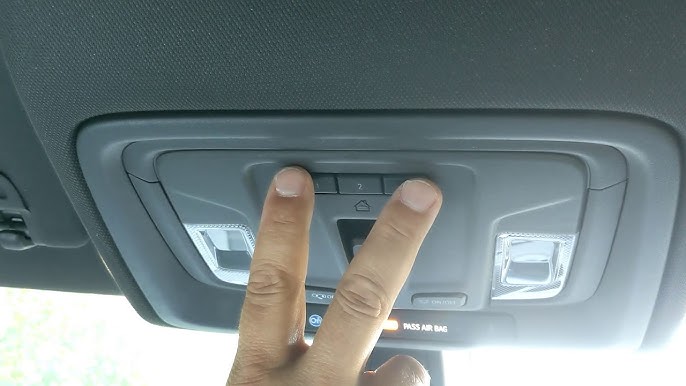
- Locate the three HomeLink buttons on your overhead console or rearview mirror.
- Press and hold the two outer buttons simultaneously.
- Continue holding for approximately 20 seconds until the indicator light begins to flash rapidly.
- Release both buttons. The memory is now cleared for all three buttons.
Phase 2: Initial Handshake
- Turn your 2024 GMC Sierra’s ignition to ON/RUN. The engine does not need to be running, but accessory power must be active.
- Hold your original handheld garage remote 1–3 inches away from the HomeLink button you wish to program.
- Simultaneously press and hold the handheld remote button AND the desired HomeLink button.
- Watch the HomeLink indicator light. It will flash slowly at first, then rapidly once the frequency is captured. This usually takes 10–20 seconds.
- Release both buttons once the rapid flashing occurs.
Phase 3: Completing Rolling Code Synchronization
Skip this phase ONLY if your garage opener is confirmed fixed-code/DIP-switch.
- Go to your garage door motor unit and locate the “Learn” or “Smart” button. It is typically yellow, purple, orange, or red and located near the antenna wire.
- Press and release the Learn button. You typically have 30 seconds to complete the next step before the motor exits learning mode.
- Return to your Sierra immediately.
- Firmly press and hold the programmed HomeLink button for 2 seconds, then release.
- Repeat this press-hold-release cycle up to three times until the garage door activates.
Concrete Timing Detail: During Phase 3, each button press should last exactly 2 seconds. Holding longer than 4 seconds may cause the system to interpret the action as a “clear” command rather than a “sync” command. Precision matters here.
Troubleshooting Common Sync Issues
Even with perfect execution, environmental factors can interfere. Use this comparison table to diagnose problems quickly:
| Symptom | Likely Cause | Recommended Solution |
|---|---|---|
| Light never flashes rapidly | Dead handheld remote battery or wrong frequency | Replace CR2032 battery; verify opener compatibility |
| Flashes rapidly but door won’t move | Rolling code sync incomplete | Repeat Phase 3 within 30-second window |
| Works intermittently | Signal interference or range issue | Reposition vehicle; check for LED bulb interference |
| Indicator stays solid | Button already programmed to different device | Clear memory and restart from Phase 1 |
| Door opens but won’t close via HomeLink | Safety sensor misalignment | Check photo-eye sensors at floor level |
The LED Bulb Interference Factor
A frequently overlooked issue in 2024 vehicles involves aftermarket LED garage lighting. Certain non-shielded LED bulbs emit electromagnetic noise on the 300–400 MHz spectrum that directly competes with HomeLink signals. If your programming works perfectly outside but fails inside the garage, try turning off your garage lights temporarily. If functionality returns, replace your bulbs with RF-shielded, garage-door-opener-compatible LEDs.
Advanced Features: Smart Home Integration
Your 2024 GMC Sierra’s HomeLink isn’t limited to just the garage door. The same programming principles apply to:
- Gate Operators: Community entrance gates use identical rolling code protocols
- Smart Plugs & Lighting: HomeLink-compatible smart switches can control exterior lights
- Security Systems: Some alarm panels support HomeLink disarm triggers
When programming secondary devices, always use a different HomeLink button than your primary garage door. Labeling buttons mentally (e.g., left = gate, center = garage, right = lights) prevents dangerous confusion while driving.
Frequently Asked Questions (FAQ)
Q1: Can I program my 2024 GMC Sierra HomeLink without the original remote?
Generally, no. The original handheld remote is required to transfer the specific frequency and encryption key to your vehicle. However, if your garage opener supports myQ or similar Wi-Fi connectivity, some 2024 Sierra trims allow cloud-based provisioning through the infotainment system without a physical remote. Check your owner’s manual for “HomeLink Cloud Setup” instructions.
Q2: Why does my HomeLink work for opening but not closing the garage door?
This almost always indicates a safety sensor obstruction. Modern garage doors will not close via remote if the photoelectric eyes at floor level are blocked, misaligned, or dirty. Clean the sensor lenses and ensure they face each other directly. If sensors are functional, the issue may be a weak signal; try reprogramming with fresh batteries in your handheld remote.
Q3: How many devices can my 2024 Sierra HomeLink store?
The standard HomeLink system in the 2024 GMC Sierra stores up to three distinct devices. Each of the three buttons corresponds to one device. If you need more capacity, consider upgrading to a HomeLink Bridge accessory or utilizing smartphone-based garage control through the myGMC app as a supplementary solution.
Q4: Is there a difference between programming a 2024 Sierra and older models?
Yes. While the basic handshake remains similar, 2024 models feature enhanced rolling code encryption and faster processor response times. Older tutorials referencing 2018–2022 models may suggest holding buttons for 30+ seconds during initial sync; the 2024 system typically captures signals in 10–20 seconds. Always follow 2024-specific timing to avoid timeout errors.
Q5: Will programming HomeLink erase my garage opener’s existing remotes?
No. Adding your Sierra as a new remote does not delete previously programmed keypads, car visors, or wireless entry pads. The garage motor simply adds your vehicle to its authorized device list. However, pressing the motor’s “Learn” button for more than 10 seconds will factory-reset the opener and erase ALL remotes. Only press it briefly during Phase 3.
Q6: My 2024 Sierra has HomeLink buttons but nothing happens at all. What’s wrong?
First, verify your trim level includes active HomeLink hardware. Some base trims have cosmetic button placeholders without internal transceivers. Check your RPO codes (located in the glove box) for code UG1 (HomeLink). If UG1 is present but unresponsive, check fuse #F27 in the instrument panel fuse block. A blown fuse is the most common cause of complete system failure in new vehicles.
Conclusion
Mastering how to program garage door opener on 2024 GMC Sierra transforms daily convenience and eliminates the clutter of extra remotes. By following the precise timing, understanding rolling code requirements, and troubleshooting methodically, you can achieve reliable synchronization in under ten minutes. Remember that patience during the 2-second press cycles and verifying LED interference are often the difference between frustration and success.
Now that your Sierra is seamlessly connected to your home, why not help fellow truck owners who are still struggling with their setup? Share this guide on Facebook, X (Twitter), or your favorite GMC forum so others can enjoy the same effortless garage access. Your share might save someone a headache-filled evening in their driveway!
Leave a Reply