Introduction
Are you struggling to sync your new 2024 Ford Expedition with your garage door? You’re not alone. Many Ford owners find the HomeLink garage door opener programming process confusing at first, but it’s actually quite straightforward once you know the right steps. Whether you’ve just purchased your vehicle or recently moved to a new home, learning how to program garage door opener on 2024 Ford Expedition will save you time and eliminate the frustration of manually opening your garage every day.
This comprehensive guide walks you through everything you need to know about programming your Ford’s built-in HomeLink system, from initial setup to troubleshooting common issues.
What Is HomeLink and Why Does Your 2024 Ford Expedition Have It?
HomeLink is a universal wireless control system integrated into many modern vehicles, including the 2024 Ford Expedition. This technology allows your car to communicate with garage door openers, gate operators, and even home lighting systems.
Key Benefits of HomeLink Integration
- Convenience: Open your garage without searching for remote controls
- Security: Rolling code technology prevents unauthorized access
- Compatibility: Works with over 95% of garage door opener brands
- Multiple Device Control: Program up to three different devices
According to Wikipedia, HomeLink was first introduced in 1992 and has since become an industry standard for vehicle-to-home connectivity. The 2024 Ford Expedition features the latest generation of this technology, offering improved range and faster response times compared to previous models.
Before You Begin: Essential Preparation Steps
Successful programming requires proper preparation. Follow these checklist items before starting the process:
Required Items
- Your 2024 Ford Expedition with working battery
- Original garage door opener remote (if available)
- Access to your garage door motor unit
- A ladder (if needed to reach the motor unit)
- Approximately 15-20 minutes of uninterrupted time
Important Safety Precautions
Always ensure the garage door area is clear of people and objects before testing. Keep children and pets away from the door during programming. If your garage door lacks safety sensors, consider upgrading before proceeding.
Verify Compatibility
Most garage door openers manufactured after 1993 are compatible with HomeLink. Check your opener’s manual or look for a “Learn” button on the motor unit. Common compatible brands include:
- Chamberlain
- LiftMaster
- Genie
- Craftsman
- Sommer
Step-by-Step Guide: How to Program Garage Door Opener on 2024 Ford Expedition
Step 1: Clear Existing HomeLink Memory (If Necessary)
If you’re reprogramming or the system has previous codes stored:
- Turn your ignition to the “ON” position (engine can be off)
- Press and hold the two outer HomeLink buttons simultaneously
- Continue holding for approximately 20 seconds
- Release when the indicator light begins flashing rapidly
- All previously programmed codes are now erased
Step 2: Position Your Vehicle Correctly
Proper positioning ensures strong signal transmission:
- Park your Expedition 6-10 feet from the garage door
- Ensure the vehicle is facing the garage door opener motor
- Close all windows and doors to minimize interference
- Keep the engine running if programming takes extended time
Step 3: Initiate Programming Mode
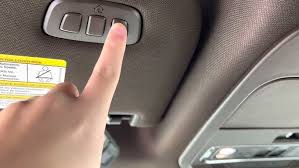
- Locate the three HomeLink buttons on your overhead console or mirror
- Choose which button you want to program (1, 2, or 3)
- Press and hold your chosen HomeLink button
- While holding, bring your original garage remote 1-3 inches from the HomeLink button
- Press and hold the button on your original remote
Step 4: Complete the Learning Process
Continue holding both buttons until the HomeLink indicator light changes from slow to rapid flashing. This typically takes 20-30 seconds. Once the light flashes rapidly, release both buttons.
Note: Some newer garage door openers use rolling code technology and require additional steps.
Step 5: Program Rolling Code Openers (If Applicable)
For security-enhanced openers:
- Locate the “Learn” or “Smart” button on your garage door motor unit
- Press and release this button (you have 30 seconds to complete next step)
- Return to your vehicle within 30 seconds
- Press and hold the programmed HomeLink button for 2 seconds
- Release, then press and hold again for 2 seconds
- Repeat this press-hold-release cycle up to three times
- Test the garage door operation
Step 6: Test Your Programming
- Stand outside your vehicle
- Press the programmed HomeLink button
- Observe whether the garage door responds
- Test multiple times to ensure consistent operation
- Verify the door reverses properly if obstructed (safety check)
Troubleshooting Common Programming Issues
Even with careful following of instructions, problems can occur. Here’s how to address them:
| Problem | Possible Cause | Solution |
|---|---|---|
| Light doesn’t flash | Weak vehicle battery | Start engine or charge battery |
| Door doesn’t respond | Incorrect distance | Move vehicle closer (6-8 feet ideal) |
| Intermittent operation | Signal interference | Remove electronic devices from vehicle |
| Programming fails repeatedly | Wrong button sequence | Restart from Step 1, follow timing exactly |
| Only works occasionally | Rolling code not synced | Repeat Step 5 carefully within 30-second window |
Advanced Troubleshooting Tips
If standard programming fails:
- Consult your garage door opener’s manual for specific HomeLink instructions
- Try programming using the “direct learn” method described in your vehicle’s owner’s manual
- Contact Ford customer support at 1-800-392-3673 for vehicle-specific assistance
- Consider professional installation if multiple attempts fail
People Also Ask: Common Questions About Ford Expedition HomeLink
How many devices can I program on my 2024 Ford Expedition?
Your 2024 Ford Expedition can store up to three different devices using the three HomeLink buttons. This means you could program your home garage, a vacation property garage, and a gate operator simultaneously. Each button operates independently, so programming one doesn’t affect the others.
Can I program my HomeLink without the original remote?
Yes, but the process differs. Without the original remote, you’ll need to use the “direct programming” method by accessing your garage door motor unit directly. This involves pressing the Learn button on the motor and then activating the HomeLink button in your vehicle. However, having the original remote makes the process significantly easier and more reliable.
Why won’t my HomeLink stay programmed?
If your programmed codes disappear, several factors might be responsible:
- Vehicle battery disconnection: Resetting the battery clears HomeLink memory
- Software updates: Occasionally, Ford software updates may reset settings
- Electrical issues: Faulty wiring or fuse problems can cause memory loss
To prevent this, avoid disconnecting your vehicle battery unnecessarily and ensure your electrical system is functioning properly.
Is HomeLink secure against hacking?
Modern HomeLink systems use rolling code technology, which changes the access code with each use. This makes it extremely difficult for unauthorized individuals to intercept and replicate your signal. The 2024 Ford Expedition features enhanced encryption compared to earlier models, providing robust security for your home access.
What should I do if I sell my vehicle?
For security reasons, always clear your HomeLink memory before selling or trading in your 2024 Ford Expedition. Follow the clearing procedure outlined in Step 1 of this guide. This prevents the new owner from accessing your garage or other programmed devices.
Can HomeLink control things other than garage doors?
Absolutely! HomeLink can operate various radio-frequency devices including:
- Gate operators
- Outdoor lighting systems
- Security alarms
- Home automation systems
- Commercial door operators
Check your device’s compatibility and consult both your vehicle manual and device manual for specific programming instructions.
Pro Tips for Optimal HomeLink Performance
Maximize your HomeLink experience with these expert recommendations:
Label Your Buttons: Use small labels or memorize which button controls which device. This prevents confusion, especially if you program multiple locations.
Regular Testing: Test your HomeLink monthly to ensure it continues functioning properly. Early detection of issues prevents being locked out unexpectedly.
Backup Remote: Always keep your original garage door remote as a backup. Batteries die, electronics fail, and having a backup ensures you’re never stranded.
Update Firmware: Check with your Ford dealer periodically for any HomeLink system updates that might improve performance or add features.
Document Your Setup: Write down which garage door opener brand and model you’ve programmed, along with the programming date. This information proves valuable if you need to reprogram later.
Conclusion
Learning how to program garage door opener on 2024 Ford Expedition transforms your daily routine, adding convenience and modern functionality to your vehicle. With HomeLink technology, you enjoy seamless integration between your car and home, eliminating the hassle of juggling multiple remotes.
Remember, successful programming depends on following each step carefully, maintaining proper vehicle positioning, and allowing adequate time for the learning process. If you encounter difficulties, don’t hesitate to consult your owner’s manual or contact Ford support for assistance.
Did this guide help you successfully program your HomeLink system? Share this article with fellow Ford Expedition owners on social media who might benefit from these instructions. Your experience could save someone else hours of frustration!
For more Ford vehicle tips and automotive guides, bookmark this page and check back regularly for updated content. Safe driving and happy garaging!
Leave a Reply