Introduction
There is nothing quite as frustrating as pulling into your driveway after a long day of work, only to realize you still have to dig through your center console for a clunky plastic remote. If you are struggling to sync your new truck’s built-in system, learning how to program garage door opener on 2024 Chevy Silverado is the first step toward seamless, keyless entry convenience. We understand that vehicle technology can sometimes feel overwhelming, but rest assured that setting up your HomeLink system is a straightforward process designed for everyday drivers. This guide will walk you through every button press and indicator light so you can get back to enjoying the modern comforts of your Silverado without the hassle.
Understanding HomeLink Technology in the 2024 Silverado
Before diving into the programming sequence, it is helpful to understand what makes the 2024 system unique. The 2024 Chevy Silverado utilizes the latest generation of HomeLink Universal Transceiver technology. Unlike older systems that relied solely on radio frequency (RF) repetition, newer models often integrate cloud-based connectivity and enhanced security protocols like rolling codes.
According to automotive electronics standards, HomeLink is compatible with over 95% of garage door openers sold in the United States. However, the integration in GM vehicles has evolved. In previous generations, buttons were located in the overhead console near the map lights. In many 2024 Silverado trims, particularly those with the premium infotainment setups, these controls may be integrated directly into the rearview mirror or accessible via the touchscreen interface depending on the specific package.
Key Features of the 2024 System
- Rolling Code Security: Automatically changes the access code every time the button is used to prevent signal theft.
- Two-Way Communication: Provides visual feedback via LED indicators to confirm successful transmission.
- Multi-Device Support: Can store up to three different frequencies for gates, garage doors, or home lighting.
- Battery-Free Operation: Draws power directly from the vehicle’s electrical system, eliminating the need for internal batteries.
For a deeper technical understanding of how these universal transceivers operate across different frequency bands, you can refer to the comprehensive overview on Wikipedia. Understanding this baseline technology helps explain why certain programming steps require holding buttons for specific durations.
Step-by-Step: How to Program Garage Door Opener on 2024 Chevy Silverado
This is the core tutorial section. Please ensure your vehicle is parked outside the garage during initial programming to avoid accidental door movement. Follow these precise steps for the standard overhead console or mirror-mounted HomeLink buttons.
Phase 1: Clearing Previous Codes (Essential for Used Trucks)
If your 2024 Silverado is pre-owned or if you are reprogramming a button, you must clear old data first. Skipping this is the most common cause of failure.
- Locate the two outer HomeLink buttons on your overhead console or mirror.
- Press and hold both outer buttons simultaneously.
- Continue holding for approximately 10 to 20 seconds.
- Watch the indicator light: it will change from solid amber to rapidly flashing green.
- Release both buttons immediately once the green flash begins. All previous programming is now erased.
Phase 2: Programming the Vehicle Button
Now that the slate is clean, you can teach the truck your specific garage door frequency.
- Turn the ignition to ACC/ACCESSORY mode or start the engine. Programming requires active vehicle power.
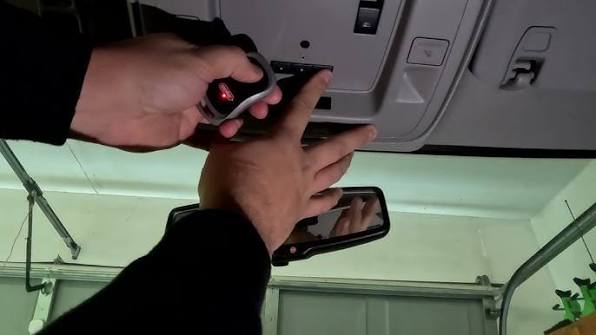
- Hold your original handheld garage door remote 1–3 inches away from the HomeLink buttons.
- Simultaneously press and hold the desired HomeLink button in the truck AND the button on your handheld remote.
- Maintain pressure on both. Observe the HomeLink indicator light above the button.
- The light will transition from a slow flash to a rapid flash or solid green. This typically takes 5–30 seconds.
- Once the rapid flash/solid light appears, release both buttons. Your vehicle button is now programmed for fixed-code openers.
⚠️ Critical Safety Note: Never program your garage door opener while the vehicle is inside the garage. Exhaust fumes can accumulate quickly, and an accidentally triggered door could damage your vehicle or property. Always perform initial syncing outdoors.
Phase 3: Synchronizing Rolling Code Openers
Most modern garage door openers (manufactured after 1996) use rolling code technology. If your door did not respond after Phase 2, or if the light flashed rapidly but the door didn’t move, complete this synchronization step.
- Locate the “Learn” or “Smart” button on your actual garage door motor unit (usually hanging from the ceiling). It is often yellow, purple, orange, or red.
- Firmly press and release the Learn button. You usually have 30 seconds to complete the next step before the motor times out.
- Return to your Silverado and press the newly programmed HomeLink button firmly for 2 seconds, then release.
- Repeat the press-hold-release cycle up to three times within the 30-second window.
- Test the system. The garage door should now activate smoothly.
Troubleshooting Common Programming Issues
Even with perfect execution, variables like battery strength and signal interference can disrupt the process. Use this comparison table to diagnose issues quickly.
| Symptom | Probable Cause | Recommended Solution |
|---|---|---|
| Light never flashes during programming | Dead handheld remote battery | Replace CR2032 battery in original remote; retry Phase 2 |
| Light flashes slowly but won’t go solid | Frequency mismatch or range issue | Move remote closer (1 inch); try different angles; verify compatibility |
| Rapid flash achieved but door won’t open | Rolling code sync incomplete | Re-do Phase 3; ensure Learn button was pressed within last 30 sec |
| Door opens but won’t close via HomeLink | Safety sensor obstruction | Check garage floor sensors for alignment/debris; HomeLink cannot override safety stops |
| Intermittent operation | Signal interference | Remove aftermarket dash cams or LED bulbs near opener; test again |
Expert Tip: The Battery Factor
Industry data suggests that nearly 40% of failed HomeLink programming attempts are attributed to weak batteries in the handheld transmitter, not vehicle malfunction. Even if your handheld remote still opens the door from 20 feet away, its signal strength may be insufficient for the close-range data transfer required during programming. Always install a fresh battery before beginning the tutorial.
FAQ: Frequently Asked Questions About Silverado HomeLink
1. Can I program my 2024 Silverado HomeLink without an original remote?
Generally, no. The vehicle needs to learn the specific frequency and code pattern from an existing transmitter. However, if your garage door opener supports Wi-Fi or cloud integration (like MyQ), some 2024 Silverado trims with connected services allow direct cloud-to-cloud pairing through the infotainment screen without a physical remote. Check your owner’s manual for “Connected HomeLink” features.
2. Why does my HomeLink work intermittently in cold weather?
Extreme temperatures can affect both the garage door opener’s receiver sensitivity and the handheld remote’s battery output. Additionally, metal garage doors can contract in cold weather, slightly altering antenna positioning. Ensure your handheld remote has a fresh lithium battery (which performs better in cold than alkaline) and verify that the garage door opener’s external antenna is hanging vertically and unobstructed.
3. Is there a difference between programming older vs. newer garage door openers?
Yes. Openers manufactured before 1996 typically use fixed DIP switches and only require Phase 2 of our tutorial. Openers made after 1996 almost universally use rolling codes and require the additional Phase 3 synchronization at the motor unit. If you are unsure of your opener’s age, check for a “Learn” button on the motor housing—its presence confirms rolling code technology.
4. Can I program community gate access alongside my home garage door?
Absolutely. The 2024 Silverado HomeLink system stores three independent frequencies. Simply repeat the programming process using a different button for your community gate transmitter. Note that some commercial/community gates use proprietary encrypted signals; if standard programming fails, contact your HOA or property manager for a compatible transponder or authorization code.
5. Will disconnecting my truck’s battery erase HomeLink memory?
No. HomeLink programming is stored in non-volatile memory that persists even when vehicle power is completely removed. You do not need to reprogram your garage door opener after battery replacement, jump-starts, or routine maintenance. Memory is only cleared when you intentionally perform the reset procedure outlined in Phase 1.
6. What if my 2024 Silverado doesn’t have visible HomeLink buttons?
Some 2024 Silverado configurations integrate HomeLink controls digitally within the infotainment system rather than using physical overhead buttons. Navigate to Settings > Vehicle > HomeLink on your touchscreen to access programming menus. If neither physical buttons nor digital menus exist, your trim level may not include HomeLink; consult your dealer about retrofit options or aftermarket universal visor clips.
Conclusion
Mastering how to program garage door opener on 2024 Chevy Silverado transforms your daily routine from a multi-step chore into effortless automation. By following the clearing, programming, and synchronization phases outlined above, you leverage the full potential of your truck’s integrated technology while maintaining top-tier security through rolling code protocols. Remember that patience during the learning phase—and a fresh remote battery—are often the difference between frustration and success.
Your Silverado was engineered to make life easier, and a properly synced HomeLink system is one of the most tangible daily benefits of that engineering. Don’t let a few minutes of setup stand between you and seamless home arrival.
Found this guide helpful? Share it with fellow Silverado owners on Facebook, X (Twitter), or your favorite truck forum! Helping another driver avoid programming headaches is the best kind of roadside assistance. Tag us and let us know which tip solved your sync issue—we love hearing from the Chevy community! 🛻🏡
Leave a Reply