Introduction
There is nothing quite as frustrating as pulling into your driveway after a long day, only to realize you cannot get your new vehicle’s built-in system to communicate with your home’s gate or garage. If you are struggling to sync your car’s technology, learning how to program garage door opener on 2023 Subaru Forester is the essential first step toward seamless daily convenience. This guide is designed to walk you through the process with empathy and precision, ensuring you can ditch the clutter of extra remotes and enjoy the integrated comfort your vehicle was designed to provide.
Understanding HomeLink in the 2023 Subaru Forester
Before diving into the buttons, it is vital to understand what you are actually programming. The 2023 Subaru Forester comes equipped with the HomeLink Wireless Control System, typically located in the overhead console near the rearview mirror or integrated directly into the mirror assembly itself.
Unlike older universal remotes that used simple radio frequency cloning, modern HomeLink systems utilize rolling-code technology for enhanced security. According to technical documentation referenced in automotive standards similar to those described on Wikipedia, this system changes the access code every time the button is used, preventing signal theft. This means the programming process is slightly more involved than simply holding two buttons down; it requires a handshake between your car, the remote, and the garage door motor unit itself.
Why Proper Programming Matters
Many owners assume their system is broken when, in reality, they have simply skipped the “learn” phase at the garage motor. Correctly following the protocol ensures:
- Security: Prevents unauthorized access via code grabbing.
- Reliability: Ensures the door opens consistently without multiple presses.
- Longevity: Reduces wear on the vehicle’s transmitter by ensuring a strong initial sync.
Step-by-Step: How to Program Garage Door Opener on 2023 Subaru Forester
This tutorial assumes you have a functioning original garage door remote and safe access to your garage ceiling motor. Please ensure your vehicle is parked outside the garage during the initial programming phase to prevent accidental door movement while you are working near the mechanism.
Phase 1: Clearing Previous Codes (Recommended)
If this is a used vehicle or if previous attempts failed, start fresh.
- Locate the two outer HomeLink buttons on your 2023 Forester’s overhead console.
- Press and hold both outer buttons simultaneously for approximately 10–20 seconds.
- Watch the indicator light. It will flash slowly at first, then rapidly. Once it flashes rapidly, release the buttons.
- The system is now erased and ready for new programming.
Phase 2: Programming the Vehicle Transmitter
This step teaches your Subaru the specific frequency of your handheld remote.
- Turn your vehicle’s ignition to the ON/RUN position. The engine does not need to be running, but the electrical system must be active.
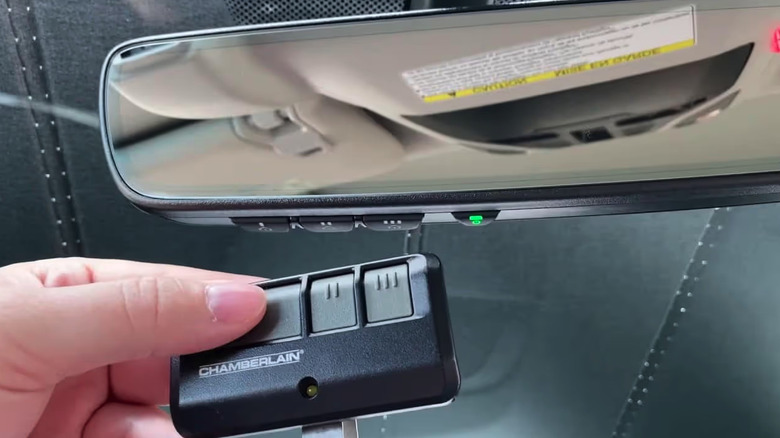
- Hold your original garage door remote 1–3 inches away from the HomeLink buttons. Do not let the remote touch the console.
- Simultaneously press and hold the desired HomeLink button in your Forester and the button on your handheld remote.
- Observe the HomeLink indicator light. It will blink slowly at first. Continue holding both buttons until the light blinks rapidly (this usually takes 5–30 seconds).
- Release both buttons once the rapid blinking begins. Your car has now learned the remote’s signal.
Phase 3: Training the Garage Door Motor (Crucial Step)
Do not skip this section. Most users fail here because they believe Phase 2 is sufficient. For rolling-code openers (manufactured after 1996), you must complete this step.
- Go to your garage door motor unit mounted on the ceiling.
- Locate the “Learn” or “Smart” button. This is typically found on the back or side panel of the motor housing. Colors vary (yellow, purple, red, or green) depending on the brand (LiftMaster, Chamberlain, Genie, etc.).
- Press and release the Learn button. You usually have 30 seconds to complete the next action before the motor exits learning mode.
- Return to your 2023 Subaru Forester immediately.
- Press and hold the programmed HomeLink button for 2 seconds, then release.
- Repeat this press-hold-release cycle up to three times.
- Test the system. The garage door should now activate via the Forester’s overhead console.
Pro Tip: If your garage door opener is an older fixed-code model (pre-1996), Phase 3 may not be necessary. However, given the age of most current infrastructure, always attempt Phase 3 first. If it fails, consult your opener’s manual for fixed-code specific instructions.
Troubleshooting Common Sync Issues
Even with perfect execution, variables can interfere. Use this table to diagnose problems quickly.
| Symptom | Probable Cause | Recommended Solution |
|---|---|---|
| Light never blinks rapidly in Phase 2 | Dead remote battery or wrong distance | Replace remote battery; adjust distance to 1–3 inches |
| Light blinks rapidly but door won’t open | Rolling code sync incomplete | Re-do Phase 3; ensure you press Learn button firmly |
| Door opens intermittently | Signal interference or weak sync | Reprogram; check for LED bulbs causing RF interference |
| Indicator stays solid, no response | Memory full or system error | Perform factory reset (Phase 1) and restart process |
| Works outside garage but not inside | Range limitation or obstruction | Ensure antenna on motor is hanging vertically; remove metal obstructions |
The LED Bulb Interference Factor
A frequently overlooked issue in modern garages is the use of non-shielded LED light bulbs. Cheap LEDs can emit radio frequency noise that jams the HomeLink signal. If your programming works perfectly outside but fails when parked inside, try unscrewing the LED bulbs in your garage opener and testing again. If functionality returns, replace them with RF-shielded garage door opener LEDs specifically rated for use with automation systems.
Expert Insights on Safety and Maintenance
Programming your vehicle is not just about convenience; it is about maintaining a secure perimeter. Automotive safety experts recommend testing your HomeLink system monthly to ensure the rolling code is cycling correctly. Additionally, always keep your original handheld remote in a secure location as a backup. While the 2023 Forester’s system is robust, batteries in the vehicle’s overhead console are hardwired and do not require replacement, whereas the garage motor’s logic board may eventually need servicing.
When performing maintenance on your garage door springs or cables, always disconnect the HomeLink system or unplug the motor to prevent accidental activation while your hands are near moving parts. Safety should always precede convenience.
Frequently Asked Questions (FAQ)
Can I program my 2023 Subaru Forester HomeLink without the original remote?
Generally, no. The HomeLink system requires the original transmitter to clone the initial frequency and rolling code seed. If you have lost your original remote, you will need to purchase a compatible replacement from your garage door manufacturer or hire a professional technician to reset the motor and provide a new remote for syncing. Some newer smart garage systems allow app-based pairing, but traditional HomeLink requires the physical remote.
How many devices can I program into my 2023 Forester?
The 2023 Subaru Forester HomeLink system supports up to three distinct channels. This means you can program three separate devices, such as your primary garage door, a secondary detached garage, and a community gate or entry barrier. Each channel operates independently and can be reprogrammed individually without affecting the others.
Does programming HomeLink void my Subaru warranty?
Absolutely not. HomeLink is an OEM-integrated feature designed specifically for this purpose. Using it as intended per the owner’s manual is fully covered under your vehicle’s warranty. Issues would only arise if you physically damaged the overhead console during installation of aftermarket accessories, which is unrelated to standard programming.
Why does my HomeLink work for the garage but not my community gate?
Community gates often use different frequencies or commercial-grade encryption protocols that differ from residential garage openers. Some gates require a separate authorization code or a specialized commercial receiver adapter. Check with your HOA or property management to confirm if your Forester’s HomeLink version is compatible with their specific gate system, as some older commercial systems are not backward-compatible with newer rolling-code vehicles.
What if my 2023 Forester has a mirror-integrated HomeLink instead of overhead buttons?
The programming sequence remains identical regardless of button placement. Mirror-integrated units function exactly like overhead consoles; the only difference is physical location. Ensure you are pressing the correct designated HomeLink zones on the mirror glass or bezel, as indicated by small etched icons or your owner’s manual diagram.
Can I program a Tesla Wall Connector or EV charger to my HomeLink?
No. HomeLink is designed exclusively for radio-frequency controlled barriers like garage doors, gates, and lights. EV chargers operate on entirely different communication protocols (typically Wi-Fi, Bluetooth, or proprietary CAN bus signals). You must use the dedicated app or interface provided by your EV charger manufacturer for scheduling and activation.
Conclusion
Mastering how to program garage door opener on 2023 Subaru Forester transforms your daily arrival experience from a fumbling hassle into a smooth, automated ritual. By following the three-phase process—clearing old codes, syncing the transmitter, and training the motor—you ensure both security and reliability for years to come. Remember, patience during the rolling-code handshake is the key to success, and troubleshooting common issues like LED interference can save you unnecessary service visits.
Your Forester was engineered to simplify your life, and taking ten minutes today to properly configure this system pays dividends every single evening you return home. Found this guide helpful? Share it with fellow Subaru owners on Facebook, Reddit, or your local Forester enthusiast group so they too can enjoy seamless garage access. Safe driving and happy syncing!
Leave a Reply