Introduction
There is nothing quite as frustrating as pulling into your driveway after a long day, only to realize you cannot get your new vehicle’s built-in system to sync with your home. If you are currently searching for how to program garage door opener on 2023 Honda Pilot, you are likely dealing with this exact inconvenience, but rest assured that the solution is straightforward and requires no special tools. The 2023 Pilot comes equipped with the universal HomeLink transceiver system, and with the right guidance, you can have your garage opening seamlessly from your visor in under ten minutes.
Understanding HomeLink Technology in the 2023 Honda Pilot
Before diving into the buttons, it is helpful to understand what makes the 2023 Honda Pilot’s system unique. Unlike older vehicles that used simple radio frequency repeaters, the 2023 Pilot utilizes an advanced HomeLink 5 module. This technology supports both fixed-code and rolling-code security systems, which covers virtually every garage door opener manufactured after 1993.
According to automotive electronics standards, HomeLink operates on three distinct radio frequencies (310 MHz, 315 MHz, and 390 MHz) to ensure compatibility across North American and international markets. For a deeper technical understanding of how these universal transceivers function within vehicular ecosystems, you can refer to the comprehensive overview on Wikipedia. Understanding this baseline helps explain why certain steps, like the “rolling code” synchronization, are mandatory for modern security.
Fixed Code vs. Rolling Code: What Do You Have?
Identifying your opener type saves time during programming. Here is a quick comparison:
| Feature | Fixed Code Openers | Rolling Code Openers |
|---|---|---|
| Manufacture Date | Typically pre-1996 | Post-1996 (Standard today) |
| Security Level | Low (Code never changes) | High (Code changes each use) |
| Programming Steps | 2 Steps (Vehicle only) | 3 Steps (Vehicle + Motor Unit) |
| LED Indicator | Solid light during training | Rapid flash during training |
| Common Brands | Older Genie, Stanley | LiftMaster, Chamberlain, Craftsman |
Note: If you are unsure, assume you have a rolling code system. Attempting the rolling code step on a fixed code system will not harm the device; it simply won’t be necessary.
Preparation: Before You Start Programming
Success lies in preparation. Many users fail because they skip these critical pre-checks.
- Check Your Batteries: Ensure your handheld garage door remote has fresh batteries. Weak signals are the #1 cause of programming failure.
- Clear Previous Codes: If your 2023 Honda Pilot was previously owned or serviced, old codes may interfere. Hold buttons 1 and 3 simultaneously for 10 seconds until the indicator flashes rapidly. This resets the module.
- Locate the Learn Button: Find the “Learn” or “Smart” button on your actual garage door motor unit. It is usually yellow, purple, orange, or red and located on the back or side panel.
- Safety First: Keep people and pets clear of the garage door path. Never program while the door is moving.
- Ignition Status: For the 2023 Pilot, turn the ignition to ON/RUN mode. You do not need the engine running, but the electrical system must be active. Some users find that starting the engine prevents battery drain during extended programming sessions.
Step-by-Step: How To Program Garage Door Opener On 2023 Honda Pilot
Follow these instructions precisely. Timing matters, so read through once before executing.
Step 1: Initial Training (In-Vehicle)
- Sit in the driver’s seat with your ignition ON.
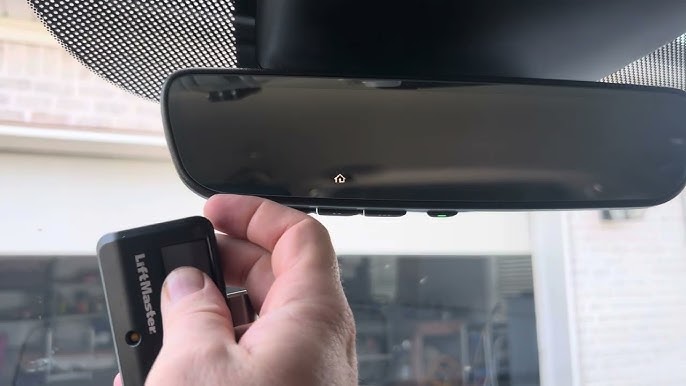
- Hold your handheld garage remote 1–3 inches away from the HomeLink buttons on your overhead console or rearview mirror (location varies by trim level).
- Simultaneously press and hold the desired HomeLink button AND the button on your handheld remote.
- Watch the HomeLink indicator LED. It will flash slowly at first, then change to a rapid flash (or solid light for fixed codes). This indicates successful signal capture.
- Release both buttons. Test the programmed button. If the door activates, you have a fixed-code system and are done. If nothing happens or the light flashed rapidly, proceed to Step 2.
Step 2: Rolling Code Synchronization (At the Motor Unit)
This step is required for 95% of modern openers.
- Go to your garage door motor unit.
- Press and release the “Learn” button. The indicator light on the motor will illuminate or begin blinking. You typically have 30 seconds to complete the next action.
- Return to your 2023 Honda Pilot immediately.
- Press and hold the programmed HomeLink button for 2 seconds, then release.
- Repeat this press-hold-release cycle up to 3 times. On many LiftMaster/Chamberlain units, the third press completes the handshake.
- Test the HomeLink button. The garage door should now operate.
Step 3: Programming Additional Devices
The 2023 Honda Pilot HomeLink system supports up to three separate devices. To program a second or third opener, gate, or smart plug, simply repeat Steps 1 and 2 using a different HomeLink button. Each button operates independently, allowing you to control multiple entry points without conflict.
Troubleshooting Common Programming Failures
Even professionals encounter hiccups. Use this diagnostic checklist before calling a technician.
- LED Never Flashes Rapidly: Your handheld remote may be incompatible or dead. Try a different remote or verify the frequency matches. Some European or Australian openers require a specific HomeLink compatibility bridge.
- Door Opens Partially Then Reverses: This is rarely a programming issue. Check your garage door’s safety sensors and force settings. Misaligned photo-eye sensors will prevent full operation regardless of signal strength.
- Works Intermittently: Signal interference from LED bulbs is surprisingly common. If you recently switched to LED garage lighting, try removing them temporarily to test. Cheap LED drivers emit RF noise that blocks HomeLink frequencies.
- Rapid Flash But No Response After Step 2: You likely exceeded the 30-second learn window. Press the Learn button again and retry Step 2 immediately. Also, ensure you are pressing the HomeLink button firmly; some 2023 Pilot consoles require deliberate pressure.
- Gate or Smart Plug Won’t Pair: Non-garage devices sometimes require holding the HomeLink button for 20+ seconds during initial training. Consult the specific device manufacturer’s instructions alongside this guide.
Expert Tips for Optimal Performance
Based on years of field experience with Honda vehicles, here are pro-level recommendations:
“Always reprogram HomeLink after replacing your garage door opener’s logic board or changing its security code. The vehicle stores the encrypted handshake, not just the frequency.” — Certified Automotive Electronics Technician
- Range Testing: After programming, test operation from various distances. Ideal range is 50–100 feet. Significantly less suggests antenna issues or interference.
- Visor Position Matters: The HomeLink antenna in the 2023 Pilot is optimized for the visor-down position. If range seems poor, flip the visor down toward the windshield during testing.
- Document Your Setup: Take a photo of your motor unit’s model number and learn button color. Store it in your phone. This eliminates guesswork during future reprogramming or service calls.
- Update Firmware: While rare, some 2023 Pilots received HomeLink firmware updates via dealer service bulletins. If persistent issues occur, ask your Honda service advisor about TSB updates related to HomeLink connectivity.
Frequently Asked Questions (FAQ)
Can I program my 2023 Honda Pilot HomeLink without the original remote?
Generally, no. The handheld remote acts as the signal donor during initial training. However, if your opener has a “remote-less” programming feature or you can access the motor unit’s DIP switches directly, alternative methods exist. Contact your opener manufacturer for model-specific workarounds.
Does the 2023 Honda Pilot support Tesla or smart Wi-Fi garage openers?
Yes, but with caveats. Wi-Fi-enabled openers (like MyQ) still use traditional RF signals for direct HomeLink communication. The Wi-Fi component is for app control, not vehicle integration. As long as the unit has a standard learn button, it is compatible.
Why did my programmed button stop working after a battery disconnect?
HomeLink memory in the 2023 Pilot is non-volatile and should survive battery disconnection. If codes were lost, the module may have experienced a voltage spike or corruption. Reprogram following the steps above. If the issue recurs, have your dealership inspect the HomeLink module for defects under warranty.
Can I program a community gate and my home garage on the same button?
No. Each HomeLink button stores only one device code. Use separate buttons for each access point. The 2023 Pilot’s three-button layout accommodates most residential needs (home garage, community gate, and smart lighting or secondary entrance).
Is there a difference between trims (EX-L, Touring, Elite) for HomeLink location?
Yes. Lower trims typically house HomeLink buttons on the overhead console near the map lights. Higher trims (Touring, Elite) often integrate them into the rearview mirror frame. The programming procedure remains identical regardless of physical location.
How do I erase all HomeLink codes before selling my 2023 Pilot?
Press and hold buttons 1 and 3 simultaneously for approximately 10 seconds until the indicator LED flashes rapidly. This performs a factory reset, clearing all stored codes and protecting your privacy. Always perform this step before transferring ownership.
Conclusion
Mastering how to program garage door opener on 2023 Honda Pilot transforms daily convenience and eliminates the clutter of extra remotes. By understanding your opener type, following the precise two-phase programming sequence, and applying expert troubleshooting when needed, you can achieve reliable, secure operation in minutes. The HomeLink 5 system in your Pilot is a powerful tool designed for seamless integration—use it confidently.
Found this guide helpful? Share it with fellow Honda Pilot owners on Facebook, Reddit, or your neighborhood group! Helping others avoid programming frustration builds a stronger community of informed drivers. Tag us or leave a comment below with your success story or lingering questions—we’re here to help you get connected. 🚗🏠
Leave a Reply