Introduction
There is nothing quite as frustrating as pulling into your driveway after a long day of work, only to realize you cannot get your new truck’s built-in remote to sync with your home. If you are currently searching for how to program garage door opener on 2023 Chevy Silverado, you are likely dealing with this exact annoyance, but rest assured that the solution is straightforward and requires no special tools. The 2023 Silverado comes equipped with the Homelink system, a universal transceiver that replaces handheld remotes, and with the right guidance, you can have your overhead door syncing seamlessly with your vehicle in under ten minutes.
Understanding the Homelink System in Your 2023 Silverado
Before diving into the programming steps, it is vital to understand what makes the 2023 model unique. Unlike older vehicles that used fixed-code technology, the 2023 Chevy Silverado utilizes Homelink Version 5. This iteration supports both fixed-code and rolling-code security systems, which are standard in modern garage door openers manufactured after 1996.
According to automotive safety standards and general transceiver technology documented on Wikipedia, these systems operate on radio frequencies typically between 288 MHz and 390 MHz. Understanding this helps explain why simply “holding buttons” sometimes fails; the handshake protocol between the truck and the opener must be precise.
Key Features of the 2023 Silverado Homelink
- Three Programmable Buttons: Allows control of two garage doors and one gate or light.
- Rolling Code Compatibility: Automatically syncs with secure openers like LiftMaster, Chamberlain, and Genie.
- Battery-Free Operation: Draws power directly from the Silverado’s electrical system.
- Visual Feedback LED: Located above the buttons to indicate programming status.
Preparation: What You Need Before Starting
To ensure the process of learning how to program garage door opener on 2023 Chevy Silverado goes smoothly, gather the following items. Skipping preparation is the number one cause of programming failure.
| Item | Purpose | Notes |
|---|---|---|
| Original Handheld Remote | Signal Cloning | Must have fresh batteries |
| Ladder or Step Stool | Reaching Learn Button | Safety first; do not climb on tires |
| Owner’s Manual | Backup Reference | Specific button locations vary by trim |
| Clear Driveway Space | Safety Zone | Keep vehicle outside the garage during programming |
| Second Person (Optional) | Assistance | Helpful for holding remote while pressing truck buttons |
⚠️ Critical Safety Warning: Never program your Homelink system while the vehicle is inside the garage. Carbon monoxide buildup can occur rapidly if the engine runs for an extended period in an enclosed space. Always perform initial programming outside with the garage door closed or fully open and clear.
Step-by-Step: How to Program Garage Door Opener on 2023 Chevy Silverado
Follow these instructions precisely. The 2023 Silverado’s Homelink module is sensitive to timing, so patience is key.
Step 1: Clear Previous Codes (If Applicable)
If you purchased the Silverado used or previously programmed a different device, you must reset the system first.
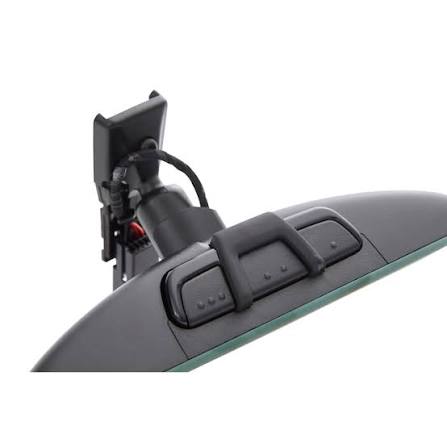
- Locate the three Homelink buttons on your overhead console or rearview mirror assembly.
- Press and hold the two outer buttons simultaneously.
- Hold for approximately 20 seconds until the indicator LED begins to flash rapidly.
- Release both buttons. The system is now factory reset and ready for new programming.
Step 2: Train the Homelink Button to Your Handheld Remote
This step clones the signal from your existing remote to the truck.
- Sit in the driver’s seat with the ignition in ACC/ACCESSORY mode or the engine running.
- Hold your original handheld remote 1–3 inches away from the Homelink buttons.
- Simultaneously press and hold the desired Homelink button AND the button on your handheld remote.
- Watch the Homelink LED closely:
- Slow Flash: Still learning.
- Rapid Flash: Programming successful.
- Once the LED flashes rapidly, release both buttons.
Step 3: Program Rolling Code Openers (Most 2023 Users)
If your garage door opener was manufactured after 1996, it likely uses rolling code technology. Step 2 alone will not open the door; you must complete this synchronization.
- Locate the “Learn” or “Smart” button on your garage door opener motor unit (usually on the back or side panel).
- Press and release the Learn button. The indicator light on the motor will illuminate or blink.
- Within 30 seconds, return to your Silverado.
- Press and hold the programmed Homelink button for 2 seconds, then release.
- Repeat the press-hold-release cycle up to three times.
- Test the system by pressing the Homelink button once. The door should activate.
Step 4: Verify and Fine-Tune
Test the range from various distances. If the response is inconsistent:
- Replace the battery in your original handheld remote (weak signals cause poor cloning).
- Reposition the angle of the remote during Step 2.
- Ensure no aftermarket LED bulbs in the garage opener are causing RF interference.
Troubleshooting Common Programming Issues
Even when following the guide on how to program garage door opener on 2023 Chevy Silverado, issues can arise. Here are data-backed solutions based on common service bulletins.
LED Flashes Slowly and Never Changes
- Cause: Incompatible frequency or dead remote battery.
- Fix: Verify your opener operates on 315 MHz or 390 MHz. Replace remote battery with a premium alkaline cell.
Door Opens During Programming but Stops Working After
- Cause: Rolling code sync was incomplete.
- Fix: Repeat Step 3 entirely. Some Genie models require pressing the Learn button twice before syncing with the vehicle.
Homelink Works Intermittently
- Cause: Radio frequency interference from nearby devices.
- Fix: Identify sources like wireless routers, baby monitors, or cheap LED garage lights operating near 315 MHz. Relocate or shield these devices.
No Response at All After Reset
- Cause: Blown fuse or module malfunction.
- Fix: Check the BODY CONTROL MODULE (BCM) fuse in the interior fuse block. Consult your 2023 Silverado owner’s manual for the exact location.
Pros and Cons of Using Built-In Homelink vs. Handheld Remotes
Understanding the trade-offs helps validate why programming your Silverado is worth the effort.
✅ Advantages
- Convenience: No fumbling for clips or visor remotes.
- Security: Rolling code encryption changes with every use.
- Integration: Works with smart home ecosystems via compatible openers.
- Durability: No batteries to replace in the vehicle unit.
❌ Disadvantages
- Vehicle Dependency: Cannot open garage if truck is unavailable.
- Programming Complexity: Initial setup requires more steps than simple remote pairing.
- Compatibility Limits: May not work with pre-1996 fixed-code openers without a compatibility bridge.
- Repair Cost: Module replacement is significantly more expensive than buying a $20 universal remote.
Frequently Asked Questions (FAQ)
1. Can I program my 2023 Silverado Homelink without an original remote?
Generally, no. The Homelink system requires cloning an existing signal. However, if your garage door opener has a direct “pair” feature that allows adding new transmitters without cloning, consult your opener’s manual. Otherwise, purchase a compatible OEM replacement remote first.
2. Why does my Homelink work for the garage but not my community gate?
Community gates often use different frequencies or require commercial-grade transmitters. The 2023 Silverado Homelink supports most residential gates, but some HOA systems use proprietary encrypted signals. Contact your property management to confirm compatibility with Homelink Version 5.
3. Do I need to reprogram my Homelink after changing my garage door opener battery?
No. Changing the battery in the garage door opener motor or handheld remote does not erase Homelink memory. Reprogramming is only necessary if you replace the entire opener unit, reset the opener’s logic board, or clear the Homelink module itself.
4. Is there a limit to how many times I can reprogram the same button?
There is no practical limit. You can overwrite any of the three Homelink buttons as many times as needed. Each new programming session simply replaces the previous code stored in that button’s memory slot.
5. My 2023 Silverado has Homelink buttons but they don’t respond. What’s wrong?
First, verify the system isn’t locked out due to too many failed attempts (wait 15 minutes and retry). Next, check the BCM fuse. If power is confirmed but buttons remain unresponsive, the Homelink module may have failed and require dealer diagnosis under warranty.
6. Will programming Homelink void my 2023 Silverado warranty?
Absolutely not. Programming the Homelink system is a user-serviceable function explicitly outlined in your owner’s manual. It does not modify vehicle software, wiring, or mechanical components. Warranty concerns only arise from unauthorized electrical modifications or physical damage during installation.
Conclusion
Mastering how to program garage door opener on 2023 Chevy Silverado transforms your daily routine from a minor frustration into seamless convenience. By understanding the Homelink Version 5 system, preparing properly, and following the precise three-phase programming sequence, you can achieve reliable operation in minutes rather than hours. Remember that safety always comes first—never program in an enclosed garage—and that troubleshooting is a normal part of the process, not a sign of failure.
Your 2023 Silverado is engineered to make life easier, and a properly synced Homelink system is one of its most underrated features. Now that you have regained control of your entryway, we encourage you to share this guide with fellow Silverado owners who might be struggling with the same issue. Post it on your favorite truck forum, share it on social media, or send it directly to a friend who just brought home their new Chevy. Helping others master their vehicles strengthens our entire community of enthusiasts and ensures everyone enjoys the full potential of their investment. Happy driving, and may your garage door always open on the first try!
Leave a Reply