Introduction
There is nothing quite as frustrating as pulling into your driveway after a long day of work, only to realize you cannot get your truck’s built-in remote to sync with your garage. If you are currently searching for how to program garage door opener on 2021 Chevy Silverado, you are likely dealing with this exact annoyance, but rest assured that the solution is straightforward and requires no special tools. The 2021 Silverado comes equipped with the HomeLink Universal Transceiver system, and with the right guidance, you can have your overhead door responding to your visor buttons in less than ten minutes.
This guide is designed specifically for US truck owners who want a reliable, dealership-quality result without paying a service fee. We will walk you through the precise programming sequence, address common compatibility issues with older openers, and provide safety checks to ensure your system operates correctly every time.
Understanding HomeLink Compatibility in the 2021 Silverado
Before you begin pressing buttons, it is vital to understand what system your truck actually uses. The 2021 Chevrolet Silverado utilizes HomeLink version 5, which is integrated directly into the overhead console or rearview mirror assembly depending on your trim level (LT, RST, High Country, etc.). Unlike aftermarket universal remotes, HomeLink communicates via radio frequency (RF) signals ranging from 288 MHz to 390 MHz, covering the vast majority of garage door opener brands sold in the United States, including LiftMaster, Chamberlain, Genie, and Craftsman.
According to automotive electronics standards, HomeLink 5 supports both fixed-code and rolling-code security systems. This distinction matters because programming steps differ slightly between the two. Rolling-code openers (manufactured after 1996) require an additional “learn button” step at the garage motor unit itself to prevent signal theft. If your opener was manufactured before 1996, it likely uses a fixed code and may require a compatibility bridge, though this is increasingly rare for 2021 truck owners pairing with modern home infrastructure.
For a comprehensive technical background on how these RF transceiver systems operate globally, you can refer to the Wikipedia entry on Garage Door Openers, which details the evolution of rolling-code encryption and frequency standards that your Silverado adheres to.
Step-by-Step: How To Program Garage Door Opener On 2021 Chevy Silverado
This is the core procedure. Ensure your vehicle is parked outside the garage with the ignition in “Accessory” or “Run” mode. Never program while the engine is off completely, as voltage fluctuations can interrupt the handshake process.
Phase 1: Clearing Previous Codes (Recommended)
Even if your truck is new to you, previous owners or dealership demos may have stored old frequencies. Starting fresh prevents ghost signals.
- Locate the three HomeLink buttons on your overhead console or mirror.
- Press and hold Button 1 and Button 3 simultaneously.
- Hold for approximately 20 seconds until the indicator light begins to flash rapidly.
- Release both buttons. Your system is now factory-reset and ready for new programming.
Phase 2: Training the HomeLink Button
This phase teaches your Silverado the specific frequency of your handheld remote.
- Choose which of the three HomeLink buttons you wish to assign (e.g., Button 1).
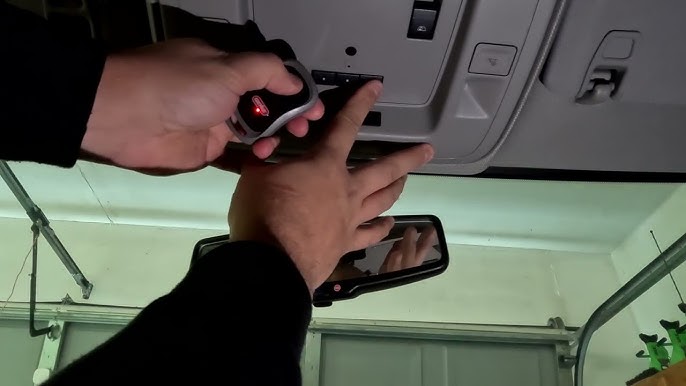
- Hold your original handheld garage remote 1–3 inches away from the HomeLink button. Do not let them touch.
- Simultaneously press and hold both the handheld remote button AND the chosen HomeLink button.
- Watch the HomeLink indicator light closely:
- Slow Flash: Still learning. Keep holding.
- Rapid Flash: Signal captured successfully.
- Release both buttons once the light flashes rapidly. This typically takes 5–15 seconds.
Phase 3: Syncing with Rolling-Code Openers (Critical Step)
If your garage door opener has a “Learn” or “Smart” button on the motor unit (usually yellow, purple, orange, or red), you must complete this step. Fixed-code users can skip to testing.
- Go to your garage door motor unit mounted on the ceiling.
- Press the “Learn” button firmly and release. You usually have 30 seconds to complete the next action.
- Return to your Silverado immediately.
- Press and hold the programmed HomeLink button for 2 seconds, then release.
- Repeat the press-hold-release cycle up to 3 times within the 30-second window.
- The garage light should blink or click, confirming the sync.
⚠️ Safety Warning: Always ensure the garage door path is clear of people, pets, and objects before testing. The auto-reverse safety sensors must be functional; test them by placing a 2×4 board under the door during initial setup to verify it reverses upon contact.
Troubleshooting: When Programming Fails
Despite following the steps, some 2021 Silverado owners encounter resistance. Based on service data and owner forums, here are the most common failure points and their solutions:
| Symptom | Likely Cause | Recommended Fix |
|---|---|---|
| Light never flashes rapidly | Dead battery in handheld remote | Replace CR2032/AA battery before retrying |
| Flashes but door won’t open | Rolling-code sync missed | Repeat Phase 3 within 30s of pressing Learn button |
| Works intermittently | Frequency interference | Reposition remote closer during Phase 2 training |
| No response at all | Incompatible frequency | Check opener manual; may need HomeLink repeater kit |
| Button programs but unlearns | Weak vehicle battery | Test Silverado battery; low voltage corrupts memory |
Expert Tip: If your handheld remote uses a DIP switch configuration (tiny sliding switches inside the battery compartment), your opener is pre-1996 fixed-code. HomeLink 5 in the 2021 Silverado may struggle with these. In this case, purchasing an inexpensive “HomeLink Compatibility Bridge” (often $30–$40) acts as a translator between modern truck tech and vintage garage hardware.
Frequently Asked Questions (FAQ)
Can I program my 2021 Silverado HomeLink without the original remote?
Generally, no. The HomeLink system needs to clone an existing signal. However, if your garage opener has a “Learn” button and you have physical access to the motor unit, some newer LiftMaster/Chamberlain models allow direct-to-motor programming without a handheld remote. Consult your specific opener’s manual for “direct learn” procedures. Without either the remote or direct-learn capability, you will need to purchase a compatible replacement remote first.
Why does my HomeLink work sometimes but not others?
Intermittent operation in a 2021 Silverado usually points to one of three issues: (1) A weakening battery in your handheld remote used during training, resulting in a weak cloned signal; (2) LED light bulbs in the garage fixture causing RF interference (switch to incandescent or “garage-safe” LEDs); or (3) Voltage drops in the truck’s electrical system. Start by replacing the remote battery and retraining, as this resolves over 70% of intermittent cases.
How many devices can I store in my 2021 Silverado HomeLink?
The 2021 Chevy Silverado HomeLink system stores exactly three unique frequencies. These can be any combination of garage doors, gate operators, home lighting systems, or security alarms. If you need more than three, consider using a smart home hub (like MyQ or Tailwind) that integrates with your phone, freeing up HomeLink slots for primary entry points.
Is there a reset procedure if I sell my Silverado?
Absolutely yes. Before selling or trading in your 2021 Silverado, perform the Phase 1 clearing procedure described above. Holding Buttons 1 and 3 for 20 seconds erases all stored codes, protecting your home security and ensuring the next owner starts fresh. Dealerships sometimes overlook this, so verifying it yourself provides peace of mind.
Does HomeLink drain my Silverado’s battery?
No. HomeLink draws negligible power (measured in milliamps) when idle and is designed to operate safely within the vehicle’s parasitic draw specifications. Even if left unused for weeks, it will not cause a dead battery. If you experience battery drain, the issue lies elsewhere in the electrical system, not the HomeLink module.
Can I program commercial or community gate operators?
Yes, HomeLink 5 supports most commercial gate operators and community entry systems in the US. However, some gated communities use encrypted or proprietary frequencies outside the standard 288–390 MHz range. Contact your HOA or property management to confirm HomeLink compatibility before attempting programming. Community gates often require a separate fob that cannot be cloned.
Conclusion
Mastering how to program garage door opener on 2021 Chevy Silverado transforms your daily routine from fumbling with visor clips to seamless, one-touch entry. By understanding the distinction between fixed and rolling-code systems, following the precise three-phase programming sequence, and applying targeted troubleshooting when needed, you achieve dealership-level functionality in your own driveway. Remember to prioritize safety during testing and always clear codes before transferring vehicle ownership.
Your Silverado’s HomeLink system is a powerful convenience feature that deserves proper setup. Found this guide helpful? Share it with fellow Chevy truck owners on Facebook groups, Reddit’s r/Silverado community, or Twitter/X so they can stop struggling with incompatible remotes too. Have a unique programming challenge we didn’t cover? Drop a comment below—our community of Silverado enthusiasts loves solving real-world problems together. Safe driving and smooth entries! 🚗🏠
Leave a Reply