Introduction
There is nothing quite as frustrating as pulling into your driveway after a long day, only to realize you cannot get your new vehicle’s built-in system to sync with your home. If you are currently searching for how to program garage door opener on 2020 Toyota Highlander, you are likely dealing with this exact annoyance, but rest assured that the solution is simpler than it appears. The 2020 Highlander comes equipped with the HomeLink Wireless Control System, and with the right guidance, you can have your integrated opener functioning perfectly in under ten minutes. This guide will walk you through every step with empathy and precision, ensuring you spend less time fumbling with buttons and more time enjoying the convenience of your vehicle.
Understanding HomeLink Compatibility Before You Start
Before diving into the programming sequence, it is vital to understand what system you are working with. The 2020 Toyota Highlander utilizes HomeLink Version 5, which is compatible with the vast majority of radio-frequency (RF) garage door openers manufactured after 1993. However, compatibility is not universal, and verifying this first saves significant frustration.
According to technical documentation from Wikipedia, HomeLink operates by learning the specific RF signal from your existing handheld remote and replicating it via the vehicle’s overhead console. This means if your original remote works, the Highlander can almost certainly learn it.
Quick Compatibility Checklist
| Feature | Requirement for 2020 Highlander | Notes |
|---|---|---|
| Opener Age | Post-1993 | Older models may need a repeater kit |
| Frequency | 288–399 MHz | Standard US residential range |
| Rolling Code | Supported | Required for security post-1996 |
| Fixed Code | Supported | Common in pre-1996 systems |
| Smart Learn Button | Color Varies | Usually Yellow, Purple, Orange, or Red |
Expert Tip: Locate the “Learn” or “Smart” button on your garage door motor unit before sitting in the car. Knowing its color and location beforehand streamlines the rolling code programming phase significantly.
Step-by-Step: How To Program Garage Door Opener On 2020 Toyota Highlander
This tutorial assumes you are programming a rolling code opener, which applies to nearly all modern garage doors. Please ensure your vehicle is parked outside the garage during programming to prevent accidental activation or carbon monoxide buildup.
Phase 1: Clearing Previous Codes (Recommended)
Even if the buttons appear blank, previous owner data may linger. Always start fresh.
- Turn the ignition to ON (or press the START button twice without foot on brake).
- Press and hold the two outer HomeLink buttons simultaneously.
- Hold for approximately 10 seconds until the indicator light changes from solid to rapidly flashing.
- Release both buttons. The system is now erased and ready.
Phase 2: Training the HomeLink Button
- Choose which of the three HomeLink buttons you wish to program.
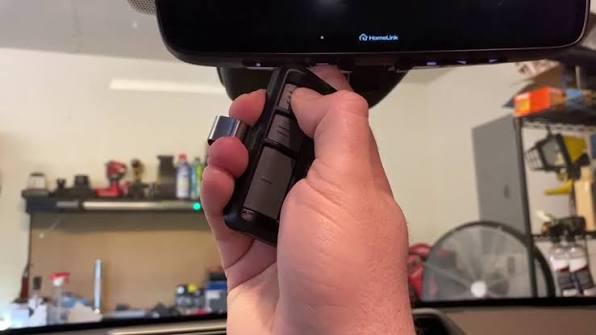
- Hold your original handheld remote 1–3 inches away from the HomeLink surface.
- Simultaneously press and hold your handheld remote button AND the chosen HomeLink button.
- Watch the HomeLink indicator light closely:
- It will flash slowly at first.
- After 5–10 seconds, it will flash rapidly.
- Once rapid flashing occurs, release both buttons. Your Highlander has learned the signal.
Phase 3: Syncing Rolling Code Openers
If your garage door opened during Phase 2, skip to testing. If not, complete this critical step.
- Go to your garage door motor unit and locate the Learn/Smart button.
- Press and release the Learn button (the LED will illuminate or blink).
- Within 30 seconds, return to your Highlander and press and hold the programmed HomeLink button for 2 seconds, then release.
- Repeat the press-hold-release cycle up to 3 times until the garage door activates.
- Test the button one final time to confirm reliable operation.
Safety Note: Never attempt programming while the vehicle is running inside an enclosed space. Always park outside with adequate ventilation.
Troubleshooting Common Programming Failures
Despite following the steps correctly, some users encounter hiccups. Here are data-backed solutions for the most frequent issues reported by Toyota technicians and automotive forums.
Problem: Indicator Light Flashes Slowly and Never Changes
- Cause: Signal interference or incompatible frequency.
- Solution: Try repositioning the handheld remote. Move it to different angles and distances (try 4–6 inches instead of 1–3). Replace the battery in your handheld remote—a weak battery is the #1 cause of failed training according to service center reports.
Problem: Door Opens During Training But Not Afterward
- Cause: Rolling code synchronization was incomplete.
- Solution: Repeat Phase 3 entirely. Ensure you press the motor unit’s Learn button fresh each time before attempting the HomeLink press cycle. Some brands (like LiftMaster) require precise timing within the 30-second window.
Problem: HomeLink Works Intermittently
- Cause: Low vehicle battery voltage or RF interference from nearby electronics.
- Solution: Check your Highlander’s 12V battery health. Remove any aftermarket dash cams or phone chargers temporarily during programming, as these can emit interfering frequencies.
Pros vs. Cons: Built-In HomeLink vs. Universal Remote
| Factor | HomeLink (2020 Highlander) | Aftermarket Universal Remote |
|---|---|---|
| Convenience | ✅ Integrated, no extra device | ❌ Clutters visor/dash |
| Reliability | ✅ OEM-grade antenna | ⚠️ Varies by brand quality |
| Security | ✅ Rolling code encryption | ⚠️ Depends on model |
| Cost | ✅ Included with vehicle | ❌ $20–$60 additional |
| Compatibility | ⚠️ Limited to RF systems | ✅ Often broader protocol support |
| Setup Time | ⚠️ 5–15 minutes initial | ✅ Usually instant pairing |
Frequently Asked Questions (FAQ)
1. Can I program my 2020 Toyota Highlander HomeLink without an original remote?
Generally, no. HomeLink is a learning system, not a standalone transmitter. It requires an existing working remote to clone the signal. If you have lost all remotes, you must purchase a replacement remote compatible with your garage door opener first, or hire a technician to reset the opener and provide a new remote.
2. Why does my HomeLink work for the garage door but not my gate or lights?
Each HomeLink button controls only one device. You must program separate buttons for each accessory. Additionally, some gates and lighting systems use different protocols (e.g., Z-Wave or proprietary RF) that may require a HomeLink-compatible bridge or repeater module.
3. Do I need to reprogram HomeLink after changing my car battery?
In most cases, no. HomeLink memory is stored in non-volatile memory and survives battery disconnection. However, if the battery was completely dead for an extended period or if there was an electrical surge during replacement, a reprogram may be necessary. Always test functionality after battery service.
4. Is HomeLink secure against hacking or signal theft?
Yes, when properly configured. Modern HomeLink systems use rolling code technology, meaning the access code changes with every use. Even if someone intercepts a transmission, that specific code becomes invalid immediately. This is vastly superior to older fixed-code systems and meets current FCC security standards.
5. My 2020 Highlander has three buttons; can I use all three independently?
Absolutely. Each of the three HomeLink buttons functions as an independent channel. You can program one for your primary garage, one for a secondary garage or gate, and one for outdoor lighting or a smart home device—provided each uses a compatible RF signal.
6. What if my garage door opener is older than 1993?
Openers manufactured before 1993 typically use fixed-code DIP switches and lack the security features HomeLink expects. While some early fixed-code models can still be programmed, many require a HomeLink Compatibility Bridge (sold separately). Contact your garage door opener manufacturer or a certified dealer to verify if your vintage unit supports direct HomeLink integration.
Conclusion
Learning how to program garage door opener on 2020 Toyota Highlander transforms a daily inconvenience into seamless automation. By following the clearing, training, and rolling code synchronization steps outlined above, you leverage the full potential of your vehicle’s integrated technology safely and efficiently. Remember that patience during the initial setup pays dividends in years of reliable, keyless entry to your home.
If this guide helped you successfully sync your Highlander, please share it on social media to assist fellow Toyota owners navigating the same process. A quick post on Facebook, X (Twitter), or Reddit could save someone else hours of frustration. Safe driving, and enjoy the convenience of your newly programmed HomeLink system!
Leave a Reply