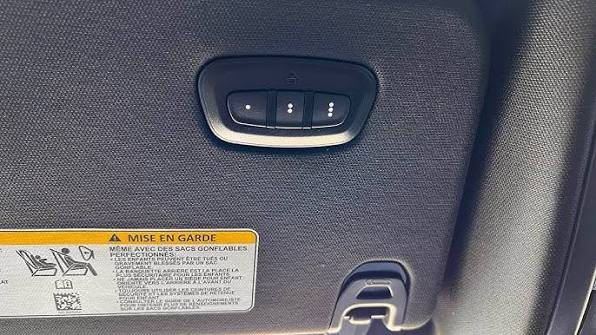
Programming your garage door opener can feel overwhelming, especially when you’re dealing with a new vehicle or a replacement remote. Many Dodge Ram owners struggle with the HomeLink system, wondering why their garage door won’t respond to their truck’s built-in buttons. If you’ve been searching for how to program garage door opener in Dodge Ram, you’re not alone—this is one of the most common questions among Ram owners across the United States.
The good news? With the right steps and a bit of patience, you can have your garage door responding to your Dodge Ram in under 10 minutes. Whether you drive a Ram 1500, 2500, or 3500, this comprehensive guide will walk you through every step, troubleshoot common issues, and ensure your HomeLink system works flawlessly.
What Is HomeLink and Why Does Your Dodge Ram Have It?
HomeLink is a universal transceiver system integrated into many vehicles, including the Dodge Ram lineup. This technology allows your vehicle to communicate with garage door openers, gate operators, and even home lighting systems. According to Wikipedia, HomeLink was first introduced in 1992 and has since become the industry standard for vehicle-based home automation control.
Most Dodge Ram models from 2013 onwards come equipped with HomeLink, typically located on the rearview mirror or overhead console. The system uses radio frequency signals compatible with most major garage door opener brands, including Chamberlain, LiftMaster, Genie, and Craftsman.
Understanding how HomeLink works is crucial before attempting to program it. The system essentially acts as a learning remote—it captures the signal from your existing garage door remote and replicates it. This means you’ll need your original garage door remote handy during the programming process.
Step-by-Step Guide: How to Program Garage Door Opener in Dodge Ram
Step 1: Prepare Your Equipment
Before starting, gather these items:
- Your Dodge Ram (engine running or ignition in “On” position)
- Original garage door remote control
- A ladder (if needed to reach the garage door opener motor)
- Patience and about 10-15 minutes of uninterrupted time
Important: Ensure your garage door opener is functioning properly with its original remote before attempting to program HomeLink.
Step 2: Clear Existing HomeLink Memory
If your HomeLink system has been previously programmed, you’ll need to clear it first:
- Press and hold the two outer HomeLink buttons simultaneously
- Continue holding for approximately 20 seconds
- Watch for the indicator light to flash rapidly, then turn off
- Release both buttons when the light changes
This process erases all previously stored codes and prepares the system for new programming.
Step 3: Choose Your Programming Method
There are two primary methods for programming HomeLink in your Dodge Ram:
Method A: Standard Programming (For Most Openers)
- Hold your original garage door remote 1-3 inches away from the HomeLink buttons
- Press and hold the desired HomeLink button
- While holding the HomeLink button, press and hold the button on your original remote
- Continue holding both buttons until the HomeLink indicator light flashes slowly, then rapidly
- This process typically takes 20-30 seconds
- Release both buttons once the rapid flashing begins
Method B: Rolling Code Programming (For Newer Openers)
Many modern garage door openers use rolling code technology for enhanced security. If Method A doesn’t work, try this approach:
- Complete Steps 1-3 from Method A above
- Locate the “Learn” or “Smart” button on your garage door opener motor unit
- Press and release the Learn button (the indicator light will illuminate)
- Within 30 seconds, return to your vehicle and press the programmed HomeLink button three times
- Test the garage door operation
Step 4: Test Your Programming
After completing the programming steps:
- Park your Dodge Ram outside the garage
- Press the programmed HomeLink button
- Observe if the garage door responds
- Test multiple times to ensure consistent operation
If the door operates correctly, congratulations! Your HomeLink system is now programmed. If not, proceed to the troubleshooting section below.
Common Programming Issues and Solutions
Even with careful following of instructions, you might encounter problems. Here are the most frequent issues and their solutions:
| Problem | Possible Cause | Solution |
|---|---|---|
| HomeLink light doesn’t flash | Dead vehicle battery or fuse issue | Check vehicle battery and HomeLink fuse |
| Remote won’t program | Incorrect distance or timing | Hold remote 1-3 inches away, hold buttons firmly |
| Door doesn’t respond after programming | Rolling code not synced | Use Method B and press Learn button on opener |
| Intermittent operation | Weak signal or interference | Reprogram closer to garage, check for obstructions |
| All buttons stopped working | System memory corrupted | Clear all memory and reprogram from scratch |
Expert Tip: Dealing with Older Garage Door Openers
If you have a garage door opener manufactured before 1995, it might use dip switches instead of digital coding. In this case:
- Match the dip switch positions on your original remote
- Set the same pattern on any compatible universal remote
- Program that universal remote to HomeLink using Method A
- Alternatively, consider upgrading to a modern opener for better compatibility
People Also Ask: Frequently Asked Questions
How long does it take to program a garage door opener in a Dodge Ram?
Typically, the entire process takes between 10-15 minutes for first-time programmers. Experienced users can complete it in 5-7 minutes. The actual button-holding procedure only takes 20-30 seconds, but preparation, testing, and potential troubleshooting add to the total time.
Can I program multiple garage doors to my Dodge Ram HomeLink?
Yes, most Dodge Ram HomeLink systems support up to three different devices. You can program three separate garage doors, or a combination of garage doors, gates, and home lighting systems. Each button corresponds to one device, making organization simple and intuitive.
Why won’t my HomeLink program on the first try?
Several factors can cause initial programming failures:
- Distance issues: The remote must be 1-3 inches from the HomeLink buttons
- Timing problems: Both buttons must be held simultaneously for the full duration
- Battery weakness: A weak remote battery may not transmit a strong enough signal
- Interference: Other electronic devices can disrupt the signal transmission
Try replacing the remote battery and ensuring you’re in an area with minimal electronic interference.
Do I need special tools to program HomeLink in my Dodge Ram?
No special tools are required. You only need your original garage door remote and access to your vehicle. However, having a ladder helpful if you need to access the garage door opener motor unit for rolling code synchronization. Some users find a flashlight useful for seeing indicator lights clearly.
Will programming HomeLink void my vehicle warranty?
No, programming HomeLink is a standard feature provided by the manufacturer and will not void your warranty. The HomeLink system is designed for user programming and is covered under your vehicle’s standard warranty. However, improper installation of aftermarket HomeLink systems (if not factory-installed) could potentially affect warranty coverage.
What should I do if none of the programming methods work?
If standard troubleshooting doesn’t resolve the issue:
- Consult your Dodge Ram owner’s manual for model-specific instructions
- Contact HomeLink customer support at 1-800-355-3515
- Visit a Dodge dealership for professional assistance
- Consider having a professional garage door technician verify your opener’s compatibility
In rare cases, the HomeLink module itself may be defective and require replacement under warranty.
Advanced Tips for Optimal HomeLink Performance
To ensure your HomeLink system continues working reliably:
Maintain Strong Signals: Keep your garage door opener remote batteries fresh. Weak batteries can cause programming failures and inconsistent operation.
Minimize Interference: Avoid parking near large metal structures or other vehicles when programming. Electronic interference from nearby devices can disrupt the signal transmission process.
Regular Testing: Test your HomeLink system monthly to ensure it remains properly synchronized. If you notice intermittent operation, reprogramming may be necessary.
Update When Needed: If you replace your garage door opener, you’ll need to reprogram HomeLink with the new system. Keep your original remote until the new programming is confirmed working.
Leave a Reply