Introduction
Tired of fumbling for a bulky remote clip or leaving your garage door open because you forgot the transmitter? You are certainly not alone; thousands of drivers face this daily inconvenience. Integrating your opener directly into your vehicle transforms your daily routine, offering seamless access to your home. If you are looking for the most efficient way to set this up, this guide on how to program 2020 Dodge Ram garage door opener systems will walk you through the process with precision and ease.
Preparation: What You Need Before Starting
Before we dive into the technical steps, it is crucial to gather the necessary tools and ensure your environment is safe. Programming the HomeLink system (the built-in universal transceiver in your Ram) requires patience and the original remote.
Essential Checklist:
- Your 2020 Dodge Ram: Ensure the ignition is in the “RUN” or “ON” position (engine running is recommended to prevent battery drain during the process).
- The Original Garage Remote: The handheld remote you currently use to open the door. Note: It is best to be inside the vehicle or within 10 feet of it for this step.
- A Stepladder: You will likely need this to access the “Learn” button on your garage door motor unit.
- Fresh Batteries: Ensure your handheld remote has a fresh battery (usually CR2032). A weak signal is the #1 cause of programming failure.
Safety First: Park your truck outside the garage with the door fully open. This allows you to see the light bulb on the motor unit flash, which confirms successful programming without trapping you inside.
Step-by-Step: How To Program 2020 Dodge Ram Garage Door Opener
The 2020 Dodge Ram (1500, 2500, and 3500 models) typically features the HomeLink system integrated into the overhead console or the rearview mirror housing. The process is divided into two distinct phases: Training the Vehicle and Training the Garage Door Motor.
Phase 1: Clearing Previous Settings (Crucial Step)
If your truck is new to you or you are replacing an old device, you must clear the memory first.
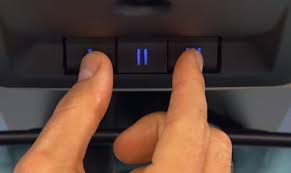
- Locate the two outer buttons (usually Button 1 and Button 3) on the HomeLink module.
- Press and hold both buttons simultaneously.
- Wait for 20 seconds. The indicator light will flash rapidly (usually amber or red) and then turn solid or go out. This indicates the memory is cleared.
Phase 2: Programming the Handheld Remote to HomeLink
This step “teaches” your Ram’s system the signal from your existing remote.
- Turn the ignition to the ON/RUN mode.
- Hold your original handheld remote 1 to 3 inches away from the HomeLink button you wish to program.
- With one hand, press and hold the desired HomeLink button.
- With the other hand, press and hold the button on your handheld remote.
- Watch the Indicator Light:
- It will first flash slowly.
- Then, it will flash rapidly.
- Stop holding once the light flashes rapidly (this usually takes about 10–30 seconds).
- Test the button. If the garage door moves, you have a fixed-code system and are finished! If it doesn’t move, or if your opener was manufactured after 1997, proceed to Phase 3.
Phase 3: Syncing “Rolling Code” Technology
Most modern openers (like LiftMaster, Chamberlain, and Genie) use security technology that changes the signal every time the remote is used. You must sync the car to the motor directly.
- Locate the “Learn” or “Smart” button on your garage door motor unit (usually hanging from the ceiling). It is often colored yellow, red, orange, or purple.
- Press and release the “Learn” button. The indicator light next to it will glow or blink for 30 seconds.
- Immediately return to your Dodge Ram.
- Press the programmed HomeLink button firmly for 2 seconds and release.
- Repeat this press-hold-release cycle two more times (total of 3 cycles).
- You should see the garage door motor lights flash or hear a click, confirming the synchronization is complete.
Understanding Rolling Code Technology
It is important to understand why Phase 3 is necessary for your 2020 model. Modern garage door openers utilize a security protocol known as Rolling Code (or hopping code). Unlike older “fixed code” systems that used the same digital password every time, rolling code technology generates a new, unique code with every use.
This prevents “code grabbing,” where a thief intercepts your signal to open your garage later. For a deeper technical understanding of how this encryption secures your home, you can read more about the Rolling code technology on Wikipedia.
Why this matters for your Ram: The HomeLink system in your 2020 Dodge Ram is designed to automatically recognize and adapt to these changing codes, but it requires the initial “handshake” (Phase 3) to synchronize its internal counter with the motor unit.
Troubleshooting Common Issues
Even with a perfect guide, technology can sometimes be finicky. Below is a comparison table to help you diagnose why your how to program 2020 Dodge Ram garage door opener attempt might be failing.
| Symptom | Probable Cause | Solution |
|---|---|---|
| Indicator light blinks but door doesn’t move. | The handheld remote battery is weak, or the distance was too great. | Replace the remote battery (CR2032). Repeat Phase 2 with the remote within 1 inch of the HomeLink button. |
| Door moves, but stops immediately. | The “Rolling Code” sync failed. | You missed Phase 3. You must press the “Learn” button on the motor and then press the car button 3 times. |
| HomeLink light stays solid (no flash). | The system is not clearing or holding the signal. | Ensure the ignition is ON. If it stays solid while trying to clear, hold the buttons for a full 60 seconds. |
| Range is very short (only works inches away). | Radio frequency interference or poor antenna connection. | Check if you have a LED bulb in the opener causing interference. Try programming again with the handheld remote closer to the motor unit. |
Pro Tip: If you have a “purple” learn button on your motor (common for older LiftMaster models), you may need to cycle the learn button on the motor multiple times to get it to accept the HomeLink signal.
Frequently Asked Questions (FAQ)
1. Where is the HomeLink button located in the 2020 Dodge Ram? In most 2020 Ram 1500 and Heavy Duty models, the HomeLink buttons are located in the overhead console, near the reading lights and sunglasses holder. In some trims with the auto-dimming rearview mirror, the buttons are integrated directly into the bottom of the mirror housing.
2. Can I program a second garage door to my Ram? Yes, absolutely. The HomeLink system typically has three independent buttons. You can program Button 1 for the main door, Button 2 for a side gate or second door, and Button 3 for a home automation system or a neighbor’s gate. Just repeat the steps above using a different button.
3. My garage door opener doesn’t have a “Learn” button. What do I do? If your motor is very old (pre-1996) and lacks a Learn button, it likely uses DIP switches. In this case, you do not need Phase 3. Once the indicator light flashes rapidly during Phase 2, the programming is complete. However, for security reasons, upgrading to a modern opener is highly recommended.
4. Will this work if I have a rental property or different frequency? HomeLink operates on a wide frequency range (288-390 MHz and 310-400 MHz), covering almost all major brands in the US (Chamberlain, LiftMaster, Genie, Craftsman). If your specific opener uses a unique frequency not supported by HomeLink, you may need a compatible repeater or a frequency converter, though this is rare for standard residential openers.
5. Do I need to reprogram the system if I change my truck’s battery? No. The HomeLink memory is non-volatile, meaning it retains the programming even if the vehicle’s main battery is disconnected or dies. You only need to reprogram if you move to a new house or buy a new garage door opener.
Conclusion
Mastering how to program 2020 Dodge Ram garage door opener controls is a straightforward process that significantly enhances your daily convenience and home security. By following the three-phase approach—clearing memory, training the handheld signal, and syncing the rolling code—you ensure a reliable connection every time you pull into the driveway.
Remember, the key to success lies in the details: fresh batteries in your remote, precise timing during the “Learn” button sync, and patience.
Did this guide save you a trip to the dealership or a call to support? If you found this tutorial helpful, please share it on social media with your fellow Ram owners! Let us know in the comments if you encountered any unique challenges with your specific trim level. Safe driving and happy automating!
Leave a Reply