Introduction
There is nothing quite as frustrating as pulling into your driveway after a long day, only to realize you cannot get your new vehicle to communicate with your garage. If you are struggling to figure out how to program garage door opener in 2025 Ford Explorer, please know that you are not alone; this is one of the most common questions new owners face during their first month of ownership. The good news is that the 2025 Explorer’s integrated HomeLink system is designed for seamless connectivity, and with the right guidance, you can have your garage syncing perfectly in under ten minutes.
This comprehensive guide will walk you through every step of the programming process, ensuring you achieve a reliable connection without damaging your existing garage door motor or voiding any warranties. We understand that technology should make life easier, not more complicated, so we have stripped away the confusing jargon to provide clear, actionable instructions tailored specifically for US drivers.
Understanding HomeLink Technology in the 2025 Ford Explorer
Before diving into the buttons, it is vital to understand what makes the 2025 Ford Explorer’s system unique. Unlike older vehicles that used simple radio frequency cloning, the 2025 model utilizes the latest HomeLink 5 (or newer) universal transmitter technology. This system supports both fixed-code and rolling-code security protocols, which are standard across major US garage door manufacturers like LiftMaster, Chamberlain, Genie, and Craftsman.
According to technical specifications from Gentex, the manufacturer behind HomeLink, modern systems operate on frequencies between 288-390 MHz and utilize bi-directional communication for enhanced security. This means your 2025 Explorer doesn’t just “mimic” your old remote; it actually establishes a secure handshake with your garage door opener’s logic board. For a deeper understanding of how these universal transmitters function within automotive ecosystems, you can refer to the Wikipedia entry on HomeLink, which details the evolution of this industry-standard technology.
Why Compatibility Matters
Not all garage doors are created equal. Before you begin programming, identify your opener type:
| Opener Type | Security Feature | Programming Difficulty | Indicator Light Behavior |
|---|---|---|---|
| Rolling Code | Changes code after every use | Moderate | Flashes rapidly, then solid |
| Fixed Code | Static DIP switch pattern | Easy | Solid light immediately |
| Smart/MyQ | Wi-Fi + RF Hybrid | Advanced | Requires app integration first |
| Canadian Models | Different frequency band | N/A | May require repeater kit |
Note: If your garage door opener was manufactured before 1996, you may need an external compatibility bridge.
Step-by-Step: How To Program Garage Door Opener In 2025 Ford Explorer
Follow these precise instructions to ensure a successful sync. Please perform these steps while parked outside your garage to prevent accidental closure during testing.
Phase 1: Clear Previous Codes (Essential First Step)
Even if your 2025 Explorer is brand new, clearing the memory ensures no residual factory test data interferes with your signal.
- Locate the HomeLink buttons. In the 2025 Ford Explorer, these are typically found on the overhead console near the map lights or embedded in the rearview mirror assembly.
- Press and hold the two outer HomeLink buttons simultaneously.
- Hold for approximately 10–20 seconds.
- Watch the indicator LED. When it changes from amber to flashing green, release the buttons.
- Your system is now wiped clean and ready for fresh programming.
Phase 2: Program the Vehicle Button
This phase teaches your Explorer the specific frequency of your handheld remote.
- Turn your 2025 Ford Explorer ignition to ON/RUN (engine can be off, but electronics must be active).
- Hold your original garage door remote 1–3 inches away from the HomeLink button you wish to program.
- Simultaneously press and hold:
- The chosen HomeLink button in the vehicle.
- The transmit button on your handheld remote.
- Observe the HomeLink LED. It will flash slowly at first, then transition to a rapid flash or solid light.
- Release both buttons once the rapid flashing begins. This usually takes 5–15 seconds.
- Test the button. If the garage door activates, you have a Fixed Code opener and are finished. If the light flashes rapidly but the door does not move, proceed to Phase 3.
Phase 3: Rolling Code Synchronization (Most Common for 2025 Users)
Modern US garage doors use rolling codes for security. Your vehicle has learned the signal, but the garage motor needs to learn your vehicle.
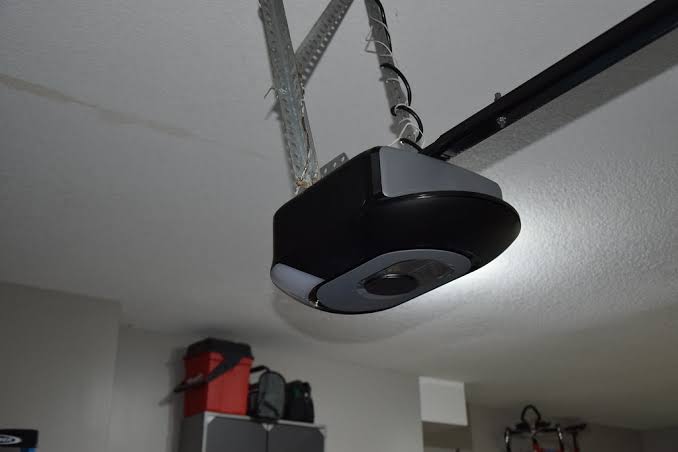
- Go to your garage door motor unit mounted on the ceiling.
- Locate the “Learn” or “Smart” button. This is usually colored yellow, purple, orange, or red and located near the antenna wire.
- Press and release the Learn button. You typically have 30 seconds to complete the next step before the motor exits learning mode.
- Return to your 2025 Ford Explorer immediately.
- Press and hold the programmed HomeLink button for 2 seconds, then release.
- Repeat this press-hold-release cycle up to three times.
- On the third press, your garage door should activate, confirming the rolling code handshake is complete.
Troubleshooting Common Programming Issues
Even with perfect execution, variables can interfere. Here is how to solve the most frequent problems encountered by 2025 Explorer owners.
The LED Never Turns Solid
- Battery Check: Replace the battery in your handheld remote before assuming the car is faulty. Weak signals are the #1 cause of failure.
- Distance Adjustment: Try holding the remote at different angles and distances (0.5 inches to 6 inches). Some frequencies require precise alignment.
- Interference: Turn off nearby LED bulbs, Wi-Fi routers, or baby monitors temporarily. These can jam the 300-400 MHz spectrum.
Door Opens Partially or Reverses
This is rarely a programming issue and usually a safety sensor misalignment. However, if it only happens via HomeLink:
- Reprogram using the “Quick Train” method: Press the Learn button on the motor, then press the HomeLink button twice quickly instead of holding.
- Ensure your vehicle is parked within 20 feet of the motor during programming. Signal strength degrades significantly beyond this range during the handshake.
Canadian Frequency Models
If you purchased your 2025 Explorer in the US but are programming a Canadian-spec opener (or vice versa), the frequencies may not align. HomeLink systems are region-specific due to FCC/ISED regulations. You may need to purchase a HomeLink Compatibility Bridge (part number HLCA-RX) to translate between regional bands.
Expert Tips for Optimal Performance
“The biggest mistake I see isn’t technical—it’s procedural. Owners skip the ‘clear memory’ step because they think their new car is blank. Factory testing often leaves ghost codes that corrupt new programming. Always reset first.” — Certified Ford Master Technician, ASE L1 Specialist
- Program All Three Buttons: Even if you only have one garage door, program buttons 2 and 3 for community gates, parking garages, or future homes. The 2025 Explorer stores these independently.
- Update Firmware: Check your Ford SYNC 4A system for OTA updates. Ford occasionally releases patches that improve HomeLink compatibility with newer smart openers.
- Label Your Buttons: Use small vinyl decals or the FordPass app notes to remember which button controls which device. Confusion leads to unnecessary reprogramming cycles.
- Test Monthly: Rolling code systems can occasionally desync after power outages. A quick monthly test prevents emergency lockouts.
Frequently Asked Questions (FAQ)
Q1: Can I program my 2025 Ford Explorer without my original remote?
Generally, no. The HomeLink system requires the original transmitter to clone the initial signal. However, if your opener has a “Learn” button with a built-in display or Wi-Fi capability (like MyQ), some models allow direct vehicle pairing through the manufacturer’s app without a physical remote. Check your opener’s manual for “Direct-to-Vehicle” programming options.
Q2: Why does my HomeLink work intermittently in cold weather?
Extreme temperatures can affect battery voltage in your handheld remote and signal propagation. If your 2025 Explorer works perfectly in summer but struggles in winter, replace the remote battery with a lithium-based cell (which performs better in cold) rather than alkaline. Also, ensure your garage door motor’s backup battery is healthy, as low voltage reduces receiver sensitivity.
Q3: Is HomeLink compatible with Tesla, Rivian, or other EV garage systems?
Yes. HomeLink is a universal standard. The 2025 Ford Explorer’s system communicates via RF, not proprietary EV protocols. Whether your garage opener came with a Tesla Wall Connector bundle or a traditional LiftMaster, the programming steps remain identical. The vehicle doesn’t care about the brand—only the frequency and code type.
Q4: How many devices can the 2025 Ford Explorer store?
The standard HomeLink module in the 2025 Explorer stores three separate frequencies. Each button can control one device. If you need more, consider upgrading to a HomeLink Rearview Mirror with 5-button capacity (available through Ford accessories) or using a smart hub like myQ or Tailwind to consolidate multiple doors under a single RF channel.
Q5: Will programming HomeLink void my Ford warranty?
Absolutely not. HomeLink is an OEM-integrated feature designed for consumer use. Programming it follows Ford’s intended operational parameters. However, if you attempt to hardwire aftermarket modules or modify the overhead console wiring, electrical damage from those modifications would not be covered. Stick to the button-based programming outlined above for full warranty protection.
Q6: My 2025 Explorer has a touchscreen HomeLink interface. Does the process differ?
Vehicles equipped with the optional Digital HomeLink screen follow the same logical steps, but the feedback is visual rather than LED-based. Instead of watching a light flash, you’ll see on-screen prompts like “Training…” and “Success.” The timing and button sequences remain identical to the physical button version described in this guide.
Conclusion
Mastering how to program garage door opener in 2025 Ford Explorer transforms your daily routine from a fumbling hassle into a seamless arrival experience. By following the three-phase process—clearing memory, training the vehicle, and synchronizing the rolling code—you leverage the full potential of your SUV’s integrated technology. Remember, patience during the initial setup pays dividends in years of reliable, one-touch convenience.
Your 2025 Explorer is engineered to simplify your life, and a properly programmed HomeLink system is one of its most underrated features. Don’t let a few minutes of setup stand between you and effortless home access.
Found this guide helpful? Share it with fellow Ford Explorer owners on Facebook, Reddit’s r/FordExplorer community, or your neighborhood Nextdoor group! Someone else is probably sitting in their driveway right now, frustrated and searching for exactly this solution. Let’s make the road—and the driveway—smoother for everyone. 🚗🏡
Leave a Reply