Introduction
There is nothing quite as frustrating as pulling into your driveway after a long day, only to realize you cannot get your new truck’s built-in system to communicate with your garage. If you are struggling to sync your vehicle, understanding how to program garage door opener in 2024 Chevy Silverado is the first step toward reclaiming that seamless convenience. This guide is designed to walk you through the process with empathy and precision, ensuring you get your Homelink system working perfectly without the headache of endless trial and error.
Understanding the 2024 Silverado Homelink System
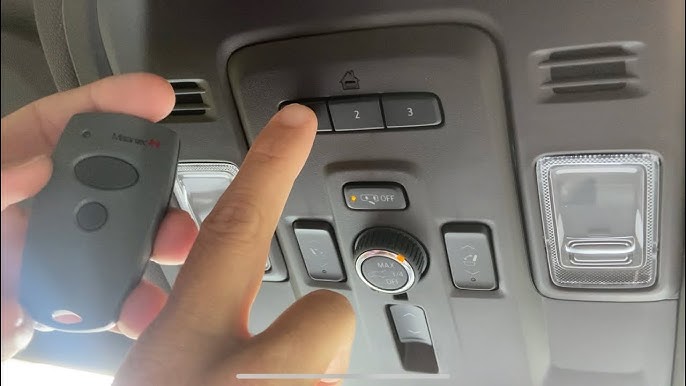
Before diving into buttons and LEDs, it is vital to understand what you are actually programming. The 2024 Chevy Silverado comes equipped with the Homelink Wireless Control System, typically integrated into the overhead console or the rearview mirror assembly. Unlike older universal remotes, this system acts as a transceiver that learns the specific radio frequency of your existing garage door remote.
According to automotive safety standards and manufacturer guidelines, the Homelink system in the 2024 Silverado supports up to three distinct devices. This means you can program your primary garage door, a gate operator, and even smart home lighting controls simultaneously. However, the programming method differs significantly depending on whether your garage door opener uses fixed-code technology (older models pre-1996) or rolling-code technology (modern security standard). Identifying this distinction early saves time and prevents synchronization failures.
Expert Note: Always check the manufacture date on your garage door motor unit. If it was built after 1996, it almost certainly uses rolling-code technology, which requires an additional “learn” button step at the garage motor itself after programming the truck.
Step-by-Step: How To Program Garage Door Opener In 2024 Chevy Silverado
This tutorial focuses on the rolling-code method, as it applies to the vast majority of garage door openers compatible with a 2024 vehicle. Please ensure your truck’s ignition is in the “ON/RUN” position (engine running or accessory mode) throughout this process to prevent battery drain and ensure signal strength.
Phase 1: Clearing Previous Codes (Recommended)
If this is a used Silverado or you have attempted programming previously, start fresh to avoid memory conflicts.
- Locate the two outer Homelink buttons on your overhead console.
- Press and hold both outer buttons simultaneously for approximately 20 seconds.
- Watch the indicator light; it will flash slowly, then rapidly.
- Release the buttons once the rapid flashing begins. The system is now erased and ready for new programming.
Phase 2: Programming the Truck Button
Precision matters here. Follow these exact timing and distance parameters for optimal signal capture.
- Hold your original handheld garage remote 1–3 inches (2.5–7.6 cm) away from the Homelink surface. Do not press it directly against the plastic, as this can sometimes block the receiver.
- Simultaneously press and hold the handheld remote button AND the desired Homelink button in your Silverado.
- Maintain pressure while watching the Homelink indicator light. It will flash slowly at first.
- Continue holding until the light changes to a rapid flash (or turns solid, depending on trim level). This usually takes 10–30 seconds.
- Release both buttons. Test the newly programmed button by pressing it once; the light should illuminate steadily, indicating successful frequency capture.
Phase 3: Synchronizing with the Garage Motor (Rolling-Code Only)
This is the step most users miss when researching how to program garage door opener in 2024 Chevy Silverado. Your truck now knows the signal, but your garage needs to trust the truck.
- Go to your garage door motor unit mounted on the ceiling.
- Locate the “Learn” or “Smart” button. It is typically colored yellow, purple, orange, or red and located near the antenna wire or light lens.
- Press and release the Learn button. You typically have 30 seconds to complete the next step before the motor exits learning mode.
- Return to your Silverado immediately.
- Press and hold the programmed Homelink button for 2 seconds, then release. Repeat this press-hold-release cycle up to three times.
- On the third press, the garage door should activate, confirming the rolling code handshake is complete.
For comprehensive technical background on how these wireless protocols evolved, you can refer to the Wikipedia entry on Garage Door Openers, which details the transition from dip-switches to encrypted rolling codes.
Troubleshooting Common Programming Failures
Even with perfect execution, variables like interference or dead batteries can disrupt the process. Use this diagnostic table to identify your issue quickly.
| Symptom | Probable Cause | Recommended Solution |
|---|---|---|
| Light never flashes rapidly | Weak remote battery or wrong frequency | Replace handheld remote battery; verify opener is FCC-compatible |
| Light flashes rapidly but door won’t open | Rolling-code sync incomplete | Repeat Phase 3; ensure Learn button press was within 30-second window |
| Door opens but closes immediately | Safety sensor misalignment | Check photo-eye sensors at floor level; clean lenses and realign |
| Intermittent operation | LED bulb interference | Replace garage light bulbs with RF-shielded LED or incandescent |
| Homelink works outside but not inside | Signal blockage or range issue | Reposition vehicle during programming; check for metal roof obstruction |
Why Distance Matters During Programming
Many owners attempt to program their Silverado while parked inside the garage. This often fails due to signal reflection and multipath interference. The metal structure of the garage and the proximity to the motor can create standing waves that corrupt the learning signal.
- Best Practice: Always perform Phase 2 programming outside the garage, facing the closed door.
- Optimal Range: Park 10–20 feet from the garage door during initial programming.
- Battery Voltage: Ensure your handheld remote has a fresh CR2032 or equivalent battery. A weak signal is the #1 cause of “partial” programming where the light flashes but the sync fails.
Frequently Asked Questions (FAQ)
Can I program a Chamberlain/LiftMaster MyQ opener to my 2024 Silverado?
Yes, but with caveats. Newer MyQ openers use encrypted frequencies that some older Homelink versions cannot learn directly. If your 2024 Silverado’s Homelink fails to sync after multiple attempts, you may need a Homelink Compatibility Bridge (sold separately). This bridge acts as a translator between the modern MyQ encryption and your truck’s receiver. Always check the Homelink compatibility checker online using your specific garage motor model number before purchasing additional hardware.
Does programming Homelink erase my car’s key fob memory?
No. The Homelink system operates on a completely independent circuit and memory bank from your Silverado’s keyless entry or push-to-start fobs. Programming your garage door opener will not affect your truck’s locks, alarm, or remote start functions. They are isolated systems designed to prevent cross-interference.
How many devices can the 2024 Silverado Homelink store?
The 2024 Chevy Silverado Homelink system stores up to three unique device codes. These can be any combination of garage doors, gates, security lights, or smart home switches. If you need to add a fourth device, you must overwrite one of the existing three slots by repeating the programming process on that specific button.
Why does my Homelink work intermittently in cold weather?
Cold temperatures can reduce the output voltage of both your handheld remote battery and the garage motor’s logic board capacitor. Additionally, metal contraction in extreme cold can slightly shift antenna alignment. If you experience seasonal issues, replace the remote battery with a lithium cell (which performs better in cold) and ensure the garage motor’s backup battery (if equipped) is fully charged.
Is there a way to test if my garage opener is compatible before programming?
Yes. Visit the official Homelink compatibility website and enter your garage door opener’s brand and model number. Alternatively, check the motor unit’s label for FCC ID and frequency (typically 300–400 MHz). Most openers manufactured after 2015 are fully compatible with the 2024 Silverado’s Homelink Version 5 system.
What if my Silverado has the rearview mirror Homelink instead of overhead console?
The programming procedure is identical regardless of button location. The rearview mirror-integrated Homelink uses the same internal module and follows the exact same three-phase process outlined above. The only difference is physical ergonomics; you may find it easier to program mirror-mounted buttons with the vehicle in park and the driver’s seat adjusted forward for better reach.
Conclusion
Mastering how to program garage door opener in 2024 Chevy Silverado transforms your daily routine from a multi-remote juggling act into a single-button convenience. By following the three-phase rolling-code method, respecting signal distance requirements, and troubleshooting systematically, you can achieve reliable synchronization in under 15 minutes. Remember that patience during the learning phase pays dividends in years of seamless operation.
Now that your Silverado is fully synced, take a moment to enjoy the satisfaction of a job well done. Found this guide helpful? Share it on Facebook, X (Twitter), or Reddit to help fellow Chevy owners conquer their Homelink setup! Your share could save someone else an hour of frustration in their driveway tonight. Safe driving and happy programming!
Leave a Reply