Introduction
There are few things more frustrating than pulling into your driveway after a long day, only to realize you still have to dig through the center console for a clunky plastic clicker. If you own this specific SUV model and are searching for how to program garage door opener in 2021 Toyota Highlander, you are likely ready to streamline your daily routine using the built-in HomeLink system. This guide is designed to take the guesswork out of the syncing process, helping you achieve seamless entry without technical headaches or expensive dealership visits.
We understand that vehicle manuals can be dense and confusing, so we have broken down the official procedures into clear, actionable steps tailored specifically for the 2021 Highlander’s interface. Whether you are setting up a new opener or reprogramming an old one after moving houses, this comprehensive tutorial will get your integrated transmitter working perfectly.
Understanding the HomeLink System in Your 2021 Highlander
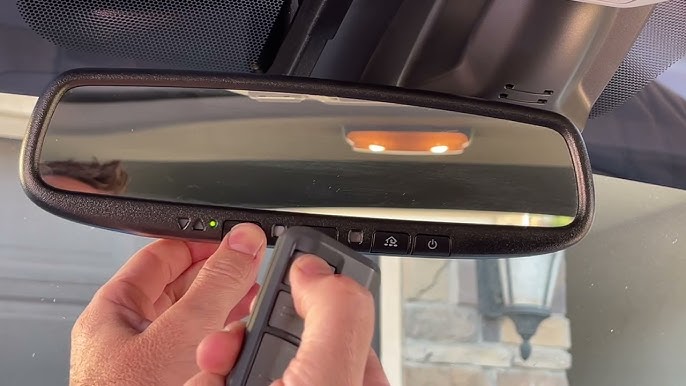
Before diving into buttons and lights, it is crucial to understand what you are actually programming. The 2021 Toyota Highlander comes equipped with the HomeLink Universal Transceiver, typically located in the overhead console near the rearview mirror or integrated directly into the mirror assembly itself.
Unlike older vehicles that used simple radio frequency (RF) cloning, modern HomeLink systems utilize advanced rolling-code technology. This means the signal changes every time you use it, providing superior security against code grabbers. According to automotive safety standards, this system is compatible with nearly all major garage door opener brands manufactured after 1996, including LiftMaster, Chamberlain, Genie, and Craftsman.
Why Proper Programming Matters
Skipping steps or rushing the process can lead to intermittent connectivity or, worse, security vulnerabilities. Taking the time to follow the exact sequence ensures:
- Reliable Range: Consistent activation from 50+ feet away.
- Security Compliance: Proper rolling-code synchronization.
- Multi-Device Functionality: Ability to store up to three different frequencies simultaneously.
Note: Always verify your garage door opener has functional safety reverse sensors before programming. Programming a door with faulty sensors is a significant safety hazard.
Step-by-Step: How To Program Garage Door Opener In 2021 Toyota Highlander
This section answers the primary user intent directly. Follow these instructions precisely. The process generally takes between 5 to 10 minutes.
Phase 1: Clearing Previous Codes (Recommended)
If you purchased the vehicle used or are unsure of existing settings, start fresh. This prevents ghost signals from interfering with your new setup.
- Locate the two outer HomeLink buttons on your overhead console or mirror.
- Press and hold both outer buttons simultaneously.
- Keep holding for approximately 10 seconds.
- Watch the indicator light; it should change from solid amber to rapidly flashing green.
- Release both buttons immediately once the green flash begins.
Your HomeLink memory is now erased and ready for new programming.
Phase 2: Initial Frequency Training
Now we teach the Highlander to recognize your handheld remote’s specific frequency.
- Turn your vehicle’s ignition to the ON/ACCESSORY position. The engine does not need to be running, but electrical power must be active.
- Hold your original garage door remote 1–3 inches away from the HomeLink buttons. Closer proximity ensures accurate frequency capture during initial training.
- Simultaneously press and hold:
- The button on your handheld remote
- The desired HomeLink button (one of the three programmable buttons)
- Observe the HomeLink indicator light. It will begin as a slow blink.
- Continue holding until the light changes to a rapid flash or becomes solid green. This indicates successful frequency capture.
- Release both buttons.
Test the Button: Press the newly programmed HomeLink button once. If the garage door activates, you have a fixed-code opener, and you are finished! If the light flashes rapidly then goes solid, or if nothing happens, proceed to Phase 3.
Phase 3: Rolling Code Synchronization (Critical Step)
Most openers manufactured after 1996 require this additional handshake. This is where most users encounter difficulty when learning how to program garage door opener in 2021 Toyota Highlander.
- Go to your garage door opener motor unit mounted on the ceiling.
- Locate the “Learn” or “Smart” button. It is usually colored yellow, purple, orange, or red and may be recessed.
- Press and release the Learn button. You typically have 30 seconds to complete the next step before the motor exits learning mode.
- Return to your Highlander quickly.
- Press and hold the programmed HomeLink button for 2 seconds, then release.
- Repeat this press-hold-release cycle up to three times within the 30-second window.
After the third press, the garage door should activate, confirming successful rolling-code synchronization.
Troubleshooting Table: Common Issues & Solutions
| Symptom | Probable Cause | Recommended Solution |
|---|---|---|
| Light never turns solid green during Phase 2 | Dead remote battery or wrong distance | Replace remote battery; adjust distance to 1-3 inches |
| Rapid flash but door won’t open | Rolling code sync incomplete | Repeat Phase 3; ensure Learn button was pressed first |
| Works intermittently | Signal interference or weak battery | Check vehicle battery health; reposition remote during training |
| Indicator stays solid amber | Memory full or system error | Perform Phase 1 reset; check fuse for overhead console |
| Door opens but won’t close via HomeLink | Safety sensor misalignment | Inspect photo-eye sensors at floor level; clean lenses |
Safety Considerations and Best Practices
When researching how to program garage door opener in 2021 Toyota Highlander, safety should never be an afterthought. The convenience of integrated transmitters must be balanced with responsible operation.
Never Program While Vehicle Is Moving
Always perform programming with the vehicle parked in a safe location, preferably outside the garage. Accidental activation during programming could cause injury or property damage.
Maintain Line-of-Sight During Testing
During initial testing, ensure you have visual confirmation of the door’s movement. Do not rely solely on auditory cues, as mechanical failures can occur silently.
Regular Sensor Verification
The Wikipedia article on garage door openers emphasizes that photoelectric safety sensors are mandatory in the United States for all residential openers manufactured after 1993. Test these monthly by placing an object in the door’s path while closing; the door should immediately reverse upon beam interruption.
Battery Maintenance Schedule
- Handheld Remote: Replace annually or when range decreases noticeably.
- Vehicle Battery: A weak 12V system can cause HomeLink transmission failures even if other electronics function normally.
- Opener Backup Battery: If your unit has battery backup, test quarterly per manufacturer specifications.
Advanced Tips for Optimal Performance
Beyond basic programming, several optimization strategies can enhance your HomeLink experience in the 2021 Highlander.
Positioning Matters
The HomeLink antenna in the 2021 Highlander is integrated into the overhead console. For best results:
- Avoid metallic window tint on the windshield, which can attenuate RF signals.
- Remove aftermarket dash accessories that may emit electromagnetic interference.
- If range is poor, try programming with the vehicle positioned at different angles relative to the garage.
Multi-Button Configuration Strategy
You have three programmable buttons. Consider this logical arrangement:
- Left Button: Primary home garage door
- Center Button: Community gate or secondary entrance
- Right Button: Guest access or vacation rental property
This standardized layout reduces cognitive load and prevents accidental activation of the wrong device.
Firmware Updates
Some 2021 Highlanders received HomeLink firmware updates via Toyota’s over-the-air system or dealer service campaigns. If you experience persistent issues despite correct programming, contact your Toyota dealer to verify your software version is current.
Frequently Asked Questions (FAQ)
Can I program my 2021 Highlander HomeLink without the original remote?
Generally, no. The HomeLink system requires the original handheld transmitter to capture the correct frequency and rolling code seed. However, some newer “smart” openers allow direct WiFi-based programming through manufacturer apps without a physical remote. Check your opener’s manual for app-based pairing options.
Why does my HomeLink work sometimes but not others?
Intermittent operation typically indicates either a failing battery in the handheld remote used during programming, electromagnetic interference from nearby devices, or incomplete rolling-code synchronization. Start by replacing the remote battery and repeating Phase 3 of the programming sequence. Also verify your vehicle’s 12V battery is healthy, as voltage fluctuations affect transmitter power output.
Is HomeLink compatible with smart garage openers like MyQ or Tailwind?
Yes, but with caveats. HomeLink communicates via traditional RF signals, not WiFi. Smart openers that include an RF receiver bridge (like many MyQ-enabled units) work seamlessly. Pure WiFi-only smart controllers without RF capability cannot be programmed directly to HomeLink. In such cases, consider adding a universal RF-to-WiFi bridge module.
How do I know if my garage door opener uses rolling code or fixed code?
Openers manufactured after 1996 almost universally use rolling code technology. You can confirm by checking the motor unit label for terms like “Security+,” “Intellicode,” or “Rolling Code.” Alternatively, if Phase 2 programming results in a rapid flash rather than immediate operation, your system requires rolling-code synchronization (Phase 3), confirming it is not a legacy fixed-code unit.
Can I program multiple vehicles to the same garage door opener?
Absolutely. Most modern openers support 8–16 remote transmitters simultaneously. Each vehicle’s HomeLink counts as one transmitter slot. Simply repeat the programming process for each vehicle independently. There is no need to erase previously programmed remotes unless you’ve reached the opener’s maximum capacity.
What if my 2021 Highlander doesn’t have visible HomeLink buttons?
Some trim levels integrate HomeLink controls into the rearview mirror assembly rather than the overhead console. Look for small, discreet buttons on the mirror housing itself. The programming procedure remains identical regardless of button placement. If no buttons exist anywhere, your trim may not include HomeLink; verify via your VIN decoder or dealer parts department.
Conclusion
Mastering how to program garage door opener in 2021 Toyota Highlander transforms a minor daily annoyance into effortless convenience. By following the structured phases outlined above—clearing old codes, training the frequency, and completing rolling-code synchronization—you ensure reliable, secure operation for years to come. Remember that patience during the 30-second Learn button window is often the difference between success and frustration.
The integration of HomeLink represents one of the most practical features in modern Toyota SUVs, eliminating clutter and streamlining your arrival experience. Take pride in having configured this system yourself, saving both time and potential dealership service fees.
Found this guide helpful? Share it with fellow Highlander owners on Facebook, Twitter, or your favorite Toyota enthusiast forum! Helping others avoid programming frustration strengthens our community. Have questions or unique experiences with your 2021 Highlander’s HomeLink? Drop a comment below—we’d love to hear from you and keep this resource updated for everyone. Safe driving and smooth entries ahead! 🚗🏠
Leave a Reply