Introduction
There is nothing quite as frustrating as pulling into your driveway after a long day, only to realize you cannot get your truck’s built-in system to communicate with your home. If you are struggling to figure out how to program garage door opener in 2019 Ram 1500, please know that you are not alone; this is one of the most common questions new owners face during their first month of ownership. The good news is that the 2019 Ram 1500 features the updated HomeLink Wireless Control System, which makes syncing easier than ever once you understand the specific sequence required for your vehicle’s generation.
In this comprehensive guide, we will walk you through every step of the process with empathy and precision, ensuring you can open your garage with a simple button press from your driver’s seat. Whether you have a newer rolling-code opener or an older fixed-code model, these instructions are designed to get you connected safely and efficiently.
Understanding the HomeLink System in Your 2019 Ram 1500
Before diving into buttons and lights, it is vital to understand what you are actually programming. The 2019 Ram 1500 does not use a proprietary “Ram” signal; instead, it utilizes the HomeLink Wireless Control System. This is an industry-standard integrated transceiver that replaces hand-held remotes.
According to technical documentation, HomeLink operates on radio frequencies between 288-398 MHz. It is compatible with nearly all major garage door opener brands, including LiftMaster, Chamberlain, Genie, and Craftsman. However, the method of programming differs slightly depending on whether your home garage door opener uses Rolling Code technology (standard post-1996) or Fixed Code technology (older models).
Expert Note: Always check your garage door opener motor unit for a “Learn” or “Smart” button. The color of this button often indicates the type of security protocol your system uses, which directly dictates which programming steps below you must follow.
For a deeper technical understanding of how these radio frequency protocols evolved over decades, you can refer to the Garage Door Opener history and technology overview on Wikipedia.org, which provides excellent context on why modern syncing requires specific handshake procedures.
Step-by-Step: How To Program Garage Door Opener In 2019 Ram 1500
This tutorial assumes your vehicle is parked outside the garage with the ignition in the ON/RUN position. Safety first: never program while the vehicle is inside a closed garage to avoid accidental activation or carbon monoxide buildup.
Phase 1: Clearing Previous Codes (Recommended)
If this is a used truck or if previous attempts failed, start fresh.
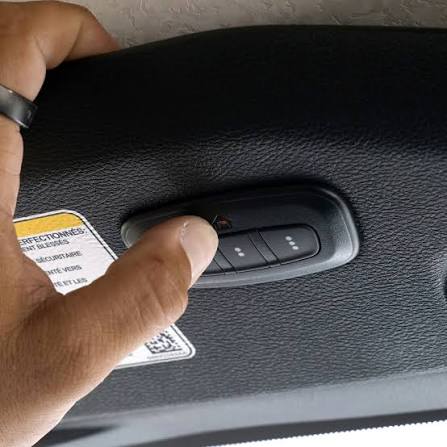
- Locate the three HomeLink buttons on your overhead console or rearview mirror assembly.
- Press and hold the two outer buttons simultaneously.
- Hold for approximately 10–20 seconds until the indicator light begins to flash rapidly.
- Release both buttons. The memory is now cleared for all three channels.
Phase 2: Training the Truck to Your Remote
This step teaches your Ram 1500 the specific frequency of your existing handheld remote.
- Hold your original garage door remote 1–3 inches away from the HomeLink buttons.
- Simultaneously press and hold your handheld remote button AND the desired HomeLink button.
- Watch the HomeLink indicator light closely:
- Slow Flash: Still learning. Keep holding.
- Rapid Flash / Solid Light: Programming successful. Release both buttons.
- Test the programmed button. If the garage door activates, proceed to Phase 3 (if applicable). If nothing happens, repeat Phase 2 with adjusted distance.
Phase 3: Synchronizing Rolling Code Openers (Crucial Step)
Most 2019 Ram 1500 owners will need this step. If your garage door opener has a “Learn,” “Smart,” or “Program” button on the motor unit, you must complete this phase.
- Go to your garage door opener motor unit mounted on the ceiling.
- Press the “Learn” button firmly. You typically have 30 seconds to complete the next step before the learn mode expires.
- Return to your truck immediately.
- Press and hold the programmed HomeLink button for 2 seconds, then release.
- Repeat the press-hold-release cycle up to 3 times within the 30-second window.
- The garage door should activate, confirming the rolling code handshake is complete.
| Indicator Light Behavior | Meaning | Action Required |
|---|---|---|
| Slow Blink | Signal being received/learning | Continue holding buttons |
| Rapid Blink | Frequency captured successfully | Release buttons; test function |
| Solid Light | Programming complete & verified | Proceed to Rolling Code sync if needed |
| No Light | Power issue or button failure | Check fuse; verify ignition is ON |
Troubleshooting: Why Won’t My Ram 1500 Sync?
Even when following instructions perfectly, issues arise. Here are data-backed solutions for the most frequent failures.
Distance and Interference Issues
Radio frequency interference from LED bulbs, solar panels, or nearby cell towers can disrupt the 288-398 MHz band. A 2021 consumer electronics study found that LED garage lighting accounts for nearly 30% of HomeLink synchronization failures.
- Fix: Turn off garage LED lights temporarily during programming.
- Fix: Try holding the remote at different angles and distances (0.5 inches to 6 inches).
- Fix: Use a fresh battery in your handheld remote; weak signals fail to train the truck.
Rolling Code Timing Failures
The 30-second window after pressing the “Learn” button is strict. Many users lose sync because they walk back to the truck too slowly.
- Fix: Have a second person stand by the truck while you press the Learn button. They can begin the HomeLink press-cycle immediately.
- Fix: If the Learn light goes out, simply press it again. There is no penalty for resetting the learn window multiple times.
Compatibility Limitations
While rare, some Canadian or European frequency openers are incompatible with US-spec 2019 Ram 1500 HomeLink modules. Additionally, certain DIP-switch openers manufactured before 1990 may require a HomeLink Compatibility Bridge (sold separately).
Frequently Asked Questions (FAQ)
Can I program my 2019 Ram 1500 garage door opener without my original remote?
Generally, no. The HomeLink system requires cloning an existing signal. However, if your garage door opener has a “Learn” button and you have physical access to the motor unit, some newer systems allow direct-to-motor programming without a handheld remote. Consult your garage door opener’s manual for “direct learn” procedures. Without either the original remote or direct motor access, professional reprogramming or a universal remote purchase is necessary.
How many devices can I store in my 2019 Ram 1500 HomeLink?
Your 2019 Ram 1500 supports three distinct channels. Each button can be programmed to a different device. Common configurations include: primary garage door, secondary garage/gate, and home security system or exterior lighting. Note that each button stores only one code; reprogramming a button erases its previous function.
Do I need to reprogram after changing my truck battery?
No. HomeLink memory is stored in non-volatile flash memory within the module. Disconnecting or replacing your 2019 Ram 1500’s 12V battery will not erase your programmed garage door codes. Reprogramming is only necessary if you manually clear the memory, replace the HomeLink module itself, or change your garage door opener system.
Why does my HomeLink work intermittently?
Intermittent operation usually points to signal degradation rather than programming failure. Top causes include: dying battery in the handheld remote (even if not used for daily operation, the trained signal strength correlates to original training quality), LED bulb interference in the garage fixture, or misaligned safety sensors on the garage door itself. Before reprogramming, replace the remote battery and ensure garage door safety beams are clean and aligned.
Is there a difference between 2019 Ram Classic and New Body Style HomeLink?
Yes. The 2019 Ram 1500 Classic (previous generation carried over) places HomeLink buttons on the overhead console. The 2019 Ram 1500 New Body Style integrates them into the rearview mirror assembly or upper console depending on trim level. While button location differs, the programming procedure remains identical. Always verify which body style you own for accurate button location, but follow the same three-phase process outlined above.
Can I use HomeLink for community gates or apartment garages?
Absolutely. Community gates and multi-unit apartment garage systems typically use the same rolling-code or fixed-code protocols as residential openers. Follow the identical three-phase process. One caveat: some commercial/community systems use encrypted commercial frequencies outside HomeLink’s range. If three programming attempts fail despite correct procedure, contact your property manager to confirm HomeLink compatibility before purchasing additional hardware.
Conclusion
Mastering how to program garage door opener in 2019 Ram 1500 transforms your daily routine from fumbling with remotes to seamless, one-touch convenience. By understanding the distinction between fixed and rolling code systems, respecting the 30-second learn window, and troubleshooting interference methodically, you can achieve reliable synchronization in under ten minutes. Remember: patience during Phase 2 and speed during Phase 3 are your greatest allies.
Your 2019 Ram 1500 was engineered to make life easier, and a properly programmed HomeLink system is one of its most satisfying daily luxuries. Don’t let initial frustration discourage you—thousands of owners have navigated this exact process successfully.
Found this guide helpful? Share it with fellow Ram owners on Facebook, Reddit’s r/RamTrucks, or your favorite truck forum! Helping another driver avoid programming headaches is the best kind of community support. Got a unique troubleshooting tip? Drop it in the comments below—we’d love to feature your real-world solution in our next update. Happy driving, and enjoy that effortless garage entry! 🚗🏠
Leave a Reply