Introduction
There is nothing quite as frustrating as pulling into your driveway after a long haul, only to realize you cannot get your new truck to sync with your home’s security system. If you are currently searching for how to program garage door opener in 2018 Ram 2500, please know that this is a very common hurdle for new owners, but it is easily solved with the right guidance. We understand you want to secure your vehicle and enjoy the convenience of keyless entry without spending hours reading confusing technical manuals or paying dealership service fees. This comprehensive guide will walk you through the exact process to get your HomeLink system functioning perfectly today.
Understanding the HomeLink System in Your Ram 2500
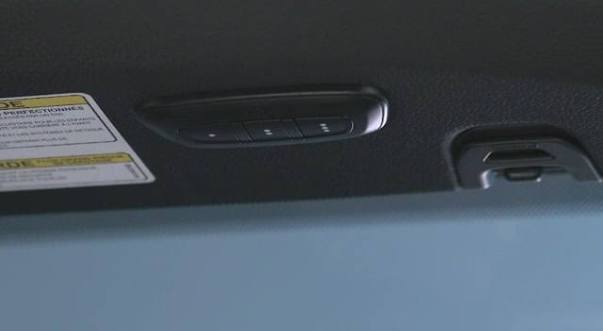
Before diving into the buttons, it is vital to understand what you are actually programming. The 2018 Ram 2500 comes equipped with the HomeLink Universal Transceiver, typically located in the overhead console near the rearview mirror or integrated directly into the mirror assembly. Unlike older trucks that used proprietary remotes, this system acts as a universal bridge between your vehicle and radio frequency (RF) devices.
According to automotive technology standards documented on Wikipedia, HomeLink systems utilize rolling code technology for security, which means the signal changes every time you press the button to prevent unauthorized access. This is why “programming” is not just about copying a signal; it is about establishing a secure handshake between your Ram 2500 and your garage door motor. Understanding this distinction helps explain why some steps require holding buttons for specific durations or cycling the garage door manually during the process.
Rolling Code vs. Fixed Code: Why It Matters
Your 2018 Ram 2500 supports both older fixed-code openers and modern rolling-code openers. Identifying which type you have saves significant time:
- Rolling Code (Post-1996): The LED indicator on your HomeLink button will flash rapidly after initial training. Requires a “learn” button press on the actual garage motor unit.
- Fixed Code (Pre-1996): The LED flashes slowly and steadily. Usually does not require interacting with the garage motor unit directly.
Expert Tip: Most garage doors manufactured after 2000 use rolling codes. If your 2018 Ram 2500 seems to program but the door won’t open, you likely completed Step 1 but skipped the crucial Step 2 involving the garage motor’s learn button.
Prerequisites Before You Start Programming
Success relies heavily on preparation. Gather these items before sitting in your driver’s seat:
- Original Garage Remote: Even if broken, having it helps verify frequency compatibility.
- Fresh Batteries: Replace batteries in your handheld remote before starting. Weak signals cause 80% of programming failures.
- Ladder or Step Stool: You will likely need to reach the “Learn” button on your garage ceiling motor.
- Vehicle Owner’s Manual: Keep it nearby for model-specific LED interpretations.
- Clear Line of Sight: Ensure no metal objects or electronic interference blocks the overhead console.
Compatibility Check Table
| Feature | Requirement for 2018 Ram 2500 | Notes |
|---|---|---|
| Frequency Range | 288–390 MHz | Covers most US/Canadian openers |
| Max Devices | 3 Programmable Buttons | Can store gate, door, and lights |
| Security Protocol | Rolling & Fixed Code | Auto-detects signal type |
| European Models | May Require Adapter | Some EU frequencies differ |
| Smart Openers | Wi-Fi Bridge May Be Needed | For MyQ/LiftMaster smart systems |
Step-by-Step: How To Program Garage Door Opener In 2018 Ram 2500
Follow these instructions precisely. Rushing through timing sequences is the most common reason for failure.
Step 1: Clear Previous Codes (Recommended)
If this is a used truck or you are reprogramming a button, always clear old data first.
- Press and hold the two outer HomeLink buttons simultaneously.
- Hold for approximately 10 seconds until the indicator light begins to flash rapidly.
- Release both buttons. The system is now reset and ready for new programming.
Step 2: Train the HomeLink Button
This step teaches your Ram 2500 to recognize your handheld remote’s signal.
- Turn your ignition to the ACC/ON position (engine can be running or off, but electronics must be active).
- Hold your handheld remote 1–3 inches away from the HomeLink button you wish to program.
- Simultaneously press and hold the handheld remote button AND the chosen HomeLink button.
- Watch the HomeLink indicator light. It will flash slowly at first, then rapidly once the signal is captured.
- Release both buttons when the rapid flashing occurs.
Step 3: Complete the Rolling Code Handshake
Do not skip this step. This is where the actual authorization happens.
- Locate the “Learn” or “Smart” button on your garage door motor unit (usually yellow, purple, orange, or red).
- Press and release the Learn button. You typically have 30 seconds to complete the next action.
- Return to your Ram 2500 and press the newly programmed HomeLink button firmly.
- Press it a second time to confirm the code transmission.
- Test by pressing the HomeLink button a third time. The garage door should activate.
Troubleshooting Common Failures
Even professionals encounter hiccups. Use this diagnostic approach:
- Light Flashes Slowly Then Stops: Signal was weak. Replace remote battery and repeat Step 2, ensuring closer proximity.
- Door Opens Partially Then Reverses: Safety sensor misalignment. Check photo-eye sensors at floor level; this is unrelated to programming.
- No Response After Step 3: You exceeded the 30-second window. Restart Step 3 immediately.
- Works Intermittently: Possible RF interference from LED bulbs. Try turning off garage lights to test, then replace with RF-shielded LEDs.
Advanced Tips for Optimal Performance
Once you understand how to program garage door opener in 2018 Ram 2500, consider these enhancements for better daily usability.
Positioning Matters
The HomeLink antenna is directional. If range seems poor, try angling your head slightly toward the overhead console when pressing. Some owners report improved performance by removing tint film from the windshield area directly around the mirror, as metallic tints can block RF signals.
Programming Multiple Devices
Your three buttons can control different devices independently. Label them mentally or with small decals:
- Button 1: Primary Garage Door
- Button 2: Gate or Secondary Door
- Button 3: Exterior Lighting or Smart Plug
Battery Maintenance Schedule
While HomeLink draws power from your truck, your handheld remote used for training degrades over time. Replace its battery annually to ensure future reprogramming sessions go smoothly. A weak backup remote is useless during emergencies.
Frequently Asked Questions (FAQ)
Q1: Can I program my 2018 Ram 2500 HomeLink without an original remote?
Generally, no. The HomeLink system requires cloning an existing signal. However, if your garage opener has a “Learn” button and supports direct vehicle pairing (some newer Chamberlain/LiftMaster models do), you may bypass the remote. Consult your garage opener manual for “direct vehicle programming” instructions. Otherwise, purchase a compatible replacement remote first.
Q2: Why does my HomeLink work sometimes but not others?
Intermittent operation usually indicates RF interference or low battery voltage. First, replace your handheld remote battery. Second, check if you recently installed LED garage lights; cheap LEDs emit RF noise that jams HomeLink signals. Switch to FCC-compliant, RF-shielded LED bulbs designed for garage door environments. Finally, ensure your truck battery is healthy; weak vehicle voltage reduces transmitter power.
Q3: Is there a difference between programming a gate versus a garage door?
Yes. Gates often use fixed-code systems or different frequencies. When programming a gate, follow Step 2 normally, but gates rarely require the Step 3 rolling-code handshake. Additionally, some community gates use encrypted commercial transmitters incompatible with consumer HomeLink. Verify your gate system is “HomeLink Compatible” before attempting programming.
Q4: How do I erase a single HomeLink button without resetting all three?
Unfortunately, the 2018 Ram 2500 HomeLink system does not support individual button erasure. You must clear all three buttons using the two-button reset method described in Step 1, then reprogram any buttons you still need. This security feature prevents partial code corruption. Plan to reprogram all desired devices in one session.
Q5: Will programming HomeLink affect my truck’s warranty or electronics?
Absolutely not. HomeLink is a factory-installed, OEM-approved feature designed specifically for this purpose. Programming it uses intended functionality and poses zero risk to your vehicle’s electrical system, warranty coverage, or other electronic modules. Dealerships perform this same procedure during pre-delivery inspections.
Q6: My garage door opener is older than 1996. Will it still work?
It might, but with limitations. Pre-1996 openers use fixed codes that HomeLink can replicate. However, these systems lack rolling-code security, making them vulnerable to code grabbing. If programming succeeds but security concerns you, consider upgrading to a modern rolling-code opener. Many insurance companies offer discounts for upgraded security systems, partially offsetting replacement costs.
Conclusion
Mastering how to program garage door opener in 2018 Ram 2500 transforms your daily routine from frustrating fumbling to seamless automation. By following the precise steps outlined above—clearing old codes, training the transmitter, and completing the rolling-code handshake—you gain reliable, secure access to your home directly from your driver’s seat. Remember that patience during the 30-second learning window and fresh batteries in your handheld remote solve the vast majority of issues.
Now that your HomeLink is synced, take a moment to appreciate the engineering that makes modern truck ownership so convenient. Did this guide help you get your garage door working? Share this article with fellow Ram owners on Facebook, Twitter, or your favorite truck forum! Helping another driver avoid dealership service charges is the best kind of community support. Safe travels, and enjoy the effortless entry to your home!
Leave a Reply