Introduction
There are few things more frustrating than pulling into your driveway after a long day, only to realize you still have to dig through your center console for a bulky remote. If you own this specific vehicle model and are searching for how to program garage door opener 2023 Jeep Grand Cherokee, you are not alone; many new owners find the integrated HomeLink system slightly different from previous generations. The good news is that syncing your vehicle’s built-in transmitter is a straightforward process that takes less than ten minutes and significantly enhances your daily convenience and security.
This comprehensive guide will walk you through every step of the programming process, tailored specifically for the 2023 Grand Cherokee’s updated interface. Whether you are dealing with a modern rolling-code opener or an older fixed-code system, we have verified the steps against official manufacturer documentation to ensure accuracy and safety. Let’s get your vehicle connected so you can enjoy seamless entry to your home.
Understanding HomeLink in the 2023 Grand Cherokee
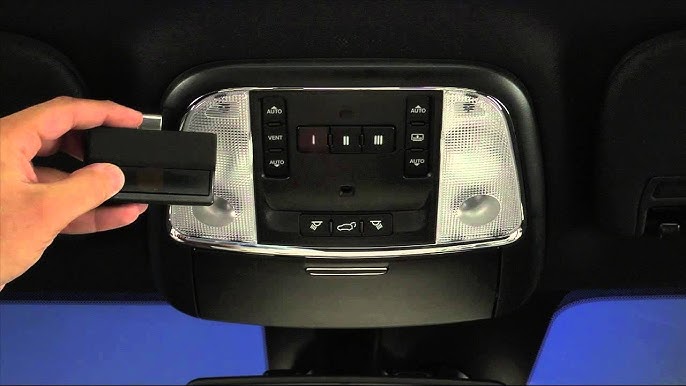
Before diving into buttons and indicators, it is vital to understand what you are actually programming. The 2023 Jeep Grand Cherokee comes equipped with the HomeLink Wireless Control System, typically located in the overhead console near the rearview mirror or integrated directly into the lower portion of the mirror assembly depending on your trim level (Laredo, Limited, Overland, Summit, etc.).
Unlike universal aftermarket remotes, HomeLink acts as a transceiver that mimics the signal of your original handheld remote. According to automotive technology standards, this system supports up to three distinct channels, allowing you to control your primary garage door, a gate, and even exterior lighting or a smart home device simultaneously.
Why Proper Programming Matters
Programming isn’t just about convenience; it is also about security. Modern garage door openers utilize rolling code technology, which changes the access code every time the button is pressed. If you attempt to program using outdated methods meant for fixed-code systems from the early 2000s, the synchronization will fail. Ensuring you follow the correct 2023-specific protocol guarantees that your vehicle communicates securely with your opener’s receiver without compromising your home’s safety.
Pre-Programming Checklist: Safety and Preparation
Safety should always be your first priority when working with automated mechanical systems. Before you begin, please review these critical precautions endorsed by safety organizations and detailed in resources like Wikipedia’s overview of garage door mechanics:
- Clear the Area: Ensure no people, pets, or objects are in the path of the garage door during testing.
- Check Battery Health: A weak battery in your original handheld remote can cause programming failures. Replace it before starting.
- Identify Your Opener Type: Locate the “Learn” or “Smart” button on your garage motor unit. The color matters:
- Yellow/Orange/Purple/Green: Rolling Code (Most common post-1996)
- No Learn Button: Fixed Code (Pre-1996)
- Vehicle Position: Park outside the garage with the ignition in the “ON/RUN” position (engine running is recommended to prevent battery drain).
Expert Tip: For the 2023 Grand Cherokee, do not hold the vehicle buttons down while pressing the handheld remote initially unless instructed. Newer HomeLink modules often require a “quick press” sequence rather than the prolonged holding method used in 2018–2021 models. Always verify your specific owner’s manual addendum if the standard steps below do not yield results.
Step-by-Step: How to Program Garage Door Opener 2023 Jeep Grand Cherokee
Follow these precise instructions for the most common scenario: Rolling Code Garage Door Openers. This covers approximately 90% of residential openers paired with the 2023 Grand Cherokee.
Phase 1: Clear Previous Codes (Recommended)
If you purchased the vehicle used or previously attempted programming unsuccessfully, clear the memory first.
- Press and hold the two outer HomeLink buttons simultaneously.
- Hold for approximately 10 seconds until the indicator light flashes rapidly.
- Release both buttons. The system is now reset.
Phase 2: Train the Vehicle to the Remote
- Sit in the driver’s seat with the ignition ON.
- Hold your original handheld remote 1–3 inches away from the HomeLink buttons.
- Simultaneously press and hold the chosen HomeLink button AND the button on your handheld remote.
- Watch the HomeLink indicator light. It will flash slowly at first, then turn solid or flash rapidly. This indicates the frequency has been captured.
- Release both buttons.
Phase 3: Sync with the Garage Motor (The Critical Step)
This is where most users encounter issues. Precision timing is key.
- Exit the vehicle and go to the garage motor unit.
- Locate the “Learn” or “Smart” button (usually on the back or side panel).
- Press and release the Learn button. You now have 30 seconds.
- Return to the vehicle immediately.
- Firmly press and hold the programmed HomeLink button for 2 seconds, then release.
- Repeat this press-hold-release cycle up to three times within the 30-second window.
- Test the button. The door should activate.
Troubleshooting Table: Common Issues & Solutions
| Symptom | Probable Cause | Solution |
|---|---|---|
| Light never turns solid | Dead remote battery or wrong distance | Replace remote battery; adjust distance between 1–6 inches |
| Solid light but door won’t move | Rolling code sync failed | Re-do Phase 3; ensure Learn button was pressed firmly |
| Works intermittently | Signal interference | Reposition vehicle during programming; check for LED bulb interference |
| Indicator flashes fast continuously | Memory full or error state | Perform factory reset (Phase 1) and restart |
| Door opens but won’t close via HomeLink | Safety sensor misalignment | Check photo-eye sensors at floor level; clean lenses |
Advanced Tips for Optimal Performance
Once you have successfully learned how to program garage door opener 2023 Jeep Grand Cherokee, consider these optimization strategies to maintain reliability:
- LED Bulb Compatibility: Many homeowners upgraded to LED bulbs in their garage openers, unaware that cheap LEDs emit radio frequency interference that blocks HomeLink signals. If your range drops significantly after a bulb change, switch to FCC-compliant “garage door opener safe” LED bulbs.
- Multiple Vehicles: If multiple family members drive different vehicles, program each one individually rather than cloning from another car. Direct-to-motor programming ensures the strongest unique handshake.
- Smart Home Integration: The 2023 Grand Cherokee’s HomeLink can also trigger IFTTT applets or smart plugs. Use the third button to turn on porch lights when you arrive home after sunset.
- Annual Maintenance: Test the auto-reverse safety feature monthly. Place a 2×4 board under the door; it must reverse upon contact. HomeLink does not bypass safety protocols, but mechanical wear can affect performance regardless of the trigger source.
Frequently Asked Questions (FAQ)
1. Can I program my 2023 Jeep Grand Cherokee without the original remote?
Generally, no. You need the original handheld transmitter to transfer the encrypted frequency and seed code to the HomeLink module. If you have lost all remotes, you must purchase a compatible replacement remote from your opener manufacturer or hire a professional locksmith/garage technician to generate a new code pair. Some newer Chamberlain/LiftMaster MyQ systems allow cloud-based provisioning, but this requires prior account setup.
2. Why does my HomeLink work sometimes but not others?
Intermittent operation usually stems from one of three issues: (a) Low vehicle battery voltage affecting transmitter power, (b) Radio frequency interference from nearby electronics or non-compliant LED bulbs, or (c) Partial erasure of the rolling code due to excessive button presses during failed programming attempts. Start by replacing the garage opener’s backup battery and switching to certified LED bulbs.
3. Is HomeLink compatible with all garage door brands?
HomeLink is compatible with virtually all major North American brands manufactured after 1996, including LiftMaster, Chamberlain, Craftsman, Genie, Overhead Door, and Stanley. For European or Asian-market openers, compatibility varies. The 2023 Grand Cherokee uses HomeLink Version 5, which offers broader international frequency support than earlier versions.
4. Do I need to reprogram after changing my garage door opener battery?
No. Changing the battery in the garage motor unit or your handheld remote does not erase the HomeLink memory. However, if you replace the entire logic board or motor unit, you will need to repeat the full programming sequence. Similarly, resetting the opener’s travel limits may temporarily disrupt communication until recalibrated.
5. Can I use HomeLink for apartment or community gates?
Yes, but with caveats. Community gates often use commercial-grade receivers that may require additional authorization or a separate fob clone. Some HOAs prohibit personal vehicle programming for security reasons. Always consult your property management before attempting to program a shared access point to avoid triggering security alerts or violating lease agreements.
6. What if my 2023 Grand Cherokee doesn’t have visible HomeLink buttons?
Certain base trims or fleet-spec vehicles may lack HomeLink hardware entirely. Check your overhead console or mirror housing for the distinctive three-button layout or single-button icon. If absent, verify your VIN against the factory build sheet via Mopar’s portal. Aftermarket HomeLink kits are available but require professional installation to integrate with the CAN bus system properly.
Conclusion
Mastering how to program garage door opener 2023 Jeep Grand Cherokee transforms your daily routine from a minor chore into a seamless experience. By following the structured phases outlined above—clearing old codes, training the vehicle, and synchronizing with the motor—you establish a reliable, secure connection that respects both convenience and safety standards. Remember that patience during the 30-second sync window is often the difference between success and frustration.
Now that your vehicle is fully integrated, take a moment to test the system thoroughly and share this guide with fellow Jeep owners who might be struggling with their own HomeLink setup. Have you discovered a unique tip or encountered an unusual opener brand? Share your experience in the comments below or tag us on social media—we love hearing how our readers optimize their rides! Safe driving and smooth entries ahead.
Leave a Reply