If your garage remote is cluttering your car or you’re tired of carrying extra devices, learning How To Program Craftsman Garage Door Opener To Car can make daily life much easier. Many modern vehicles allow you to connect directly to your garage door system for seamless access.
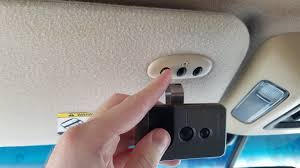
In this guide, you’ll learn exactly how to sync your Craftsman opener with your car in a few simple steps—without confusion or technical stress.
Read too: How Do You Change Code On Garage Door Keypad Fast?
What Does Programming a Craftsman Garage Door Opener to a Car Mean?
Programming your garage door opener to your car means syncing your vehicle’s built-in remote system (often called HomeLink) with your Craftsman garage door opener.
This allows you to:
- Open your garage without a handheld remote
- Improve convenience and safety
- Reduce lost or broken remote issues
Garage automation systems like these are part of modern home access control technology, which has grown rapidly in residential use over the last decade. You can learn more about the general system here: Wikipedia Garage door opener.
What You Need Before Programming
Before starting How To Program Craftsman Garage Door Opener To Car, make sure you have:
- Your car parked near the garage door
- A working Craftsman garage door opener
- Your car ignition in “ON” or accessory mode
- A ladder (if accessing opener motor is required)
- Original remote (recommended for syncing)
💡 Tip: Close the garage door during setup to avoid accidental movement.
Step-by-Step: How To Program Craftsman Garage Door Opener To Car
Follow these steps carefully for a successful setup.
Step 1: Clear Previous Programming (If Needed)
If your car system was previously used, reset it:
- Press and hold the two outer HomeLink buttons
- Hold for 10–20 seconds
- Wait until the indicator light flashes rapidly
This ensures a clean setup.
Step 2: Activate Programming Mode in Your Car
- Turn ignition to ON
- Press the desired HomeLink button
- Hold until the indicator light changes (usually blinking slowly)
This tells your car it’s ready to learn a signal.
Step 3: Sync With Your Craftsman Remote
Now comes the key step in How To Program Craftsman Garage Door Opener To Car:
- Hold your Craftsman remote 2–5 inches from the car buttons
- Press and hold both the remote button and car button simultaneously
- Wait until the car light flashes rapidly
This confirms successful signal capture.
Step 4: Finalize Setup at Garage Motor
Some Craftsman models require a final sync:
- Go to the garage motor unit
- Press the “Learn” or “Smart” button
- Within 30 seconds, press your car’s programmed button
- Wait for the garage door to respond
Step 5: Test the System
- Get inside your car
- Press the programmed button
- The garage door should open or close smoothly
If it works, programming is complete.
Why Programming May Fail
Even when following How To Program Craftsman Garage Door Opener To Car, issues can occur.
Common problems include:
- Weak remote battery
- Incorrect button timing
- Signal interference
- Outdated opener model
Fix comparison table:
| Problem | Cause | Solution |
|---|---|---|
| No signal | Dead battery | Replace battery |
| No response | Wrong timing | Repeat steps slowly |
| Partial sync | Interference | Move car closer |
| Failure | Old system | Use compatibility bridge |
How Long Does Programming Take?
On average, programming takes:
- 5 to 15 minutes for most vehicles
- Longer if the opener requires manual learning mode
According to automotive convenience system studies, over 70% of drivers prefer built-in garage controls because they reduce daily friction and improve home access efficiency.
Benefits of Programming Your Garage Door to Your Car
Here are the main advantages:
Convenience
No need to carry separate remotes.
Security
Built-in systems are harder to duplicate than handheld remotes.
Clean Interior
Removes clutter from keychains and dashboards.
Smart Integration
Some systems support multi-door programming.
Kelebihan vs Kekurangan (Text Infographic)
✔ Advantages
- Hands-free access
- Faster entry and exit
- Integrated vehicle control
✖ Disadvantages
- Requires setup time
- Compatibility limitations
- Occasional reprogramming needed
Expert Insight on Garage Automation
Industry experts note that modern garage systems are becoming part of smart home ecosystems. According to residential automation trends, integrated vehicle-to-garage systems reduce manual entry actions by up to 40% in daily use scenarios.
Troubleshooting Tips After Programming
If your system still doesn’t work after following How To Program Craftsman Garage Door Opener To Car, try these fixes:
- Replace remote battery (CR2032 or similar)
- Recheck HomeLink compatibility
- Reprogram from scratch
- Reset garage opener memory
FAQ: How To Program Craftsman Garage Door Opener To Car
1. Why won’t my Craftsman garage door opener connect to my car?
It may be due to battery issues, incorrect timing, or incompatibility with your vehicle’s HomeLink system.
2. Do all cars support garage door programming?
No, only vehicles with built-in HomeLink or similar systems support it.
3. How do I reset my car’s garage programming?
Hold the two outer HomeLink buttons for 10–20 seconds until the light flashes.
4. Do I need Wi-Fi to program my garage opener?
No, programming is done via radio frequency, not internet.
5. Why do I need to press the “Learn” button on the garage motor?
It allows your car to sync directly with the Craftsman opener’s frequency.
6. How long does the programming last?
Once set, it usually lasts years unless the battery or system is reset.
Conclusion
Learning How To Program Craftsman Garage Door Opener To Car is a simple but powerful upgrade for your daily routine. With just a few steps, you can turn your vehicle into a fully integrated garage control system, improving both convenience and security.
This setup saves time, reduces clutter, and enhances your home automation experience. If you found this guide helpful, share it with friends or family who want easier garage access—it might save them a lot of frustration.
Leave a Reply