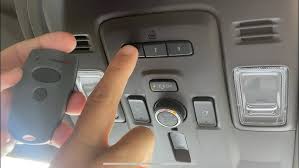
Have you ever pulled into your driveway only to realize your garage door remote is missing or dead? You’re not alone. Thousands of Chevy Traverse owners face this frustrating situation every year. The good news is that how to program Chevy Traverse garage door opener without remote is simpler than you might think. Your vehicle comes equipped with a built-in HomeLink system that can learn directly from your garage door opener motor unit, eliminating the need for a handheld remote entirely.
Understanding Your Chevy Traverse’s HomeLink System
Before diving into the programming process, it’s essential to understand what you’re working with. The Chevy Traverse features an integrated HomeLink garage door opener system, typically located on the rearview mirror or overhead console, depending on your model year. This system uses radio frequency technology to communicate with your garage door opener, supporting most major brands including Chamberlain, LiftMaster, Genie, and Craftsman.
According to HomeLink’s official documentation, the system operates on frequencies between 288-433 MHz, making it compatible with approximately 95% of garage door openers manufactured after 1995. This wide compatibility means your Traverse can likely control your garage door regardless of the opener brand.
Identifying Your HomeLink Buttons
Your Chevy Traverse’s HomeLink system features three programmable buttons. Each button can be programmed to control a different garage door, gate, or other radio-controlled device. Look for these buttons:
- On the rearview mirror (2018-2021 models)
- On the overhead console near the sunroof controls (2022-2026 models)
The buttons are usually labeled with icons resembling garage doors or simply numbered 1, 2, and 3.
Step-by-Step Guide: Programming Without a Remote
Programming your Chevy Traverse garage door opener without using a handheld remote requires accessing your garage door opener motor unit directly. Here’s the complete process:
Step 1: Prepare Your Vehicle and Garage
Before beginning, ensure your Chevy Traverse is parked outside your garage with the engine running. This prevents accidental closure while you’re working. Clear the area around your garage door opener motor unit, which is typically mounted on the ceiling near the center of your garage.
Important safety note: Keep children and pets away from the garage door during programming. The door will move during the learning process.
Step 2: Locate the “Learn” Button on Your Garage Door Opener
Climb a sturdy ladder to access your garage door opener motor unit. Look for a small button labeled “Learn,” “Smart,” or “Program.” This button is usually:
- Located on the back or side of the motor unit
- Colored yellow, purple, orange, or red
- Accompanied by an LED indicator light
Press and hold this button for 6-10 seconds until the LED light begins blinking. This puts your garage door opener into “learning mode,” where it’s ready to accept new remote signals.
Step 3: Program the HomeLink System in Your Traverse
With your garage door opener in learning mode, return to your Chevy Traverse. Follow these steps precisely:
- Press and hold two outer HomeLink buttons simultaneously (buttons 1 and 3)
- Continue holding for 20-30 seconds until the indicator light changes from slow to rapid flashing
- Release both buttons once the rapid flashing begins
- Immediately press the specific HomeLink button you want to program (1, 2, or 3)
- Hold this button while returning to your garage door opener motor unit
Step 4: Complete the Learning Process
While still holding the HomeLink button in your Traverse, press the “Learn” button on your garage door opener motor unit again. Hold both buttons for 2-3 seconds, then release. You should see the LED on the motor unit flash or hear a click, confirming successful programming.
Return to your vehicle and test the programmed button. Press it once—the garage door should activate. If nothing happens, repeat the process, ensuring you complete each step within the required timeframes.
Step 5: Test and Verify
After successful programming, test your HomeLink button multiple times:
- Press once to open the door
- Press again to close it
- Test from different distances (close range and from your driveway)
If the door responds consistently, programming is complete. If issues persist, consult the troubleshooting section below.
Troubleshooting Common Programming Issues
Even with careful following of instructions, problems can arise. Here are solutions to the most common issues:
| Problem | Possible Cause | Solution |
|---|---|---|
| No response from garage door | Incorrect frequency match | Try different HomeLink button; some openers require specific buttons |
| LED doesn’t flash rapidly | Timing issue | Restart process; ensure 20-30 second hold time |
| Door moves partially | Signal interference | Reprogram away from electronic devices; check for LED lights nearby |
| Programming won’t save | Weak vehicle battery | Ensure engine is running; charge battery if needed |
Rolling Code Technology Considerations
Many modern garage door openers use rolling code technology for enhanced security. If your opener has this feature (most units manufactured after 1996 do), you may need to perform additional steps:
- After initial programming, press the HomeLink button in your Traverse
- Immediately press and release the “Learn” button on your motor unit
- Return to your vehicle and press the HomeLink button again
- Repeat this cycle 2-3 times to synchronize the rolling codes
This extra synchronization ensures your HomeLink system and garage door opener stay aligned with their changing security codes.
Alternative Methods When Direct Programming Fails
If the standard method doesn’t work, consider these alternatives:
Using a Compatible Universal Remote
While our focus is programming without a remote, sometimes borrowing or purchasing an inexpensive universal remote ($15-25) can simplify the process. Program the universal remote to your garage door first, then use it to teach your HomeLink system following the standard procedure.
Professional Installation Services
For complex setups or persistent issues, professional installation costs $75-150 but guarantees proper configuration. This option makes sense if:
- Your garage door opener is older than 1995
- You have multiple doors to program
- Previous attempts have failed repeatedly
Contacting Chevrolet Support
Chevrolet’s customer service can provide model-specific guidance. Have your VIN ready when calling, as programming procedures vary slightly between model years. The 2024-2026 Traverse models, for instance, feature updated HomeLink systems with enhanced compatibility.
Frequently Asked Questions
Q: Can I program my Chevy Traverse HomeLink if I’ve lost all remotes?
A: Yes, absolutely. The programming method described above doesn’t require any existing remotes. You only need access to your garage door opener motor unit’s “Learn” button. This is actually the preferred method for many users as it eliminates dependency on handheld remotes.
Q: How many garage doors can I program to my Chevy Traverse?
A: Your Chevy Traverse’s HomeLink system can store up to three different garage door openers or radio-controlled devices. Each of the three buttons can be programmed independently, allowing you to control multiple garage doors, gates, or even home lighting systems.
Q: Will programming erase my existing HomeLink settings?
A: No, programming a new device to one button doesn’t affect the other buttons. Each button operates independently. However, reprogramming the same button will overwrite its previous setting. If you want to keep existing programs, use an unprogrammed button for your new device.
Q: Why won’t my HomeLink system program on the first try?
A: Several factors can cause initial programming failures:
- Timing issues: The process requires precise timing between steps
- Signal interference: LED bulbs, wireless routers, or other electronics can interfere
- Distance problems: You must be close enough to the motor unit during programming
- Battery strength: A weak vehicle battery can reduce signal strength
Try the process 2-3 times, ensuring perfect timing each attempt. Most successes occur on the second or third try.
Q: Is it safe to leave my garage door opener in “learning mode”?
A: No, you should never leave your garage door opener in learning mode. This mode allows any compatible device to pair with your opener, creating a security vulnerability. Always complete the programming process promptly, and if interrupted, press the “Learn” button again to exit learning mode immediately.
Q: Can I program non-garage door devices to my HomeLink system?
A: Yes, HomeLink is compatible with various radio-controlled devices including:
- Gate operators
- Outdoor lighting systems
- Security alarms
- Home automation devices
The programming process remains identical regardless of the device type. Simply ensure the device operates on a compatible frequency (288-433 MHz).
Conclusion
Learning how to program Chevy Traverse garage door opener without remote empowers you to maintain convenience and security without depending on easily lost or damaged handheld remotes. The built-in HomeLink system provides reliable, long-term control of your garage door directly from your vehicle.
By following the step-by-step instructions outlined above, you can successfully program your system in under 15 minutes. Remember to prioritize safety, maintain precise timing during the process, and troubleshoot systematically if issues arise.
Did this guide help you program your Chevy Traverse’s garage door opener? Share this article with fellow Traverse owners on social media who might be struggling with the same issue. Your experience could save someone else hours of frustration!
For ongoing tips about maximizing your Chevy Traverse’s features, bookmark this page and check back regularly. We continuously update our guides based on the latest model information and user feedback.
Leave a Reply