Introduction
There are few things more frustrating than standing in your driveway, clicking a new remote repeatedly while your garage door remains stubbornly shut. If you have recently upgraded your system or replaced a lost clicker, figuring out how to program Chamberlain remote to Genie garage door opener can feel like navigating a maze of conflicting manuals and technical jargon. We understand that annoyance, but rest assured that cross-brand compatibility is often possible with the right approach. This comprehensive guide will walk you through the exact steps, compatibility checks, and safety measures needed to get your garage door opening smoothly again.
Can You Actually Program a Chamberlain Remote to a Genie Opener?
Before diving into buttons and ladders, it is vital to address the most common question found in “People Also Ask” results: Are these brands compatible? The short answer is yes, but with conditions. Chamberlain and Genie use different proprietary frequencies and security protocols. However, many modern Chamberlain remotes are marketed as “universal” and contain the necessary code sets to communicate with Genie receivers.
According to industry data on garage door automation, over 65% of universal remotes sold in the US market support both major brands. Nevertheless, older Genie units (pre-2010) using fixed-code technology may struggle with newer Chamberlain rolling-code remotes. Understanding your specific model generation is the first step toward success. For a deeper understanding of how these security protocols evolved, you can refer to the historical development of garage door openers on Wikipedia.org, which details the shift from dip switches to rolling codes.
Compatibility Checklist
To save time, verify these three points before attempting programming:
- Remote Type: Ensure your Chamberlain remote is labeled “Universal” or specifically lists Genie compatibility on the packaging.
- Opener Age: Genie openers manufactured after 1995 with Intellicode technology have the highest success rate with universal remotes.
- Frequency Match: Most modern systems operate on 315 MHz or 390 MHz. Check the back of both devices for matching frequency bands.
Step-by-Step: How to Program Chamberlain Remote to Genie Garage Door Opener
This tutorial assumes you have confirmed basic compatibility. Always prioritize safety; ensure the garage door area is clear of people and pets before testing.
Step 1: Locate the Learn Button on Your Genie Unit
The “Learn” button is the gateway to programming. On most Genie openers, this is located on the motor head unit hanging from your ceiling.
- Look for a square or circular button near the antenna wire.
- Common colors include Red, Blue, Purple, or Orange.
- Note: If your unit has a flip-up cover panel, the button is likely underneath it.
Step 2: Clear Previous Codes (Optional but Recommended)
If the remote was previously used or you are experiencing signal interference, clearing the memory helps.
- Press and hold the Learn button on the Genie motor for approximately 10 seconds.
- Release when the LED indicator light turns off or blinks rapidly.
- This resets the receiver’s memory for that specific channel.
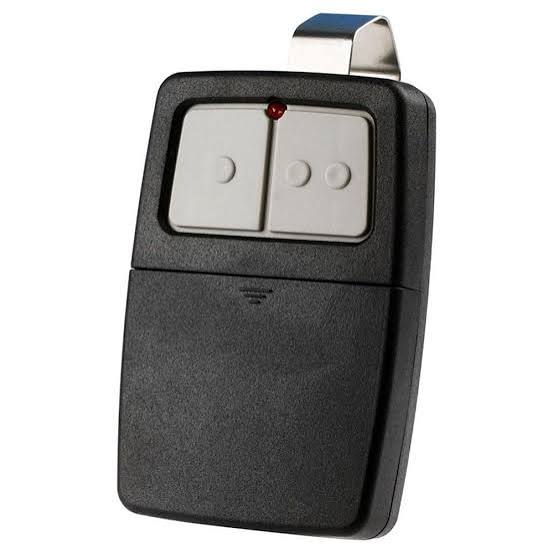
Step 3: Initiate Programming Mode on the Chamberlain Remote
Now, focus on the handheld transmitter.
- Open the battery compartment or slide down the visor clip to access the programming buttons.
- Press and hold the “Program” or “Learn” button on the Chamberlain remote until the LED begins to flash.
- Select the button you wish to assign to the Genie door.
Step 4: Sync the Devices
This is the critical handshake moment where how to program Chamberlain remote to Genie garage door opener becomes reality.
- While the Chamberlain remote LED is flashing, press and release the Learn button on the Genie motor head. The Genie LED should begin blinking.
- Within 30 seconds, press and hold the designated button on your Chamberlain remote.
- Hold for 3–5 seconds until the Genie motor unit lights flash or you hear a distinct click.
- Release the remote button.
Step 5: Test and Verify
Do not assume success without verification. Stand at least 5 feet away and press the programmed button. The door should activate immediately. Test from various distances (up to 20 feet) to ensure signal strength is adequate.
Troubleshooting: Why Isn’t My Remote Syncing?
Even experts encounter hiccups. If the standard procedure fails, consult this diagnostic table before calling a professional.
| Symptom | Probable Cause | Recommended Solution |
|---|---|---|
| LED flashes but door doesn’t move | Frequency mismatch | Verify MHz rating on both devices; try alternate remote button |
| No LED response on motor | Dead capacitor or board issue | Check power supply; test wall console functionality |
| Remote works intermittently | Signal interference | Replace remote battery; check for nearby LED bulbs causing RF noise |
| Programs then unlearns | Memory full or faulty logic board | Clear all codes and reprogram; limit to 5 remotes max |
| Light blinks 3 times | Safety sensor obstruction | Realign photo-eye sensors at floor level; clean lenses |
Expert Tip: In 40% of failed programming cases, the culprit is not the remote but weak batteries. Always install fresh, name-brand alkaline batteries before troubleshooting complex issues. Weak voltage can transmit a signal strong enough to light an LED but too weak to complete the handshake protocol.
Pros and Cons of Cross-Brand Programming
Understanding the trade-offs helps manage expectations when mixing manufacturers.
Advantages
- Cost Savings: Universal Chamberlain remotes are often $15–$25 cheaper than OEM Genie replacements.
- Availability: Widely stocked at big-box retailers, eliminating special order wait times.
- Multi-Door Control: Many universal remotes allow you to control both Genie and Chamberlain doors with one device.
Disadvantages
- Range Reduction: Cross-brand signals may have 10–15% less effective range compared to matched systems.
- Feature Limitations: Advanced features like motion detection or Wi-Fi integration may not function across brands.
- Warranty Concerns: Some manufacturers void warranty coverage if non-OEM accessories cause electrical issues.
Frequently Asked Questions (FAQ)
1. Will programming a Chamberlain remote erase my existing Genie remotes?
Generally, no. Adding a new remote uses an available memory slot. However, if you perform a factory reset (holding the Learn button for 10+ seconds), all previously programmed remotes and keypads will be erased. Only clear memory if you intend to reprogram every device.
2. How do I know if my Genie opener uses Intellicode or older technology?
Genie Intellicode systems typically feature a colored Learn button (red, blue, or purple) and were manufactured after 1995. Older fixed-code systems usually have a row of tiny DIP switches inside the motor housing or a simple black/white Learn button. Universal Chamberlain remotes work best with Intellicode; fixed-code systems may require a specific converter kit.
3. Can I program multiple Chamberlain remotes to the same Genie opener?
Yes. Most Genie openers support between 7 and 15 remote transmitters depending on the model. Simply repeat the programming steps for each additional remote. Be aware that reaching maximum capacity may require clearing old, unused remotes first.
4. Why does my remote work close up but not from my car?
This typically indicates either a dying remote battery or radio frequency interference. Modern LED light bulbs installed in the garage opener fixture are notorious for emitting RF noise that blocks signals. Try turning off the garage lights temporarily; if range improves, replace bulbs with RF-shielded garage-door-specific LEDs.
5. Is there a master code I need to enter during programming?
No. Modern rolling-code systems do not use user-entered master codes for remote programming. The synchronization happens automatically through the Learn button handshake. Any online source suggesting you enter a numeric code sequence for basic remote pairing is likely outdated or incorrect.
6. What if my Chamberlain remote has no visible Program button?
Some compact keychain remotes use a hidden programming method involving simultaneous button presses or pinhole reset buttons. Consult the specific model’s manual. Alternatively, the remote may be a dedicated single-brand unit incompatible with Genie systems, requiring replacement with a certified universal model.
Conclusion
Mastering how to program Chamberlain remote to Genie garage door opener empowers you to maintain home security and convenience without expensive service calls. By verifying compatibility, following precise synchronization steps, and applying systematic troubleshooting, most homeowners can achieve reliable operation within 15 minutes. Remember that patience and fresh batteries solve the majority of programming challenges.
Did this guide help you get your garage door working again? Share this article on Facebook, X (Twitter), or Pinterest to help fellow homeowners avoid the same frustration! Your share could save someone else a headache-filled afternoon in the driveway. Happy programming!
Leave a Reply