If you’re tired of carrying a separate garage remote every time you drive, learning How To Program Chamberlain Garage Door Opener With Car can make your daily routine much easier. Many drivers struggle with syncing their vehicle buttons to the garage system, especially during first-time setup.
In this guide, you’ll learn a simple, step-by-step method to connect your Chamberlain garage door opener directly to your car using built-in systems like HomeLink.
Read too: Tc1 Tricode Garage Door Opener Remote W/ Clip Chamberlain: Complete Guide
What Does It Mean to Program a Garage Door Opener With a Car?
Programming your garage door opener with your car means linking your vehicle’s built-in remote system to your Chamberlain garage motor.
Most modern cars use a system called HomeLink, which allows you to control garage doors, gates, and even home security systems directly from your dashboard.
According to general wireless automation principles described by Wikipedia, integrated vehicle systems use radio frequency signals to securely communicate with external devices like garage door openers.
Why Program Chamberlain Garage Door Opener With Your Car?
Before learning How To Program Chamberlain Garage Door Opener With Car, here are the benefits:
Key Advantages:
- No need for separate remote
- Increased convenience while driving
- Fewer lost or misplaced remotes
- Faster garage access
- Cleaner car interior (no extra devices)
How To Program Chamberlain Garage Door Opener With Car (HomeLink Method)
This is the most important section. Follow each step carefully.
Step 1: Turn On Your Car
- Insert key or press start button
- Turn ignition ON (do not start engine in some models)
- Close garage door for safety
Step 2: Clear Existing HomeLink Memory (Optional)
If this is your first setup or you are replacing an old system:
- Hold the two outer HomeLink buttons for 10–20 seconds
- Wait until indicator light flashes
👉 This resets previous programming.
Step 3: Press HomeLink Button in Your Car
- Choose the button you want to assign
- Hold it for 2–3 seconds
- The indicator light will start blinking slowly
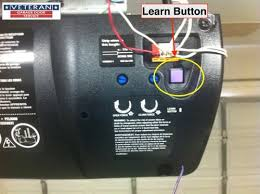
Step 4: Activate Chamberlain Learn Button
Go to your garage motor unit:
- Locate the Learn button
- Press and release it once
- You now have 30 seconds to complete pairing
Step 5: Sync Car With Garage Opener
Back in your car:
- Press and hold the HomeLink button again
- Hold for 2–5 seconds
- Wait for garage light to flash or click
This confirms successful pairing.
Step 6: Test the System
- Wait 10 seconds
- Press HomeLink button again
- Verify garage door opens or closes
How Long Does It Take to Program Chamberlain With a Car?
On average:
- Basic setup: 5–10 minutes
- First-time HomeLink setup: 10–15 minutes
- Troubleshooting cases: up to 20 minutes
Most users complete it quickly once timing is understood.
Compatibility: Which Cars Work With Chamberlain?
Most modern vehicles support HomeLink, including:
- Toyota
- Honda
- Ford
- BMW
- Mercedes-Benz
- Chevrolet
Newer models often include built-in compatibility without extra hardware.
Car Programming vs Remote Control
| Feature | Car System (HomeLink) | Remote Control |
|---|---|---|
| Convenience | High | Medium |
| Battery Needed | No | Yes |
| Setup Complexity | Medium | Easy |
| Portability | Built-in | External device |
Common Problems When Programming Chamberlain With Car
1. HomeLink Not Syncing
- Incorrect timing during Learn mode
- Old memory interference
2. Garage Door Not Responding
- Weak signal from car module
- Misaligned Learn button activation
3. Button Works Intermittently
- Incomplete programming
- Signal interference
Expert Insight: Why Vehicle Integration Matters
Automotive experts note that integrated systems like HomeLink reduce driver distraction by eliminating the need for handheld remotes. This improves convenience and safety during daily commuting.
Security Benefits of Chamberlain Rolling Code System
Chamberlain systems use rolling code technology, which changes the access code every time the garage is activated.
This reduces the risk of signal copying and unauthorized access, making it a secure option for residential homes.
How To Reset Car Garage Programming
If setup fails:
Reset Steps:
- Hold outer HomeLink buttons for 10–20 seconds
- Wait for indicator light to reset
- Reprogram from start
This clears all stored garage connections.
Maintenance Tips for Smooth Operation
To ensure long-term performance:
- Test system monthly
- Keep car buttons clean
- Replace garage remote battery yearly
- Ensure garage sensors are aligned
FAQ: How To Program Chamberlain Garage Door Opener With Car
1. How do I program my Chamberlain garage door opener with my car?
Press the HomeLink button in your car, activate the garage Learn button, and sync within 30 seconds.
2. Why is my car not connecting to the garage opener?
Most likely due to timing issues, incompatible system, or incomplete reset.
3. Do all cars support Chamberlain garage programming?
No, only vehicles with HomeLink or similar built-in systems support direct programming.
4. Do I need Wi-Fi to connect my car to garage opener?
No, this process uses radio frequency signals, not internet.
5. How many garage doors can I program in my car?
Most systems allow up to 3 doors depending on vehicle model.
6. How do I know if programming was successful?
If the garage door responds when pressing the car button, setup is complete.
Conclusion
Learning How To Program Chamberlain Garage Door Opener With Car makes daily life easier, safer, and more convenient. With just a few simple steps, you can eliminate the need for a separate remote and control your garage directly from your vehicle.
This modern integration saves time and enhances security for everyday use.
If this guide helped you, feel free to share it with friends or family who want to simplify their garage access system.
Leave a Reply