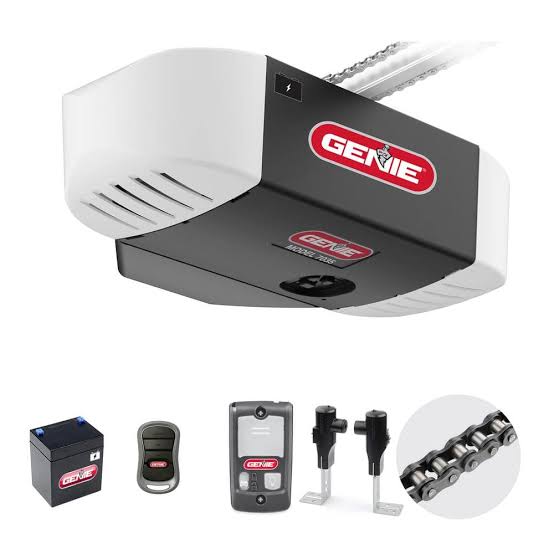
There is nothing quite as frustrating as standing in your driveway with groceries in hand, only to realize your garage door remote isn’t syncing with your opener. If you are struggling to get your system working, learning how to program a Genie Silentmax 1000 garage door opener is the essential first step to restoring convenience and security to your home. We understand that technical manuals can be confusing, so we have simplified the process into clear, actionable steps that anyone can follow safely and effectively.
Understanding Your Genie Silentmax 1000 System
Before diving into button presses, it is vital to understand what makes the Silentmax 1000 unique. This model is renowned for its quiet operation and reliability, but like all garage door openers, it relies on specific radio frequencies and rolling code technology to communicate securely.
The Silentmax 1000 typically operates on dual-frequency technology (315 MHz and 390 MHz) to prevent interference. When you program a remote or keypad, you are essentially introducing a new digital handshake between the transmitter and the motor head unit. According to industry safety standards, ensuring your system is correctly programmed also ensures that safety sensors and auto-reverse mechanisms remain active, protecting your family and pets from accidental injury.
Key Components You Will Need
- The Motor Head Unit: Located on the ceiling of your garage.
- A Compatible Remote: Genie G3T-R or similar Intellicode remotes.
- Wireless Keypad (Optional): Genie GK-R or compatible model.
- A Stepladder: Safety first; never stand on unstable furniture.
- Fresh Batteries: Weak batteries are the #1 cause of programming failure.
How Do I Program a Remote to My Genie Silentmax 1000?
This is the most common query homeowners have. The process utilizes the “Learn Button” located on the motor head. Follow these precise steps to ensure a successful sync.
Step-by-Step Remote Programming Guide
- Locate the Learn Button: Find the square “Program” button and the round “Learn” button on the motor head. On the Silentmax 1000, these are usually located under the light lens cover or on the back panel near the antenna wire.
- Initiate Programming Mode: Press and release the square Program button. The round LED indicator will turn blue. Then, press and release the round Learn button. The LED will now flash purple (or red, depending on the specific board revision). Note: You have approximately 30 seconds to complete the next step before the system times out.
- Transmit the Signal: Stand at least 4 feet away from the motor. Press and hold the button on your remote that you wish to program. Hold it until the LED on the motor head stops flashing and stays solid, then release.
- Confirm the Sync: Press the same remote button again. The LED should turn off. Press it a third time to test the door operation. The door should activate smoothly.
Pro Tip: If the LED does not change color or the door does not respond, replace the remote battery immediately. Even if the LED on the remote lights up, the voltage may be too low to transmit the programming signal to the ceiling unit.
How Do I Program a Wireless Keypad to the Silentmax 1000?
Adding a keypad provides keyless entry, which is perfect for kids coming home from school or service workers. The programming sequence differs slightly from the remote.
Keypad Setup Instructions
- Prepare the Keypad: Slide down the battery compartment cover and pull the protective tab to activate the battery. Ensure the keypad is within range of the opener during programming.
- Enter Factory PIN: Press
3,5,7on the keypad, then press the Open/Close button. This wakes up the keypad’s receiver. - Set Your Personal PIN: Enter your desired 3-to-4 digit PIN, then press the Open/Close button again.
- Sync with Motor: Go to the motor head and repeat the “Press Program, then Press Learn” sequence described in the remote section above. Once the LED is flashing, return to the keypad and press the Open/Close button.
- Final Verification: The motor LED should stop flashing. Test by entering your new PIN and pressing Open/Close.
| Feature | Remote Programming | Keypad Programming |
|---|---|---|
| Trigger Button | Remote Button | Open/Close Button |
| Distance Required | Minimum 4 feet | Within 10 feet recommended |
| LED Confirmation | Solid Light → Off | Solid Light → Off |
| Time Limit | ~30 Seconds | ~30 Seconds |
| Primary Use Case | Vehicle Entry | Keyless Exterior Access |
Why Is My Genie Silentmax 1000 Not Programming? Troubleshooting Tips
Even professionals encounter hiccups. If you have followed the steps above without success, consider these diagnostic checks before calling a technician.
Check for Radio Frequency Interference
Modern homes are filled with devices that emit RF signals. LED light bulbs installed in the garage opener fixture are notorious culprits. If you recently switched to non-Genie branded LED bulbs, they may be blocking the receiver. Try removing the bulbs temporarily and reprogramming. If it works, you need to purchase Genie-specific LED bulbs designed to shield against interference.
Inspect the Antenna Wire
The Silentmax 1000 uses a hanging antenna wire. Ensure this wire is fully extended and not coiled, cut, or touching any metal surfaces. A damaged antenna can reduce reception range to just a few inches, making programming impossible even when standing directly underneath.
Reset the System Memory
If the memory is corrupted, a factory reset may be necessary. Press and hold the Program button for approximately 10 seconds until the LED turns off and then back on. This clears all previously programmed remotes and keypads. Warning: You will need to reprogram every device after performing this reset.
Frequently Asked Questions (FAQ)
1. How many remotes can I program to a Genie Silentmax 1000?
The Genie Silentmax 1000 can store up to seven different transmitters. This includes a combination of handheld remotes, wireless keypads, and HomeLink systems in vehicles. If you attempt to program an eighth device, the oldest one in memory will be overwritten.
2. Can I use a universal remote with the Silentmax 1000?
Yes, but compatibility varies. Universal remotes must specifically list “Genie Intellicode” compatibility. Standard fixed-code universal remotes will not work because the Silentmax 1000 uses rolling code security technology that changes the access code with every use to prevent hacking.
3. How often should I reprogram my garage door opener?
You generally do not need to reprogram unless you experience issues. However, security experts recommend clearing and reprogramming your system if you move into a new home, lose a remote, or suspect unauthorized access. This ensures old codes cannot be used to enter your property.
4. What does a flashing red LED mean during programming?
A flashing red LED typically indicates that the system has timed out or encountered an error. It can also signify that the travel limits need adjustment. If this occurs during programming, simply restart the sequence from the beginning. If it persists, consult the manual for limit setting procedures.
5. Is it safe to program the opener myself?
Absolutely, provided you follow safety guidelines. Never bypass safety sensors or attempt to adjust spring tension yourself. Programming is purely electronic. However, always keep hands and tools clear of moving parts, and ensure the area below the door is clear of people and objects during testing.
6. Does weather affect programming performance?
Extreme cold can temporarily reduce battery output in both remotes and keypads. If you are programming in winter and having trouble, warm the remote in your pocket for five minutes before attempting the sync. Moisture damage to exterior keypads can also cause failure; inspect the rubber seal if problems arise after heavy rain.
Conclusion
Mastering how to program a Genie Silentmax 1000 garage door opener empowers you to maintain your home’s security and convenience without unnecessary service calls. By following the structured steps for remotes and keypads, checking for common interference issues, and understanding your system’s capacity, you can ensure reliable daily operation. Remember, a properly programmed opener is a cornerstone of modern home safety.
Did this guide help you get your garage door working again? Share this article on social media to help friends and neighbors who might be stuck in their driveways! Your share could save someone hours of frustration and make their day a little smoother. Happy programming!
Leave a Reply