Introduction
Is your garage door keypad refusing to open the door, or did you just move into a new home and need to change the entry code for security? You are not alone; thousands of homeowners face this minor but frustrating issue every year. Knowing how to reprogram a Genie garage door opener keypad is a crucial skill that saves you from costly service calls and ensures your home remains secure. In this guide, we will walk you through the process step-by-step, ensuring you can regain access quickly and safely.
Why Reprogramming Your Genie Keypad Is Essential
Before we dive into the technical steps, it is important to understand why maintaining your keypad’s programming is vital. A garage door is often the largest entry point to a home, making it a primary target for intruders if left unsecured.
According to recent home security studies, over 30% of burglaries occur through unlocked or poorly secured entry points, including garages. By regularly updating your keypad code, you mitigate the risk of unauthorized access, especially if you have recently had contractors working on your home or if you suspect an old code has been compromised.
Furthermore, Genie openers are known for their durability, but electronic components can sometimes lose synchronization due to power surges or battery degradation. Reprogramming refreshes the connection between the keypad and the motor unit, ensuring smooth operation.
Tools and Preparation: What You Need Before Starting
Successful reprogramming requires preparation. Rushing the process can lead to errors that lock you out temporarily. Here is what you need:
- A Stable Ladder: Ensure it is tall enough to reach the motor unit comfortably.
- Fresh Batteries: If your keypad is wireless, replace the batteries before starting. Weak batteries cause signal failure.
- The Owner’s Manual: While we provide a universal guide, specific models (like the Genie Intellicode vs. older DIP switch models) may have slight variations.
- A Helper (Optional): Having someone hold the ladder or test the door from the outside can speed up the process.
Safety Note: Always keep your hands and fingers clear of moving parts. Never attempt to reprogram the door while it is in motion.
Step-by-Step Guide: How To Reprogram A Genie Garage Door Opener Keypad
Most modern Genie garage door openers use the “Intellicode” technology, which uses rolling codes for enhanced security. The following steps apply to the majority of Genie models manufactured after 1997.
Step 1: Locate the “Learn” Button on the Motor Unit
The first step is accessing the brain of your garage door system. Climb your ladder and locate the motor head unit attached to the ceiling.
Look for a small button labeled “Learn” or “Program.” It is typically located near the antenna wire (a hanging yellow or purple wire). The button color varies by model:
- Purple: Common in newer Intellicode models.
- Red/Orange: Found in older Intellicode units.
- Green: Rare, usually indicates very old models.
Note: If you see a row of tiny switches instead of a button, you have an older DIP switch model. These require matching physical switches on both the remote and the motor, not digital programming.
Step 2: Clear the Old Code (Optional but Recommended)
If you are reprogramming because of security concerns, you should clear the memory first. Press and hold the Learn button for approximately 10 seconds until the indicator LED light turns off. This erases all previously programmed remotes and keypads. You will need to reprogram all your devices after this step.
If you are simply adding a new keypad or fixing a glitch, you can skip this clearing step.
Step 3: Initiate Programming Mode
Press the Learn button once briefly. You do not need to hold it. The indicator LED light on the motor unit will illuminate or begin to blink. This signals that the opener is now in “learning mode” and is waiting to receive a new signal.
You typically have 30 seconds to complete the next step before the unit times out. If the light goes out, press the Learn button again to restart the window.
Step 4: Enter the New Code on the Keypad
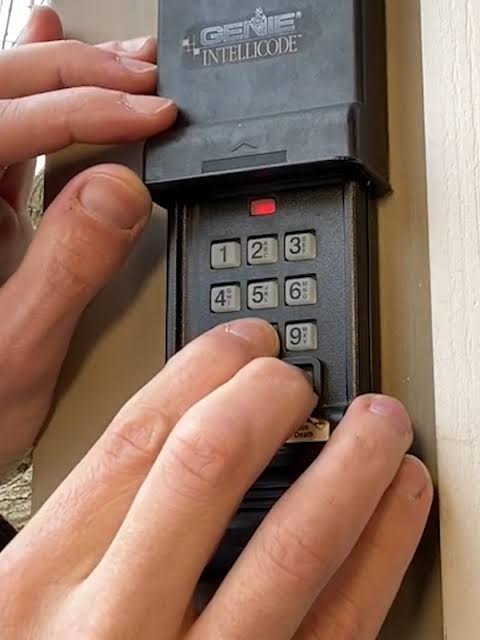
Walk over to your wireless keypad. Enter your desired PIN code. For security, avoid obvious numbers like “1234” or your birth year. A 4-digit code is standard, but some Genie models allow up to 8 digits.
After entering the numbers, press and hold the Enter or Send button on the keypad. Keep holding it until you see the lights on the keypad flash or hear a click from the motor unit.
Step 5: Test the Connection
Once the motor unit’s light blinks or turns off, the programming is complete. Lower your ladder and test the keypad from outside the garage. Enter your new code and press Enter. The door should activate immediately.
If the door does not respond, repeat Steps 3 and 4, ensuring you are within range of the antenna.
Troubleshooting Common Issues
Even with careful execution, things can go wrong. Here are the most common problems and their solutions.
| Issue | Possible Cause | Solution |
|---|---|---|
| Keypad Light Doesn’t Flash | Dead Batteries | Replace batteries with high-quality alkaline ones. |
| Motor Unit Doesn’t Respond | Out of Range | Move closer to the motor unit during programming. |
| Door Moves Then Stops | Safety Sensor Blocked | Check the sensors near the floor for dirt or obstruction. |
| Code Not Accepted | Wrong Mode | Ensure you pressed the “Learn” button before entering the code. |
Understanding the Antenna Wire
The antenna wire hanging from your Genie motor is critical for signal reception. If it is tucked behind the metal casing or wrapped tightly, the signal strength drops significantly. Ensure the wire hangs freely downward. For more technical details on radio frequency safety and standards, you can refer to general guidelines on Wikipedia.
Advanced Tips for Better Security
Reprogramming is just the first step in securing your garage. Consider these additional measures:
- Change Codes Regularly: Update your PIN every 6–12 months.
- Use Vacation Mode: If your Genie model supports it, enable vacation mode to disable all remote access while you are away.
- Inspect Physical Security: Ensure the emergency release cord is not accessible from the outside, as thieves can use a coat hanger to pull it and open the door manually.
FAQ Section
Q1: Can I reprogram my Genie keypad without the original remote?
A: Yes, you do not need the original handheld remote to program a keypad. The keypad communicates directly with the motor unit’s “Learn” button. However, if you cleared the memory, you will need to reprogram your handheld remotes separately using the same Learn button process.
Q2: What should I do if I forgot my current keypad code?
A: If you cannot access the garage because you forgot the code, you must clear the memory. Use the manual release cord to open the door manually, then follow Step 2 in our guide to hold the “Learn” button for 10 seconds. This resets the system, allowing you to set a brand-new code.
Q3: Why does my Genie keypad work intermittently?
A: Intermittent issues are usually caused by weak batteries or radio frequency interference. Replace the batteries first. If the problem persists, check for nearby sources of interference, such as LED light bulbs in the garage opener fixture, which can sometimes block signals. Replacing them with incandescent bulbs often solves this.
Q4: Is it possible to program two different codes for the same keypad?
A: Most standard Genie wireless keypads only store one user code at a time. If you need multiple users to have different codes, you may need to purchase additional keypads or upgrade to a smart garage hub that allows for multiple user profiles via a smartphone app.
Q5: How long does the programming mode last?
A: Once you press the “Learn” button on the motor unit, you have approximately 30 seconds to enter the code on the keypad. If you take longer than this, the unit will exit learning mode, and you will need to press the Learn button again to restart the process.
Conclusion
Learning how to reprogram a Genie garage door opener keypad is a straightforward task that empowers you to maintain control over your home’s security. By following the five steps outlined above—locating the Learn button, initiating programming mode, and entering your new PIN—you can resolve access issues in minutes.
Remember, a secure garage is a safe home. Don’t wait for a security breach to change your code. Take proactive steps today to ensure your family’s peace of mind.
Did you find this guide helpful? Share this article with your neighbors or on social media to help others secure their homes. If you have any questions or unique Genie models, leave a comment below!
Leave a Reply