Introduction
There is nothing quite as frustrating as standing in your driveway with a new remote, only to realize you have no idea how to program a Genie garage door remote model GICT390. Whether you have just moved into a new home, replaced a lost clicker, or are upgrading your security system, getting that seamless entry is a top priority for any US homeowner. Fortunately, this specific Intellicode remote is designed for user-friendly setup, and with the right guidance, you can sync it to your opener safely and correctly without calling a technician.
Understanding the Genie GICT390 Intellicode Remote
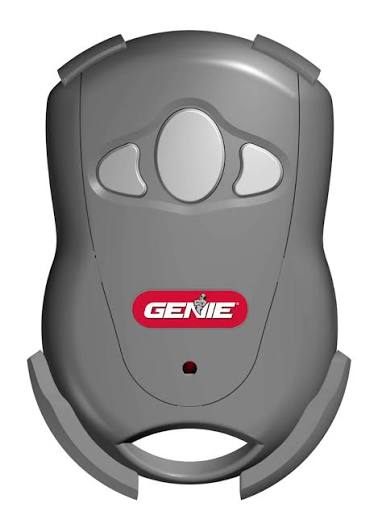
Before diving into the buttons, it is vital to understand what makes this device unique. The GICT390 is not a generic universal remote; it is a specialized Intellicode rolling code transmitter. Unlike older fixed-code remotes that use a static frequency, Intellicode technology changes the access code every time you press the button. This prevents “code grabbers” from intercepting your signal and opening your garage, a security standard that has become the industry norm since the mid-1990s.
According to technical documentation regarding radio control systems, rolling code systems utilize a pseudo-random number generator to ensure that even if a signal is recorded, it cannot be replayed to gain unauthorized access. This means that when you learn how to program a Genie garage door remote model GICT390, you are not just pairing a device; you are establishing a secure, encrypted handshake between your handheld transmitter and the overhead motor unit.
Key Specifications at a Glance
| Feature | Specification |
|---|---|
| Model Number | GICT390 / GIT-390 |
| Frequency | 315 MHz & 390 MHz Dual Band |
| Security Tech | Intellicode Rolling Code |
| Button Count | 3 Programmable Buttons |
| Battery Type | CR2032 Lithium Coin Cell |
| Compatibility | Genie Openers (1995–Present) |
Pre-Programming Checklist: Safety and Preparation
Professional installers never skip the prep work. Before you climb a ladder or start pressing buttons, ensure you have completed the following steps to avoid injury or programming errors:
- Verify Compatibility: Check your garage door opener’s motor head. The GICT390 works with most Genie Intellicode openers manufactured from 1995 onwards. If your opener has a dip-switch bank instead of a “Learn” button, this remote will not work.
- Fresh Batteries: A weak battery is the #1 cause of programming failure. Install a brand-new CR2032 battery before starting. Do not rely on the pre-installed battery if the remote has been sitting in storage.
- Clear the Area: Ensure the garage door path is free of obstructions, pets, and children. You will be testing the door during the process.
- Locate the Learn Button: Identify the square “Program/Set” button on your opener. It is usually located under the light lens cover or on the back panel near the antenna wire. On newer models, this may be an LED indicator rather than a physical button.
- Ladder Safety: Use a stable stepladder. Never stand on chairs, buckets, or unstable surfaces to reach the motor unit.
Step-by-Step: How To Program A Genie Garage Door Remote Model GICT390
This tutorial follows the official manufacturer protocol adapted for DIY clarity. Take your time; rushing causes misfires.
Step 1: Access the Opener’s Program Mode
Safely position your ladder beneath the garage door opener. Remove the light lens cover if necessary to expose the control panel. Locate the “PROGRAM/SET” button. Press and release this button once. The round LED light next to it should turn blue, indicating the unit is ready to receive a signal.
Expert Tip: If the LED does not turn blue, hold the Program button for 3 seconds and release. Some older Intellicode units require a longer press to enter learning mode. If the light turns red immediately, you may have held it too long and entered “limit setting” mode; wait 30 seconds and try again.
Step 2: Send the Initial Signal from the Remote
While standing within 4–6 feet of the motor (but safely on your ladder), press and hold the button on your GICT390 that you wish to program. Hold it for approximately 2–3 seconds until the LED on the opener changes from blue to purple (or begins flashing, depending on the model year). Release the remote button.
Step 3: Confirm the Code Handshake
Press and release the same remote button a second time. The opener’s LED should turn off or flash to confirm acceptance. This second press verifies that the rolling code seed has been successfully transferred.
Step 4: Test the Functionality
Step down from the ladder and move to a safe distance (at least 10 feet away). Press the programmed button once. The garage door should activate smoothly. Test it two more times to ensure consistency. If the door responds reliably, you have successfully learned how to program a Genie garage door remote model GICT390.
Step 5: Program Additional Buttons (Optional)
The GICT390 features three independent buttons. To program a second or third button for additional doors or gates, simply repeat Steps 1 through 4 using the desired button. Each button operates independently and can be paired to different openers.
Troubleshooting Common Programming Failures
Even professionals encounter hiccups. If your remote isn’t syncing, consult this diagnostic table before assuming hardware failure:
| Symptom | Probable Cause | Solution |
|---|---|---|
| LED never turns blue | Opener not in learn mode | Check power; reset breaker; verify button location |
| LED turns red immediately | Entered limit/travel mode | Wait 60 sec; retry with shorter button press |
| Remote programs but won’t operate | Weak battery or interference | Replace CR2032; remove nearby LED bulbs |
| Works only when very close | Antenna issue or signal blockage | Extend antenna wire; check for metal obstructions |
| Previously working remote stops | Memory full or corrupted | Clear opener memory; reprogram all remotes |
Note on LED Bulb Interference: Modern LED garage lights can emit RF noise that blocks remote signals. If your remote only works at arm’s length, try unscrewing the LED bulb temporarily. If range returns, replace the bulb with an RF-shielded “garage door opener compatible” LED.
FAQ: Your Top Questions Answered
How do I know if my GICT390 remote is compatible with my opener?
Check your opener’s manufacture date and label. The GICT390 is compatible with Genie Intellicode openers made from 1995 to present. Look for the words “Intellicode” or “Rolling Code” on the motor unit. If your opener uses 8–12 physical dip switches, it is a fixed-code system and incompatible.
Can I program multiple GICT390 remotes to the same opener?
Absolutely. Most Genie Intellicode openers can store up to 7–10 remote transmitters. Simply repeat the programming sequence for each additional remote. There is no need to erase existing remotes unless you have reached the memory limit.
Why did my remote stop working after changing the battery?
Some GICT390 units require a brief re-sync after battery replacement. Try reprogramming the remote using the steps above. Also, ensure the CR2032 battery is inserted with the positive (+) side facing up and that the contacts are clean.
Is there a way to erase all remotes from my opener for security?
Yes. Press and hold the Program/Set button on the opener for approximately 10 seconds until the LED turns red and then goes out. This clears all stored remote codes. You will need to reprogram every remote and keypad afterward. This is recommended when moving into a previously owned home.
What is the effective range of the GICT390?
Under optimal conditions, expect 20–30 feet of reliable range. Factors like wall construction, metal siding, and electronic interference can reduce this. Dual-band technology (315/390 MHz) helps mitigate interference by automatically selecting the cleaner frequency.
Can I use this remote with non-Genie openers?
No. The GICT390 is proprietary to Genie Intellicode systems. While some universal remotes claim cross-brand compatibility, the GICT390 is engineered specifically for Genie’s rolling code algorithm. For Chamberlain/LiftMaster or Craftsman units, you will need their respective branded or certified universal alternatives.
Conclusion
Mastering how to program a Genie garage door remote model GICT390 empowers you to maintain your home’s security and convenience without unnecessary service calls. By understanding the Intellicode technology, following precise programming steps, and applying basic troubleshooting, you ensure reliable daily operation for years to come. Remember: fresh batteries, proper ladder safety, and patience are your best tools.
If this guide helped you get back into your garage hassle-free, share it on Facebook, X (Twitter), or Pinterest to help fellow homeowners avoid the same frustration. Have a unique programming challenge we didn’t cover? Drop a comment below — our community of DIY enthusiasts and Genie experts loves solving real-world problems together!
Leave a Reply