Introduction
There are few things more frustrating than standing in your driveway, pressing a remote button repeatedly, and watching your garage door remain stubbornly shut. If you have recently installed a new unit or replaced a battery, knowing how to program a Genie garage door opener model 3060L is essential for restoring convenience and security to your daily routine. This comprehensive guide will walk you through the process with empathy and precision, ensuring you get back inside your home without unnecessary stress or expensive service calls.
Understanding the Genie Model 3060L System
Before diving into the buttons, it is vital to understand what makes this specific model unique. The Genie Model 3060L (often associated with the SilentMax® Connect series) utilizes Intellicode® rolling code technology. Unlike older dip-switch systems, this technology changes the access code every time the remote is used, providing over 14 billion possible combinations to prevent unauthorized entry.
According to industry safety standards, modern openers like the 3060L also integrate with Wikipedia’s overview of garage door opener safety regulations, which mandate photo-eye sensors and auto-reverse mechanisms. Understanding that your 3060L is a “smart” device helps explain why the programming sequence requires specific timing rather than simple mechanical switching.
Key Specifications at a Glance
| Feature | Specification | Benefit |
|---|---|---|
| Drive Type | Belt Drive | Ultra-quiet operation for attached garages |
| Security | Intellicode® Rolling Code | Prevents code grabbing/theft |
| Connectivity | Aladdin Connect® Ready | Smartphone control via Wi-Fi |
| Motor Power | 1.25 HPc | Lifts heavy sectional doors smoothly |
| Lighting | Integrated LED | Energy-efficient illumination |
Preparation: What You Need Before Starting
Programming fails often occur due to poor preparation. Gather these items before climbing the ladder:
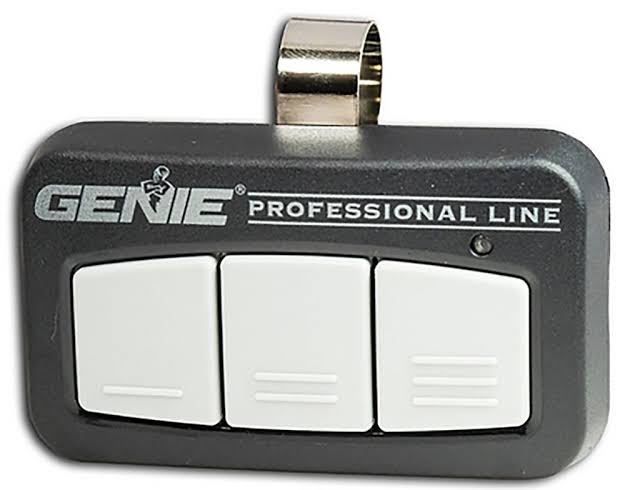
- Original Genie Remote: Ensure it is compatible with Intellicode® (usually Series II or III).
- Fresh Batteries: Weak batteries are the #1 cause of programming failure. Use high-quality alkaline batteries.
- Sturdy Ladder: Safety first; ensure stable footing near the motor head.
- Owner’s Manual: Keep the PDF or physical copy handy for error codes.
- Clear Area: Remove obstructions from the door path to test safety sensors immediately after programming.
Expert Tip: Always replace remote batteries before attempting to reprogram. A weak signal can mimic a synchronization failure, wasting up to 30 minutes of troubleshooting time.
Step-by-Step: How to Program a Genie Garage Door Opener Model 3060L
Follow these precise instructions to sync your primary remote. This process applies to standard handheld transmitters and universal remotes pre-set for Genie.
Step 1: Locate the Learn Button
On the Model 3060L, the learn button is typically located on the motor head under the light lens cover. It is usually a square purple or orange button labeled “LEARN.” You may need to remove the plastic lens cover to access it. Do not confuse this with the antenna wire terminal.
Step 2: Initiate Programming Mode
Press and release the LEARN button once. You should see an indicator LED begin to flash slowly (typically blue or amber depending on firmware version). This indicates the receiver is in “learn mode” and waiting for a signal.
- Time Limit: You have approximately 30 seconds to complete the next step before the system times out.
- Visual Cue: If the light stops flashing, press the LEARN button again to restart the window.
Step 3: Transmit the Remote Signal
Hold your remote within 6–12 inches of the motor head. Press and hold the button you wish to program for 2–3 seconds, then release. Watch the LED on the motor unit closely.
Step 4: Confirm Synchronization
Upon receiving a valid signal, the learn LED will either stop flashing and stay solid momentarily or change color (often turning off completely). This confirms the code has been accepted. Release the remote button immediately after confirmation.
Step 5: Test the Operation
Step back to a safe distance and press the programmed button. The door should activate smoothly. Test the safety reversal system by placing a 2×4 board flat on the floor under the door; the door must reverse upon contact.
Troubleshooting Common Programming Failures
Even professionals encounter hiccups. Here is how to resolve them systematically:
Remote Works Intermittently
- Cause: Battery voltage drop or interference.
- Fix: Replace batteries with premium brands. Check for nearby LED bulbs causing RF interference; switch to Genie-approved LED bulbs if necessary.
Learn Light Does Not Activate
- Cause: Logic board lockout or power issue.
- Fix: Unplug the opener for 60 seconds to reset the capacitor. Plug back in and retry. If persistent, the logic board may require replacement.
Door Opens But Won’t Close
- Cause: Safety sensor misalignment (not a programming issue).
- Fix: Check the photo-eyes at floor level. Both LEDs should be solid green/red. Clean lenses with microfiber cloth and realign brackets until lights stabilize.
Multiple Remotes Stopped Working Simultaneously
- Cause: Accidental factory reset or power surge corruption.
- Fix: Reprogram all remotes sequentially. Consider installing a surge protector rated for garage door openers to prevent future corruption.
Pros vs. Cons of DIY Programming
Understanding when to proceed versus when to call a professional saves time and money.
Advantages of Self-Programming:
- Cost Savings: Avoid $75–$150 service call fees.
- Immediate Resolution: No waiting for appointment windows.
- Skill Building: Familiarity with your home’s security systems.
- Customization: Set multiple remotes and keypads simultaneously.
Potential Drawbacks:
- Safety Risk: Working at height near electrical components.
- Warranty Concerns: Improper handling may void coverage.
- Time Investment: Troubleshooting can exceed 2 hours for novices.
- Diagnostic Limits: Cannot identify internal board failures without multimeter testing.
Frequently Asked Questions (FAQ)
Q1: Can I program a non-Genie remote to my Model 3060L?
Yes, but only if the universal remote explicitly states compatibility with Genie Intellicode® Series II or III. Generic fixed-code remotes will not work. Always verify frequency (315 MHz or 390 MHz) matches your opener’s specifications before purchase.
Q2: How many remotes can the Genie 3060L store?
The Model 3060L memory supports up to seven distinct transmitter devices. This includes handheld remotes, wireless keypads, and vehicle-integrated HomeLink® systems combined. Exceeding this limit requires clearing memory and reprogramming all devices.
Q3: Why does my remote work close up but not from my car?
This indicates signal degradation, not programming failure. Common causes include dying batteries, damaged antenna wire, or RF interference from newer LED lighting. Replace batteries first, then inspect the antenna for kinks or disconnection.
Q4: Do I need to reprogram after changing the opener’s batteries?
No. The Model 3060L uses AC power with battery backup; remote codes are stored in non-volatile memory. However, if you perform a full factory reset or replace the logic board, all remotes must be reprogrammed.
Q5: Is there a way to erase all remotes at once?
Yes. Press and hold the LEARN button for 10–15 seconds until the indicator LED turns off completely. This wipes all paired devices from memory. Use this only when moving homes or suspecting compromised security.
Q6: Can smartphone apps replace physical remote programming?
For Wi-Fi-enabled 3060L units, the Aladdin Connect® app provides virtual remote functionality. However, physical remotes still require separate RF programming. The app controls the opener via internet protocol, while remotes use direct radio frequency—both systems operate independently.
Conclusion
Mastering how to program a Genie garage door opener model 3060L empowers you to maintain your home’s security and convenience independently. By following the systematic steps outlined above—from preparation through troubleshooting—you can resolve most synchronization issues in under 15 minutes. Remember that regular maintenance, including annual safety sensor testing and battery replacement, prevents the majority of programming headaches before they start.
Your garage door is likely the largest moving object in your home and deserves respectful attention. If you found this guide helpful, please share it on social media to help fellow homeowners avoid frustrating driveway standoffs. Tag us with your success stories or remaining questions—we’re here to keep your home running smoothly!
Disclaimer: This article is for informational purposes. Always consult your official Genie owner’s manual and adhere to local electrical codes. If uncomfortable working at heights or with electrical components, hire a certified garage door technician.
Leave a Reply