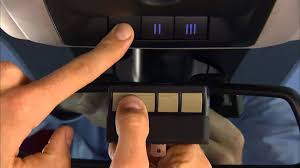
Have you just bought a new truck and feel frustrated carrying an extra remote every time you pull into your driveway? Learning how to program 2020 Ram 1500 garage door opener built-in system is surprisingly simple and will save you from juggling multiple clickers. Let’s get your truck synced up so you can glide right into your garage hassle-free.
How To Program 2020 Ram 1500 Garage Door Opener: What You Need
Before we dive into the buttons, let’s gather everything you need. The 2020 Ram 1500 comes equipped with the integrated HomeLink system, usually located on the rearview mirror or the overhead console.
You will need your truck, your existing garage door remote, and a step ladder if your garage motor is out of reach. According to the International Door Association (IDA), over 60% of homeowners prefer integrated vehicle systems because they eliminate the need for bulky visor clips.
“Integrated systems like HomeLink drastically reduce the risk of losing physical remotes, which are a primary target for opportunistic thieves,” notes automotive security expert Marcus Vance. By using your truck’s built-in system, you are upgrading both your convenience and your home security.
Step-by-Step Guide: Syncing Your Standard Garage Door
If you have an older garage door opener (manufactured before 1996), the process is incredibly straightforward. Follow these exact steps to get it working.
- Turn the ignition to the ON/RUN position. You do not need to start the engine, but the truck’s electrical system must be active.
- Locate the three HomeLink buttons on your overhead console or rearview mirror. Choose the one you want to assign to your garage door.
- Hold your original garage remote 1 to 3 inches away from the HomeLink button.
- Press and hold both buttons simultaneously. Hold the HomeLink button and the button on your handheld remote at the exact same time.
- Watch the indicator light. The HomeLink LED will start by blinking slowly. Keep holding both buttons until the light flashes rapidly. This usually takes about 20 to 40 seconds.
- Test the connection. Release both buttons. Press the programmed HomeLink button firmly. If your garage door activates, you are completely done!
How to Sync a “Rolling Code” Garage Door Opener
Most modern garage doors use rolling code technology for enhanced security. If your door did not open in the previous step, you likely have a rolling code system. Here is how to program it.
- Complete the initial programming. Follow steps 1 through 5 from the standard guide above until the HomeLink light flashes rapidly.
- Locate the “Learn” button on your garage motor. This is usually found on the back or side of the motor hanging from your garage ceiling. The button is typically yellow, purple, red, or orange.
- Press the “Learn” button once. The indicator light next to the learn button will turn on or start blinking. You have exactly 30 seconds to complete the next step.
- Return to your 2020 Ram 1500. Within the 30-second window, press and hold the programmed HomeLink button.
- Hold for 2 seconds, then release. Repeat this press-and-hold cycle two more times (for a total of three cycles).
- Test your system. Press the HomeLink button once more. Your garage door should now operate smoothly.
Built-in HomeLink vs. Standalone Remotes
Why should you bother learning how to program your truck’s built-in system instead of just buying a universal visor remote? Let’s break down the advantages and disadvantages.
| Feature | Built-in HomeLink System | Universal Visor Remote |
|---|---|---|
| Convenience | High. Always integrated into the truck’s dashboard. | Medium. Can fall off the visor or get lost in the console. |
| Aesthetics | Excellent. Looks like a factory-installed feature. | Poor. Looks like an aftermarket add-on. |
| Power Source | Truck Battery. Never needs battery replacements. | Coin Cell Battery. Requires replacement every 1-2 years. |
| Security | High. Encrypted directly through the vehicle’s network. | Medium. Susceptible to signal interception if outdated. |
| Cost | Free. Already included in your 2020 Ram 1500. | $20 – $40. Requires an additional purchase. |
As you can see, utilizing the factory system is vastly superior in almost every metric. It keeps your cabin clutter-free and ensures you never have to search for a remote with a dead battery.
Troubleshooting Common HomeLink Issues
Even with the best instructions, technology can sometimes be stubborn. Here are the most common issues and how to fix them.
- The HomeLink light never flashes rapidly: This usually means the handheld remote battery is weak, or the two devices are too far apart. Move your remote within 1 inch of the HomeLink button and try again.
- The door works, but only from very close range: You may need to adjust the range. Hold the remote slightly further away (about 4 inches) during the initial programming phase to train the system for a longer range.
- The system stopped working suddenly: Your garage motor might have reset, or the truck’s memory was cleared due to a dead truck battery. Simply repeat the rolling code steps to re-sync the devices.
Frequently Asked Questions (FAQ)
1. How do I know if my 2020 Ram 1500 has the HomeLink system?
Look at your overhead console or the bottom of your rearview mirror. If you see three distinct, unmarked buttons (usually with small LED lights beneath them), your truck is equipped with the HomeLink system.
2. Can I program multiple garage doors to my Ram 1500?
Yes! The 2020 Ram 1500 HomeLink system features three separate channels. You can program up to three different devices, such as a primary garage door, a secondary carriage house door, or even a home security gate or exterior lighting system.
3. How do I erase a previously programmed button?
If you bought a used truck or need to clear the memory, press and hold the two outer HomeLink buttons simultaneously. Keep holding them for about 10 to 20 seconds until the indicator light flashes rapidly, then release. This clears all three channels.
4. Why is my HomeLink light blinking rapidly before I even start programming?
A rapidly blinking light indicates that the system is already in programming mode or has successfully been programmed. If it blinks rapidly when you press it, but the door doesn’t move, it means the memory needs to be cleared and reprogrammed.
5. Will this work with MyQ or Chamberlain Wi-Fi openers?
Absolutely. The HomeLink system is compatible with almost all major brands, including Chamberlain, LiftMaster, and Genie. If your opener uses Wi-Fi for smartphone control, the radio frequency (RF) signals for the HomeLink will still work perfectly alongside the smart features.
Conclusion
Mastering your truck’s technology shouldn’t require an engineering degree. By following this guide on how to program 2020 Ram 1500 garage door opener, you have successfully upgraded your daily routine. You can now enjoy the seamless luxury of pulling into your driveway and watching your garage door open with a single tap on your dashboard.
Leave a Reply