Introduction
There are few things more frustrating than being locked out of your own garage because a remote stopped working or you installed a new keypad. If you are currently staring at your unit wondering how to program a Genie garage door opener model 1035, take a deep breath; you have come to the right place. This guide is designed specifically for homeowners who want a safe, reliable, and jargon-free solution to get their garage access restored quickly without calling an expensive technician.
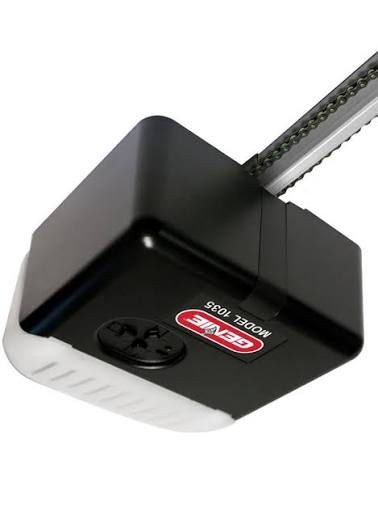
Programming this specific chain-drive model does not require advanced electrical knowledge, but it does demand precision. The Genie Model 1035 (often associated with the ChainLift series) utilizes Intellicode rolling code technology, which enhances security but can be confusing if you skip steps. Below, we break down every phase of the process, from clearing old codes to syncing new accessories, ensuring your system operates safely and efficiently.
Understanding Your Genie Model 1035 System
Before pressing any buttons, it is vital to understand what makes the Model 1035 unique. Unlike older dip-switch openers, this unit uses a rolling code system that changes the access signal every time the door is activated. This prevents thieves from “grabbing” your code, a concept well-documented in security literature regarding rolling code technology on Wikipedia.
Key Components You Will Need
- The Power Head Unit: Located on the ceiling; contains the “Learn” button and LED indicators.
- Intellicode Remotes: Compatible models typically include G3T-R, G3T-A, or GSTB-R.
- Wireless Keypad (Optional): Such as the GK-R or GUK-R.
- Stepladder: Safety first; never stand on unstable furniture to reach the motor.
- Fresh Batteries: Weak batteries are the #1 cause of programming failure.
Expert Tip: Always check the date code on your remote batteries. Even new batteries can lose charge in storage. Using alkaline batteries with a fresh expiration date ensures the signal strength is sufficient during the pairing window.
Step-by-Step: How To Program A Genie Garage Door Opener Model 1035 Remote
This is the most common task for Model 1035 owners. The process involves putting the receiver into “learn mode” and transmitting the signal from your handheld remote.
Phase 1: Locate the Learn Button
On the Genie 1035, the learn button is typically located under the light lens cover or on the back panel near the antenna wire. It is usually a small, square button labeled “LEARN CODE.” The LED indicator next to it will be your primary feedback mechanism.
Phase 2: Clear Old Codes (Recommended)
If you are moving into a new home or have lost a remote, clear the memory first to prevent unauthorized access.
- Press and hold the Learn Code button for approximately 10 seconds.
- Watch the LED indicator; it will turn red, then blink, and eventually go out.
- Release the button once the light turns off completely. All previous remotes and keypads are now erased.
Phase 3: Program the New Remote
Follow these exact timing parameters for success:
- Press the Learn Code button briefly (do not hold). The LED will begin flashing blue (or red, depending on firmware version) at a rate of roughly twice per second. You now have 30 seconds to complete the next steps.
- Press the button on your remote that you wish to program. Hold it for 1–2 seconds, then release.
- Observe the LED on the power head. It should flash rapidly or change color to acknowledge receipt.
- Press the same remote button a second time to confirm.
- Test by pressing the remote button a third time. The door should activate.
| Action | Expected LED Response | Troubleshooting Note |
|---|---|---|
| Brief press of Learn Button | Slow Flashing | Ready to receive signal |
| First Remote Press | Rapid Flash / Solid | Signal received successfully |
| Second Remote Press | Light Turns Off | Code stored in memory |
| No Response | No Change | Check battery or distance (<3 ft) |
Programming a Wireless Keypad for Genie 1035
Many users asking how to program a Genie garage door opener model 1035 also need external keypad access. The sequence differs slightly from remote programming.
- Open the keypad cover and locate the “PROGRAM” and “UP/DOWN” buttons.
- On the motor head, press the Learn Code button once (LED flashes).
- On the keypad, enter your desired 4-digit PIN.
- Press the “PROGRAM” button on the keypad.
- Press the “UP/DOWN” button on the keypad. The motor LED should react.
- Enter your PIN again and press “UP/DOWN” to finalize.
- Test the entry by entering the PIN and pressing UP/DOWN.
Safety Warning: Never program a keypad while the garage door is in motion. Ensure the area around the door threshold is clear of pets, children, and vehicles before testing.
Troubleshooting Common Programming Failures
Even professionals encounter hiccups. If your Genie 1035 refuses to learn a new device, review these data-backed solutions:
1. Signal Interference
LED bulbs in the garage door opener’s light socket can emit radio frequency interference that blocks the receiver. According to Genie technical bulletins, non-compatible LED bulbs can reduce programming range by up to 80%. Solution: Temporarily unscrew the light bulb and retry programming. If it works, replace the bulb with a Genie-approved LED or rough-service incandescent.
2. Antenna Positioning
The wire antenna hanging from the unit must be fully extended and not touching metal surfaces. If it is coiled or tucked inside the housing, signal reception drops significantly. Solution: Hang the antenna vertically, at least 6 inches away from any metal brackets or conduit.
3. Memory Capacity Limits
The Model 1035 typically supports up to 7 Intellicode devices. If you have exceeded this limit, the unit will not accept new codes even if the LED flashes. Solution: Perform a full memory clear (Phase 2 above) and reprogram only the active devices.
4. Rolling Code Desynchronization
If a remote was pressed hundreds of times while out of range, it may have “rolled ahead” of the receiver. Solution: Simply reprogramming the remote using the standard steps above will resynchronize the rolling code counter.
Frequently Asked Questions (FAQ)
Q1: Can I program a universal remote to my Genie 1035?
Yes, but compatibility varies. Universal remotes must specifically list support for Genie Intellicode systems manufactured after 1995. Generic “dip-switch” universals will not work. Always verify the packaging mentions “Intellicode” or “Rolling Code” compatibility before purchasing.
Q2: Why does my Genie 1035 learn the remote but not open the door?
This usually indicates a travel limit or force setting issue rather than a programming failure. The opener recognizes the signal but lacks the calibrated parameters to move the door safely. Consult the manual’s “Limit Adjustment” section or hire a certified technician, as improper force settings can cause severe injury or property damage.
Q3: How often should I reprogram my Genie garage door opener?
You do not need to reprogram periodically. However, security experts recommend clearing and reprogramming your system annually or immediately after losing a remote, ending a rental agreement, or experiencing a break-in attempt. This maintains the integrity of your rolling code security.
Q4: Is there a reset button on the Genie Model 1035?
There is no dedicated “factory reset” button separate from the Learn Code button. Holding the Learn Code button for 10+ seconds serves as the master reset function. Be aware this erases all paired devices, so have all remotes and keypads ready for immediate reprogramming.
Q5: Can smart home hubs control the Genie 1035 directly?
The base Model 1035 does not have built-in Wi-Fi. To integrate with Alexa, Google Home, or Apple HomeKit, you must install an Aladdin Connect retrofit kit or upgrade to a newer Genie model with integrated connectivity. Direct programming via Bluetooth or Wi-Fi is not possible on this legacy unit.
Q6: What if the Learn LED doesn’t light up at all?
First, verify the unit has power by checking the outlet and circuit breaker. If power is confirmed but the LED remains dark when pressing the Learn button, the logic board’s receiver module may have failed. This requires professional diagnosis and potentially a board replacement, as internal capacitor failure is common in units over 15 years old.
Conclusion
Mastering how to program a Genie garage door opener model 1035 empowers you to maintain your home’s security and convenience without unnecessary service calls. By following the precise timing sequences, understanding the rolling code system, and troubleshooting methodically, you can keep your garage accessible and secure for years to come. Remember: patience and fresh batteries solve 90% of programming issues.
Did this guide help you regain access to your garage? Share this article on Facebook, X (Twitter), or Pinterest to help fellow homeowners avoid the frustration of a locked-out morning. Your share could save someone hours of confusion and the cost of an emergency service call. Safe programming!
Leave a Reply