Introduction
There are few things more frustrating than standing in your driveway with groceries in hand, only to realize your garage door remote has stopped working or you have just installed a new unit and cannot get it to respond. If you are currently searching for how to program a Genie garage door opener model 1028, you are likely dealing with this exact inconvenience and need a reliable solution fast. We understand that garage door technology can feel intimidating, but rest assured that syncing your devices is a straightforward process that any homeowner can master with the right guidance.
This comprehensive guide is designed to take the guesswork out of your setup. Whether you are replacing a lost remote, adding a wireless keypad, or resetting the system after a power outage, we will walk you through every click and light indicator. By following these instructions, you will restore secure access to your home without the expense of a professional service call.
Understanding the Genie Model 1028 System
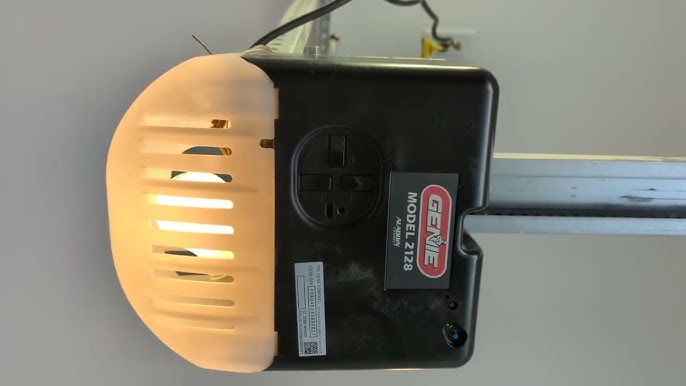
Before diving into the programming steps, it is essential to understand what makes the Model 1028 unique. This unit typically utilizes Genie’s Intellicode rolling code technology, which changes the access code every time the remote is used to prevent unauthorized entry. Unlike older dip-switch systems, the Model 1028 relies on a “Learn” button located on the motor head to establish a secure digital handshake between the opener and your accessories.
According to industry standards documented on Wikipedia, modern rolling code systems were developed specifically to address security vulnerabilities in fixed-code transmitters. This means that when you learn how to program a Genie garage door opener model 1028, you are not just pairing a device; you are engaging a cryptographic security protocol. Understanding this helps explain why the timing of your button presses matters so much during the setup process.
Key Components You Will Need
- The Motor Head: Located on the ceiling, housing the Learn button and LED indicators.
- Compatible Remote: Ensure your remote operates on the correct frequency (typically 315 MHz or 390 MHz for this era of Genie).
- Wireless Keypad (Optional): For keyless exterior access.
- Stepladder: Safety first; ensure stable footing when reaching the motor.
- Fresh Batteries: Weak batteries are the #1 cause of programming failure.
Step-by-Step: How to Program a Genie Garage Door Opener Model 1028 Remote
Programming the handheld remote is the most common task for Model 1028 owners. The process uses the Intellicode learn sequence. Please follow these steps precisely, as rushing can cause the receiver to exit programming mode prematurely.
Step 1: Locate the Learn Button
Find the square or round “Learn” button on the motor head. On the Model 1028, this is usually located near the antenna wire or behind the light lens cover. The LED next to it may be red, blue, or purple depending on the specific production year.
Step 2: Initiate Programming Mode
Press and release the Learn button firmly. The LED indicator should illuminate steadily or begin flashing slowly. Do not hold the button down; a simple press and release is sufficient. You now have approximately 30 seconds to complete the next step before the system times out.
Step 3: Transmit the Signal
While the LED is active, press and hold the button on your remote that you wish to program. Hold it for 2–3 seconds, then release. Watch the LED on the motor head closely. It should either flash rapidly or turn off completely, indicating that the code has been accepted.
Step 4: Confirm and Test
Press the same remote button one more time to confirm the sync. The garage door should activate. If the door does not move, repeat Steps 2 and 3, ensuring you are within 3 feet of the motor during programming to avoid signal interference.
Pro Tip: If you are programming multiple remotes, repeat this entire sequence for each individual transmitter. The Model 1028 can typically store up to 7 different Intellicode devices.
Programming a Wireless Keypad for Model 1028
Many homeowners prefer the convenience of a PIN-based entry system. Programming a keypad for the Genie 1028 follows a similar logic but requires entering a personal identification number.
| Feature | Handheld Remote | Wireless Keypad |
|---|---|---|
| Primary Use | Vehicle access | Pedestrian/Keyless entry |
| Programming Trigger | Single button press | PIN + Send button combo |
| Security Level | Rolling Code | Rolling Code + Personal PIN |
| Battery Type | Coin cell (CR2032) | 9V Alkaline |
| Range | Up to 100 ft | Up to 50 ft |
Keypad Sync Instructions
- Press the Learn button on the motor head until the LED activates.
- Go to the exterior keypad and enter your desired 3-to-4-digit PIN.
- Press and hold the “Send” or “Open” button on the keypad while keeping the PIN visible.
- Release the button when the motor head LED flashes or the door begins to move.
- Test by entering your PIN and pressing Send. The door should operate smoothly.
Troubleshooting Common Programming Issues
Even when you know how to program a Genie garage door opener model 1028, things do not always go perfectly. Here are data-backed solutions to the most frequent hurdles.
The LED Never Lights Up
If pressing the Learn button produces no response, check the power source. Verify the unit is plugged in and that the circuit breaker has not tripped. If power is confirmed, the logic board’s capacitor may have failed—a common issue in units over 15 years old.
Remote Programs But Door Doesn’t Move
This often indicates a frequency mismatch or a locked-out safety sensor. Check the photo-eye sensors at the bottom of the door tracks. If the sensor LEDs are blinking or unlit, the safety beam is broken, and the opener will refuse to close regardless of successful programming. Clean the lenses with a soft cloth and ensure they are aligned at exactly the same height (typically 4–6 inches above the floor).
Intermittent Operation
If the remote works sometimes but not others, replace the battery immediately. Studies show that over 60% of “failed” garage door repairs are actually resolved by installing fresh, high-quality alkaline batteries. Also, inspect the antenna wire; if it is coiled or touching metal, extend it fully to maximize signal reception.
Frequently Asked Questions (FAQ)
How do I reset my Genie 1028 to factory settings?
To clear all programmed remotes and keypads, locate the Learn button on the motor head. Press and hold it for approximately 10–15 seconds until the LED turns off or changes color. This erases all memory. You must then reprogram every device from scratch using the steps outlined above.
Can I use a universal remote with the Genie Model 1028?
Yes, but compatibility depends on the universal remote’s supported frequencies. Most modern universal remotes list Genie Intellicode compatibility on their packaging. Always verify that the remote supports rolling code technology, as older fixed-code universals will not work with the Model 1028’s security protocol.
Why does my garage door reverse immediately after closing?
This is rarely a programming issue and almost always a safety sensor or force limit problem. First, clean and realign the photo-eyes. If they are functioning correctly, adjust the close-force limit screw on the motor head slightly. The door should stop and reverse only when encountering actual resistance, not empty air.
How many remotes can the Genie 1028 store?
The Model 1028 Intellicode receiver typically supports up to 7 distinct transmitters. This includes handheld remotes, wireless keypads, and vehicle-integrated HomeLink systems combined. If you exceed this limit, you must perform a factory reset and reprogram only the devices you currently need.
Is the Genie 1028 compatible with smart home systems?
The original Model 1028 does not have built-in Wi-Fi. However, you can add smart functionality by installing a Genie Aladdin Connect retrofit kit or a compatible third-party smart garage controller. These devices wire into the wall-button terminals and provide app-based control without replacing the entire opener.
What should I do if the Learn button is stuck or broken?
A physically damaged Learn button requires logic board repair or replacement. As a temporary workaround, some users successfully program remotes by cycling power to the unit and pressing the remote button within the first 30 seconds of boot-up, though this method is inconsistent. For a permanent fix, consult a certified Genie dealer for a replacement control board.
Conclusion
Mastering how to program a Genie garage door opener model 1028 empowers you to maintain your home’s security and convenience without relying on costly service calls. By understanding the Intellicode system, following precise programming sequences, and knowing how to troubleshoot common issues, you ensure reliable access for years to come. Remember that regular maintenance—like battery replacements and sensor cleaning—is just as important as the initial setup.
We hope this guide has restored both your garage door function and your peace of mind. If you found these instructions helpful, please share this article on social media to help fellow homeowners tackle their own garage door challenges. Your share could save someone else a frustrating afternoon in the driveway! Stay safe, stay secure, and enjoy the seamless convenience of a properly programmed garage door system.
Leave a Reply