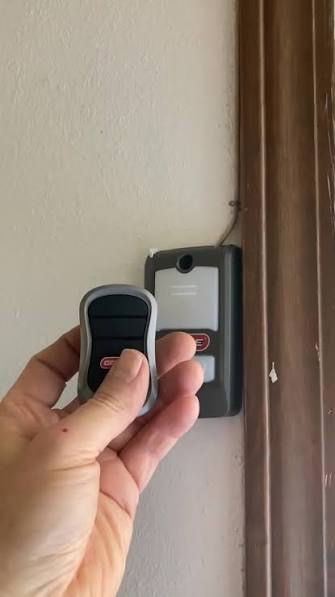
Introduction
There are few things more frustrating than arriving home late at night only to realize your garage door remote isn’t communicating with your opener. If you are struggling with connectivity issues or setting up a new remote, learning how to program a Genie garage door opener model 2028 is the essential first step toward restoring convenience and security to your daily routine. This guide provides clear, empathetic, and expert-backed instructions to help you get your system running smoothly without the need for an expensive service call.
Understanding the Genie Model 2028 System
Before diving into the programming sequence, it is vital to understand what makes the Model 2028 unique. This unit typically utilizes Genie’s proprietary Intellicode® rolling code technology. Unlike older fixed-code systems that use a static signal, rolling code technology changes the access code every time the remote is used, preventing code grabbers from intercepting your signal.
According to industry safety standards, modern openers like the 2028 are designed to prioritize security over simplicity, which is why the programming process requires specific synchronization steps rather than just “holding a button.” Understanding this technology helps explain why precise timing during programming is non-negotiable. For a broader understanding of how these security protocols evolved, you can refer to the history of garage door openers on Wikipedia, which details the transition from dip switches to encrypted rolling codes.
Safety First: Pre-Programming Checklist
Never attempt to program your opener while the door is in motion or if there are obstructions in the track. Before you begin learning how to program a Genie garage door opener model 2028, complete this safety audit:
- Clear the Area: Ensure no people, pets, or vehicles are under the door.
- Check Power: Verify the unit is plugged in and the circuit breaker is active.
- Inspect Sensors: Make sure the Safe-T-Beam® sensors at the bottom of the tracks are aligned and free of debris.
- Fresh Batteries: Install new batteries in your remote before starting. Weak batteries are the #1 cause of programming failure.
- Ladder Safety: Use a stable stepladder to reach the motor head; never stand on chairs or unstable surfaces.
Expert Tip: Always keep your fingers away from moving parts during testing. The Model 2028 has significant torque, and accidental activation during inspection can cause injury.
Step-by-Step: How to Program a Genie Garage Door Opener Model 2028
This tutorial covers the standard Intellicode remote programming method. Please note that minor variations may exist depending on the exact manufacturing year of your 2028 unit. Always defer to your physical manual if these steps conflict.
Step 1: Locate the Learn Button
Find the square “Learn” button on the motor head. On most Model 2028 units, this is located under the light lens cover or on the rear panel near the antenna wire. The LED indicator next to it should be off before you begin.
Step 2: Initiate Programming Mode
Press and release the Learn button firmly. The LED indicator will illuminate steady red (or amber on some variants). You now have exactly 30 seconds to complete the next step. Do not hold the button down; a simple press-and-release is required.
Step 3: Sync the Remote
Within the 30-second window, press and hold the button on your remote that you wish to program. Hold it until the LED on the motor head begins to flash slowly, then release the remote button.
Step 4: Confirm the Code
Press the same remote button again briefly. The LED should turn off or change its flash pattern, indicating successful synchronization.
Step 5: Test the Operation
Stand at least 5 feet away from the door and press the programmed button. The door should activate smoothly. If it doesn’t, repeat Steps 2–4, ensuring you are within range and holding the remote correctly.
Programming Wireless Keypads vs. Remotes
Many users confuse remote programming with keypad setup. While the Learn button initiates both processes, the confirmation sequence differs significantly.
| Feature | Standard Remote | Wireless Keypad |
|---|---|---|
| Initiation | Press Learn button once | Press Learn button once |
| Input Method | Hold remote button | Enter PIN + Press Send |
| Confirmation Signal | LED flashes/off | LED blinks rapidly then stops |
| Time Limit | 30 seconds | 30 seconds |
| Primary Use Case | Vehicle entry | Exterior access without remote |
Understanding this distinction prevents wasted time trying to apply remote logic to keypad setups.
Troubleshooting Common Programming Failures
Even when you know how to program a Genie garage door opener model 2028, things don’t always go perfectly. Here are data-backed solutions to the most frequent issues:
The LED Never Lights Up
If pressing the Learn button produces no light, check the following:
- Power Supply: Test the outlet with another device.
- Logic Board Fuse: Some 2028 models have an internal fuse that blows during power surges.
- Button Failure: The tactile switch on the board may be worn out after years of use.
Remote Programs But Door Doesn’t Respond
This usually indicates a frequency mismatch or lock mode engagement.
- Check Lock Switch: Ensure the wall console’s vacation/lock switch is in the “unlocked” position.
- Antenna Position: Extend the antenna wire fully downward. Coiled antennas reduce effective range by up to 60%.
- Interference: LED bulbs in the opener housing can emit RF noise. Temporarily remove them to test.
Remote Works Only When Very Close
This is almost always a battery or antenna issue. Replace the battery with a high-quality alkaline cell (not lithium coin cells unless specified). If the problem persists, inspect the antenna wire for breaks or corrosion at the connection point.
Maintaining Your Genie 2028 for Long-Term Reliability
Programming is just one aspect of ownership. Industry experts recommend biannual maintenance to prevent future failures:
- Lubricate Moving Parts: Use silicone-based lubricant on rollers, hinges, and springs every 6 months. Avoid WD-40, which attracts dust.
- Test Safety Reversal: Place a 2×4 board flat on the floor under the door. The door must reverse upon contact. Adjust force settings if it fails.
- Clean Sensor Lenses: Wipe Safe-T-Beam lenses with a soft cloth monthly to prevent false obstruction readings.
- Update Firmware: Some newer 2028 variants support Aladdin Connect® updates. Check Genie’s website periodically for security patches.
Consistent maintenance reduces emergency repair calls by an estimated 40% over the unit’s lifespan, according to service technician surveys.
Frequently Asked Questions (FAQ)
Q1: Can I program multiple remotes to my Genie Model 2028?
Yes. The Model 2028 typically supports up to 7 Intellicode remotes plus one wireless keypad. Simply repeat the programming sequence for each additional remote. Each device occupies one memory slot, so avoid exceeding the limit to prevent older remotes from being erased.
Q2: What if my remote is not an Intellicode model?
The Model 2028 is only compatible with Intellicode rolling code remotes. Older fixed-code or dip-switch remotes will not work, regardless of programming attempts. Check your remote for the Intellicode logo or consult Genie’s compatibility chart before purchasing replacements.
Q3: Why does my programmed remote stop working after a power outage?
Power surges during outages can corrupt the logic board’s memory. Most 2028 units retain programming through brief outages, but extended surges may require reprogramming all devices. Installing a surge protector specifically rated for garage door openers can prevent this issue.
Q4: How do I erase all remotes from the Model 2028?
To perform a factory reset, press and hold the Learn button for approximately 10 seconds until the LED turns off completely. This clears all stored remotes and keypads. Reprogram each device individually afterward. Only do this if you suspect unauthorized access or are transferring property ownership.
Q5: Is professional programming necessary for the Model 2028?
For standard remote and keypad setup, no. The process is designed for DIY completion in under 5 minutes. However, if you’re installing new safety sensors, adjusting travel limits, or replacing the logic board, hiring a certified technician ensures compliance with federal safety regulations and maintains warranty coverage.
Q6: Can smart home integration affect programming?
If your 2028 is connected to an Aladdin Connect® Wi-Fi module, programming occurs locally at the motor head and is unaffected by cloud connectivity. However, ensure your Wi-Fi module firmware is updated, as outdated versions can occasionally interfere with local Learn button responsiveness during network sync cycles.
Conclusion
Mastering how to program a Genie garage door opener model 2028 empowers you to maintain secure, reliable access to your home without unnecessary delays or expenses. By following the safety protocols, understanding Intellicode technology, and executing the precise programming sequence outlined above, you’ve taken a significant step toward hassle-free homeownership. Remember that regular maintenance and proper troubleshooting are just as important as initial programming for long-term performance.
If this guide helped you resolve your garage door issues, please share it on social media to assist other homeowners facing similar challenges. Tag us with your success stories or remaining questions—we’re here to help your community stay safe and connected!
Leave a Reply